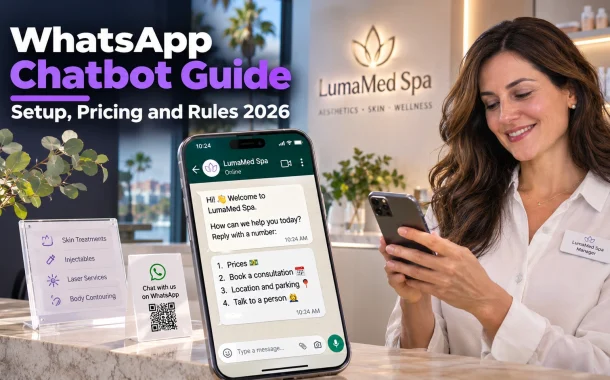
That’s what a WhatsApp chatbot does well when it’s built properly. It answers the repeat questions instantly, qualifies new leads and hands real conversations to a person with the full context. The rules changed a lot in 2025 and 2026, though. Meta now charges per message, service replies stop being free beyond a monthly allowance from October 2026, and general-purpose AI assistants are banned from the Business Platform. Below is how a WhatsApp chatbot works now for businesses in the US, UK, Canada, Australia and Europe, and how to build one customers don’t hate.
Quick answer: A WhatsApp chatbot is automated software that replies to customers on WhatsApp, usually through the WhatsApp Business Platform API. Meta charges per delivered message by category, and from October 1, 2026 each number gets 1,000 free service messages a month. You need customer opt-in, templates for messages outside the 24-hour window and a clear way to reach a human.
Table of Contents
What Is a WhatsApp Chatbot?
A WhatsApp chatbot is software that reads incoming WhatsApp messages and replies automatically, using menus, keyword rules or AI. Businesses run it on the WhatsApp Business Platform API, usually through a provider’s inbox. It handles common questions, bookings and order updates, then passes harder conversations to a human agent.
How a WhatsApp Chatbot Works
A customer sends a message to your business number. The platform passes it to your chatbot software, which decides what to reply based on a menu choice, keywords or an AI model. The reply goes back through the API. Your team watches the same conversations in a shared inbox and can take over at any point.
WhatsApp Business App vs the API
The free WhatsApp Business app gives one business a profile, a catalog, quick replies, greeting messages and away messages. It works for a solo owner. A real chatbot with menus, integrations, several agents and automated flows needs the WhatsApp Business Platform API, usually accessed through a provider such as a CRM or customer messaging tool.
WhatsApp Chatbot Pricing in 2026
WhatsApp chatbot pricing has two parts: your chatbot software subscription and Meta’s message fees. Since July 1, 2025, Meta charges per delivered message instead of per conversation. Rates depend on the message category and the recipient’s country code, and only messages you send are charged, never messages customers send to you.
Meta Message Categories
| Category | What it’s for | When you can send it | Charged? |
|---|---|---|---|
| Marketing template | Offers, promotions, restock alerts | Any time, with opt-in | Yes |
| Utility template | Order updates, booking reminders | Any time, with opt-in | Yes, and charged inside the service window from Oct 1, 2026 |
| Authentication template | One-time passcodes | Any time | Yes |
| Service | Free-form replies to customers | Only inside the 24-hour window | Free until Sept 30, 2026, then 1,000 free a month per number |
| Meta Business Agent | Meta’s AI agent replies | Only inside the 24-hour window | $2.00 per million tokens from July 1, 2026 |
The 24-Hour Window and Free Entry Points
Meta’s WhatsApp pricing page explains that a 24-hour customer service window opens each time a customer messages or calls you, and resets with every new message. Inside it, your chatbot can send free-form replies. Outside it, only approved templates can go out. When someone messages you from a Click to WhatsApp ad, a free entry point window of up to 7 days opens.
WhatsApp Chatbot Rules: Opt-In and AI Policy
Two rules matter most for any WhatsApp chatbot. You must have a person’s opt-in before you message them, and since January 15, 2026, general-purpose AI assistants can’t be distributed through the WhatsApp Business Platform. Businesses using AI to serve their own customers are still allowed.
Getting Opt-In the Right Way
Meta’s opt-in requirements say businesses must get opt-in before messaging people, clearly state that the person is opting in to receive messages and name the business. Meta also recommends separate opt-ins for different message types and an easy way to opt out. A checkbox on your booking form that names WhatsApp works well.
The General-Purpose AI Ban
As TechCrunch reported, WhatsApp’s updated terms bar general-purpose AI assistants, like standalone ChatGPT-style bots, from the Business Platform from January 15, 2026. A clinic, store or travel company using AI to answer its own customers isn’t affected. Keep your bot focused on your business and it stays within the rules.
How to Build a WhatsApp Chatbot Step by Step
To build a WhatsApp chatbot, choose a provider with WhatsApp API access, verify your business and phone number, map your top customer questions, build menus and replies, set up human handover and test before launch. Most small businesses can launch a simple menu bot without writing code.
Setup Steps
- Pick a provider. Choose a customer messaging platform or CRM that offers the WhatsApp Business Platform API, a shared inbox and a no-code bot builder.
- Verify your business. Complete Meta business verification and register a phone number that isn’t already on the WhatsApp app.
- List your top questions. Pull the most common questions from your inbox and front desk.
- Build a menu. Start with three to five options, such as prices, booking, location and talk to a person.
- Submit templates. Create utility templates for reminders and marketing templates for offers, then wait for approval.
- Add handover. Route “agent” or “human” to your team inbox with a summary.
- Test and launch. Test every path on a real phone, then link the number from your website and social profiles.
Choosing a Platform
Look for a shared team inbox, a visual flow builder, CRM integration, template management and clear pricing that shows Meta fees separately. If you already use a help desk, check whether it supports WhatsApp first. Our roundup of help desk software with chatbots compares tools that do, and our list of customer support tools covers shared inboxes.
Use a WhatsApp Chatbot as a Sales Engine
The best WhatsApp chatbot works like a front-desk salesperson, not just a support tool. It sorts every new chat by intent, qualifies leads with a few questions and alerts your best person when a high-value prospect appears. It also starts timely conversations, like reminders and restock alerts, with customers who opted in.
Triage and Qualify
Skip the vague “How can I help you?” opener. Offer a short menu instead, such as “New client” or “Existing booking.” For new clients, ask one or two qualifying questions, like which treatment they’re interested in. When someone picks a high-value option, the bot should alert a team member and say a named person will reply shortly. That turns a cold chat into personal service.
Cart Recovery, Restocks and Follow-Ups
Online stores can connect Shopify or WooCommerce so the bot messages customers who left items in their cart, using an approved marketing template. This targeted approach is much more specific than a general broadcast message in WhatsApp, which is sent to many users at once. The same event-triggered logic works for restock alerts and follow-ups after delivery. Many businesses apply it to Instagram DM automation as well, capturing leads directly from social engagement.
Rule-Based vs AI WhatsApp Chatbot
A rule-based WhatsApp chatbot uses fixed menus and keywords, while an AI chatbot reads free-text questions and writes its own answers. For most small businesses, a rule-based menu handles prices, hours, bookings and order status faster and more reliably. Add AI later for open-ended product questions your menu can’t answer.
When Rule-Based Wins
Menus work best for high-volume, simple tasks: FAQs, store hours, booking links, order tracking and first-step lead qualification. Customers don’t have to guess what to type, and every answer is one you approved. Rule-based bots are also easier to test and cheaper to run.
When to Add AI
Add AI when your chat logs show many open-ended questions the menu can’t handle, such as detailed product comparisons. Train it only on your own content, keep it focused on your business and always give it a path to a human. Our guide to AI chatbots vs human support covers where that balance sits.
Human Handover for Your WhatsApp Chatbot
Human handover is the most important feature of any WhatsApp chatbot. Customers must always be able to reach a person, and the bot should pass along a summary so they never repeat themselves. Upset customers and high-value leads should go to a human quickly, not around another menu loop.
Build an Obvious Escape Hatch
Add a menu option like “Talk to a person” on every screen, and make words like “agent” or “human” trigger handover. If the bot detects frustrated language, it shouldn’t reply “I don’t understand.” It should apologize and transfer the chat. During closed hours, it should say when a person will reply.
Hand Over With Context
When the bot transfers a chat, it should post an internal note in your team inbox with the customer’s name, what they asked and what they already chose. Your agent opens the chat ready to help. For teams that also run social channels, our list of social media automation tools covers tools that share one inbox.
Common WhatsApp Chatbot Mistakes
The most common mistakes are messaging people without opt-in, sending promotions outside the 24-hour window as free text, hiding the human option and launching an AI bot with no limits. Each one either breaks Meta’s rules, hurts your quality rating or drives customers away.
Mistakes to Avoid
- No opt-in. Messaging people who didn’t agree can get your number restricted.
- Ignoring the window. Outside 24 hours, you need an approved template.
- No way out. A bot that traps customers in a loop costs you more than it saves.
- Too many menu options. Keep the first menu short and clear.
- Collecting sensitive details. Clinics and other regulated businesses should keep medical or financial details off the bot and move those conversations to secure channels.
- Not budgeting for 2026 fees. Plan for charged service messages beyond 1,000 a month from October 2026.
FAQs
Here are the WhatsApp chatbot questions business owners ask us most.
Is a WhatsApp chatbot free?
The WhatsApp Business app is free and includes greeting messages, away messages and quick replies, but it isn’t a full chatbot. A true WhatsApp chatbot runs on the Business Platform API, where you pay your provider’s subscription plus Meta’s per-message fees. Service replies were free until September 30, 2026, and from October 1, 2026 each number gets 1,000 free service messages a month before charges apply.
How much does a WhatsApp chatbot cost?
You pay two costs. The first is your chatbot provider’s subscription, which varies by tool and number of agents. The second is Meta’s fee for each delivered message, which depends on the category and the recipient’s country. Marketing templates usually cost the most. Check Meta’s rate cards for your main customer countries and ask your provider whether they add a markup on top of Meta’s fees.
What is the 24-hour window on WhatsApp?
The 24-hour customer service window opens whenever a customer messages or calls your business, and it resets each time they message again. While it’s open, your chatbot can send free-form replies, called service messages. Once it closes, you can only send approved template messages, such as booking reminders or offers. Plan your chatbot flows so important follow-ups either happen inside the window or use a template.
Can I use ChatGPT as a WhatsApp chatbot for my business?
You can use AI models to power your own business’s customer service bot on WhatsApp. What WhatsApp banned from January 15, 2026 is distributing general-purpose AI assistants, where the AI itself is the product, through the Business Platform. A bot that answers questions about your own services is fine. Keep it trained on your content, focused on your business and connected to a human team.
Do customers need to opt in to a WhatsApp chatbot?
Yes, for messages you start. Meta requires opt-in before a business messages someone, and the opt-in must clearly say the person is agreeing to messages and name your business. When a customer messages you first, you can reply inside the 24-hour window. For reminders, offers or restock alerts, collect opt-in on forms, at checkout or in the chat, and make opting out easy.
What’s the difference between a rule-based and AI WhatsApp chatbot?
A rule-based chatbot follows fixed menus and keyword triggers, so every answer is one you wrote. An AI chatbot reads free-text questions and writes replies with a language model. Rule-based bots are faster to build, easier to test and better for prices, hours, bookings and order status. AI helps with open-ended questions. Many businesses start rule-based and add AI once chat logs show the gaps.
Can a WhatsApp chatbot book appointments?
Yes. A WhatsApp chatbot can show available times, collect the customer’s name and service, and confirm a booking by connecting to your scheduling tool through an integration. It can then send booking reminders using approved utility templates. Keep the flow short, confirm details back to the customer and offer a “talk to a person” option for changes or questions the bot can’t handle.
Can I send bulk messages with a WhatsApp chatbot?
You can send messages to many opted-in customers using approved marketing or utility templates through the Business Platform API. Each delivered message is charged by category and country. Bulk sends to people who didn’t opt in can lead to blocks and a lower quality rating for your number. Targeted, event-triggered messages, like restock alerts, usually perform better than one message sent to everyone.
Does a WhatsApp chatbot work in the UK and Europe?
Yes. The WhatsApp Business Platform works in the UK, EU, Canada and Australia, and Meta prices messages by the recipient’s country code. In the UK and EU, you also need to handle personal data under GDPR, which means a clear opt-in, a privacy notice and a lawful basis for marketing messages. Check that your chatbot provider offers data processing terms and data storage options.
How do I hand over from a WhatsApp chatbot to a human?
Add a “talk to a person” menu option and trigger words like “agent” or “human” that route the chat to your team inbox. The bot should post a short summary, including the customer’s name, question and earlier choices, so the agent doesn’t ask again. Outside business hours, the bot should tell customers when a person will reply rather than leaving them waiting with no answer.
Conclusion
Maria’s WhatsApp chatbot launched with a short menu: prices, book a consultation, location and parking, and talk to a person. Night-time messages now get an instant answer and a booking link, and her front desk starts each morning with a list of qualified leads instead of a pile of repeat questions. Anything about a client’s medical history goes straight to a team member, never to the bot. Her staff spend their time with people who are ready to book, and the clinic feels open around the clock.
That’s the model that works for a WhatsApp chatbot in 2026. Keep it focused on your business, get proper opt-in, plan around the 24-hour window and Meta’s per-message fees, and always make a human easy to reach. Start with a rule-based menu for your top questions, then add AI only where your chat logs show it’s needed. What are the three questions your team answers most on WhatsApp?