An AI humanizer isn’t something that simply “hides” that you’re using AI. In practice, an AI humanizer takes raw AI output , which is often bland, predictable, and lacking in variation , and reworks it to read like real human actually write.
Usually by shifting the rhythm, length, and cadence of sentences. GPTHumanizer AI is one of those claims to enhance AI text readability and significantly reduce common AI signals. I have conducted a real text to see how it works.
Table of Contents
Table of Contents
Here’s the deal: getting flagged feels random, but it isn’t
You paste in an AI draft you hammered out for hours, and the detector (e.g. GPTZero, Turnitin) is red.,Again.
I’ve seen it in academic paragraphs, in the SEO blogs, even in neutral explanations that don’t look suspicious at all. The annoyance comes not from using AI, but from your writing still sounding like a machine.
So I decided to test GPT Humanizer AI for myself and see what actually changed and what didn’t.
Why I tested GPTHumanizer AI
I was honestly not expecting for much.
I’ve used a number of AI humanizers before. Most try to go surface level, doing word replacements, light paraphrasing, cosmetic edits. The output can look varied but the underlying structure is still pretty rigid. You can feel the AI writing.
GPTHumanizer AI was interesting because it didn’t hyped things up. No “100% bypass” promises. No “break detectors” talk. Just making AI-assisted writing sound natural.
A quieter promise, but often one that’s a more honest one.
What GPTHumanizer AI claims to do
GPT Humanizer AI promises to reduce the typical patterns of an AI writer while keeping meaning, tone and intent.
No tricky with random punctuation, artificial errors or insertion of hidden characters, but re-phrasing line and paragraph by line, with changes in rhythm, structure and expression.
So, instead of second-guessing the claims on paper, I looked at one question:
It actually does seem less “human” to write after using it?
How I tested it
I didn’t run a single demo paragraph and stop there.
I tested GPTHumanizer the way I’d actually use it in real work. I ran three types of content through it:
1. An academic-style paragraph with rigid, formal structure.
2. A blog section with obvious AI rhythm.
3. A neutral explanatory passage that should sound natural but often doesn’t.
All of them were raw LLM output. No human edits beforehand. I started with the Lite model, reviewed the built-in feedback, and only went deeper when something still felt mechanical. That workflow ended up being important.
Notice: All information presented here reflects the state of these tools at the time of testing. The AI humanization landscape changes rapidly, including features, pricing, and detection performance. As writing models improve, detection systems evolve alongside them. Results may vary over time, so always verify details directly with the provider before committing.
The free Lite model has no paywall
Here’s the real twist.
Most humanizers force you to sprint through trial. 300 words, 2 passes, then paywall. That energy isn’t the same when you’re judging the product.
GPTHumanizer AI has an unlimited free Llite model that allows you to write whatever. 200 words per request. Unlimited requests. No subscription. It is a handy tool to help you rankwithlinks in modern SEO campaigns
You don’t aim for that perfect one-shot rewrite. You run paragraph-by-paragraph. You re-run things. You compare and contrast. You actually learn what the sweet spots of AI tend to be.
This is genuinely usable, not just promotional.
Test sample
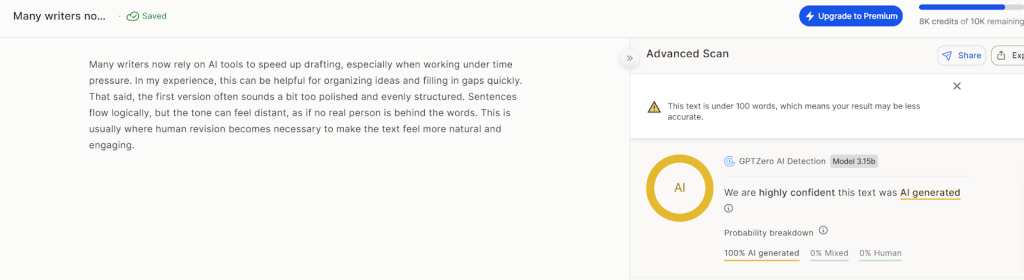
before (Raw AI Generated): “Many writers now rely on AI tools to speed up drafting, especially when working under time pressure. In my experience, this can be helpful for organizing ideas and filling in gaps quickly. That said, the first version often sounds a bit too polished and evenly structured. Sentences flow logically, but the tone can feel distant, as if no real person is behind the words. This is usually where human revision becomes necessary to make the text feel more natural and engaging.”
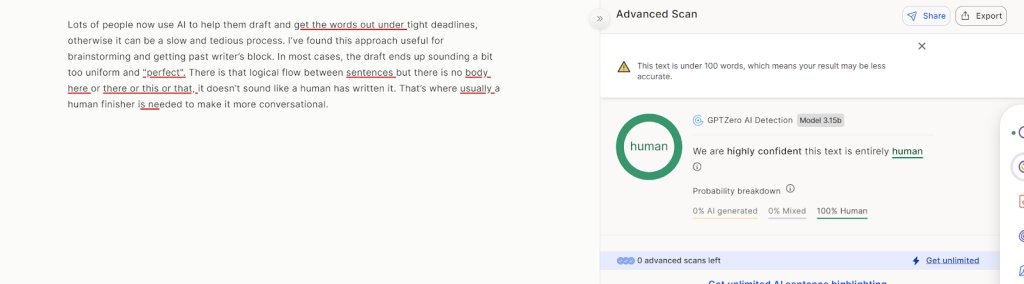
After (humanized with GPTHumanizer AI): “Lots of people now use AI to help them draft and get the words out under tight deadlines, otherwise it can be a slow and tedious process. I’ve found this approach useful for brainstorming and getting past writer’s block. In most cases, the draft ends up sounding a bit too uniform and “perfect”. There is that logical flow between sentences but there is no body here or there or this or that, it doesn’t sound like a human has written it. That’s where usually a human finisher is needed to make it more conversational.”

Test results: text quality before vs after
This is where things get concrete.
Below is a simplified snapshot of what changed across my tests. The exact outcome varied by content type, but the pattern stayed consistent.
Text Quality Comparison
| Aspect | Raw AI Draft (Before) | After GPTHumanizer |
| Sentence flow | Even, mechanical pacing | Varied, more natural rhythm |
| Paragraph structure | Predictable, formulaic | Less rigid, better transitions |
| Tone | Overly formal or generic | Context-appropriate |
| Readability | Clear but robotic | Clear and human-sounding |
| Meaning & intent | Original baseline | Fully preserved |
What stood out wasn’t flashy rewriting. It was how the text stopped feeling statistically flat.
AI detection results — what changed, before vs after
I want to be very clear here. I’m not chasing perfect scores, and GPTHumanizer isn’t either. What matters is whether obvious AI signals actually go down after humanization.
So instead of listing random percentages, I compared patterns across multiple detectors and drafts.
AI Detection Comparison
| Test Scenario | Raw AI Draft (Before) | After GPTHumanizer |
| Overall AI likelihood | AI Generated | Human Written |
| Sentence uniformity | Very high, evenly structured | Reduced variation |
| Perplexity signal | Low (high predictability) | Higher, less predictable |
| Burstiness | Flat and consistent | More uneven, human-like |
| Detector agreement | Often flagged across tools | Mixed results, fewer hard flags |
| False-positive risk | High for formal writing | Noticeably reduced |
See the picture from GPTZero before humanization, which demonstrated “AI generated”
See the picture from GPTZero after humanization, which demonstrated “human written”
Academic-style writing remained the most sensitive across detectors, which wasn’t surprising.
But the overall trend was consistent:
When structure and rhythm improved, AI likelihood scores tended to drop.
What actually changed after humanization
Sentence rhythm and structure
The biggest improvement wasn’t vocabulary. It was pacing.
After humanization, sentences stopped lining up in neat, predictable rows. Some tightened. Others expanded. The flow felt less calculated.
I didn’t see fake typos or obvious “anti-detector” tricks. That’s a good sign.
Tone and writing styles
Switching writing styles didn’t just change words — it changed posture.
The academic style stayed formal but less stiff. Blog style smoothed transitions without sounding casual for no reason. Professional and Email styles removed a lot of generic AI politeness.
It felt intentional, not cosmetic.
Meaning stayed intact
This matters more than any detector score.
Arguments stayed sharp. No dilution. I’d still recommend a final human review, but I wasn’t worried about semantic drift.
Where GPTHumanizer falls short
Now, let’s talk about the downsides, because there are some.
Sometimes the humanized text wasn’t as clean as I’d want it to be. In some cases I also spotted some little grammar problems or strange sentences or even typos. Funny enough, it’s the type of mistakes a human actually makes , but still needs to be done.
This was the case more so when I used deeper modes on already good text. The structure was improved, but polish got dropped.
So I wouldn’t consider GPTHumanizer AI as a “final draft generator”. A quick human check is still required, especially for academic assignments.
Where GPTHumanizer works best
GPTHumanizer works best when AI is already part of your drafting process and you want the final output to feel human before publishing or submitting.
It’s especially useful for students, bloggers, SEO teams, and non-native writers refining clarity and flow.
It’s less suitable if you expect one-click invisibility or skip judgment entirely.
So, is GPTHumanizer worth using in 2026
Here is my honest opinion.
If it is robotic structure, flat rhythm, and AI sameness that bothers you, GPTHumanizer AI fixes that better than most of the other AI humanizers I have tested. The free Lite model nails experiment without pressure, and the deeper models are worth it when you want it.
But don’t skip the last read. Sometimes it is too human , to the point of making mistakes too.