Here’s the plan: we unpack why anonymous payment still trips people up, reveal the scoring rubric, rank ten VPNs that welcome store-bought plastic (starting with TorGuard’s pioneer checkout), then walk you through a Vanilla Visa setup and rapid-fire FAQs.
Give us five minutes and a $50 Target card, and you’ll know which provider matches your threat model—and the one setup step most people miss. Let’s lock in your privacy for good.
Table of Contents
Table of Contents
Why pay for your VPN with gift cards or prepaid Visas
Money always leaves fingerprints.
Swipe a regular credit card, and your name, billing address, and bank remain forever in a payment log that authorities or data brokers can pull years later.
Gift cards wipe those prints away.
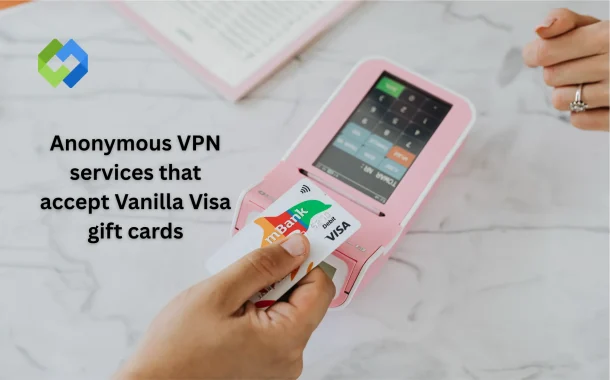
Buy a Vanilla Visa at a corner store, using cash if you want total silence. The card becomes a single-use token that spends online like any other Visa yet carries zero personal data. When you redeem it for a VPN subscription, the provider sees only a valid card number and balance; your identity never enters the room.
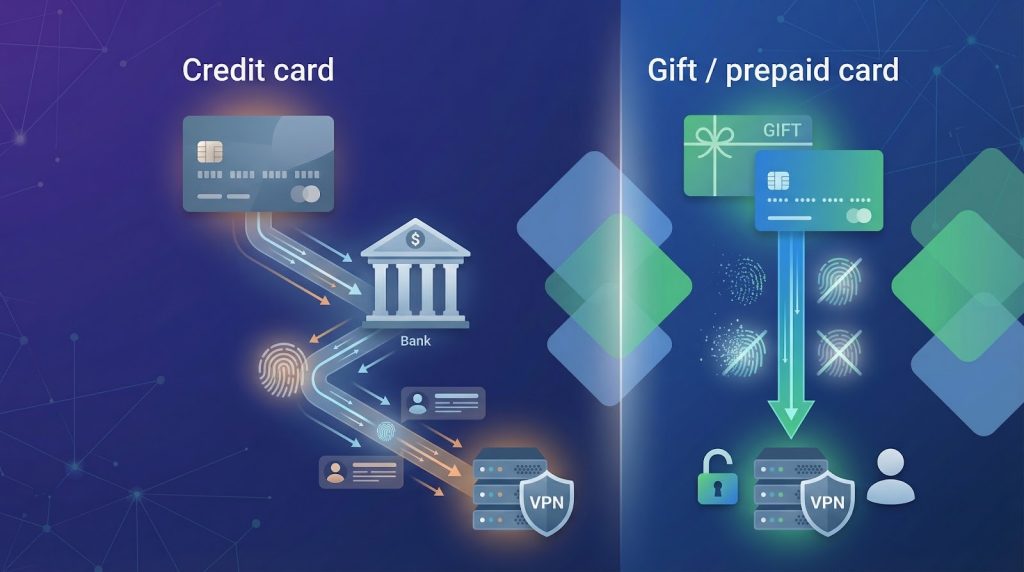
Prepaid payment adds a second benefit: it prevents surprise renewals. Because the card cannot be charged again, the service stops when the balance runs out. You decide when to extend instead of searching for a hidden “cancel” link months later.
There are trade-offs, so let’s be clear about them.
Pros
- High anonymity, comparable to paying cash in person.
- No recurring charges, or forgotten renewals.
- Turns idle store gift cards into useful online credit.
Cons
- Extra step: you must buy, and sometimes register, the card.
- Refunds are rarely offered.
- Some providers or regions limit which gift cards work online.
If privacy outranks convenience in your threat model, weigh the pros more heavily. A standard credit card is quicker, but if you want your name out of every payment database on Earth, a five-minute trip to the supermarket is a small price to pay.
How we chose the VPNs that deserve your gift card
Choosing a VPN for anonymous payment is different from picking one for bargain pricing or raw speed. We built a scoring sheet that mirrors the questions you would ask with a prepaid card in one hand and a dose of skepticism in the other.
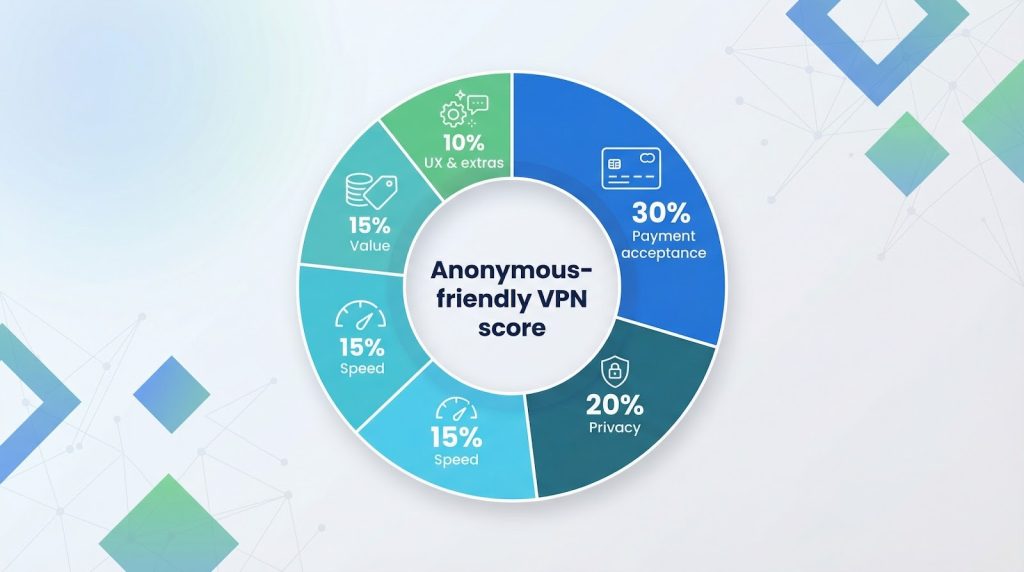
The first metric was simple acceptance. If a provider refuses Vanilla Visa or traps you in error screens, nothing else matters. That “yes, it works” box carried 30 percent of the total score.
Next came privacy safeguards. A no-logs policy is table stakes, but we wanted proof, such as independent audits or court-tested claims. Strong jurisdiction and minimal sign-up data added another 20 percent.
Speed and value split the middle. We timed real-world WireGuard downloads, factored in server reach, then compared those numbers to the price you pay after gift-card fees. Solid performance at a fair, one-time cost earned 15 percent each.
The final 10 percent covered user experience and extras. Clear checkout steps, quick support, port forwarding, or multi-hop routes nudged a service ahead when scores were close.
Add it up and you get a 100-point “anonymous-friendly” rating that lets us rank the field with confidence and clarity.
1. TorGuard: best for maximum anonymity and versatile gift card payments
TorGuard treats anonymous payment as a first-class feature, not an afterthought.
At checkout you can hand over more than 80 retail gift cards through the PayGarden or PaymentWall gateway, covering everything from Walmart to Starbucks. The balance converts instantly into VPN time, with no banking details exposed.
TorGuard anonymous VPN gift card checkout screenshot
Holding a Vanilla Visa instead? Skip the gift-card portal and drop the card into the regular credit-card field. The charge clears once the card is activated, giving you two parallel ways to stay off the grid (see PayGarden FAQ).
Privacy on the service itself is just as tight. You sign up with only an email, then connect to TorGuard’s anonymous VPN service spanning 3,000+ servers across 50 countries and enjoy WireGuard speeds near 240 Mbps. Port forwarding comes standard, making TorGuard a favorite for torrent seeders who need both stealth and performance.
The trade-off is polish. The app caters to power users, and streaming add-ons cost extra. If you prize raw control and solid anonymity over glossy dashboards, TorGuard is where your gift card works hardest.
2. NordVPN: best overall performance with cash-friendly retail codes
NordVPN keeps anonymous buying simple. Walk into Walmart, Best Buy, or Target, pay cash, and leave with a NordVPN subscription box. Inside is a scratch-off code. Enter that code online with a burner email and you are set—no card numbers, no personal data, no digital trail.
Already have a Vanilla Visa? NordVPN’s site accepts it like any standard credit card once the card is activated. Speeds hover around 300 Mbps on the NordLynx protocol, the network spans 60 countries, and extras such as Double VPN and Onion-over-VPN come standard.
The only caution is commitment. Retail codes lock you into fixed terms, and refunds must go through the store, not NordVPN. Start with a smaller box, confirm the service fits your needs, then scale up with confidence.
3. Surfshark: budget pick that lets you pay with crypto-backed gift codes
Surfshark keeps prices low and payment paths flexible.
The simplest anonymous route is to visit Bitrefill or CoinGate, buy a Surfshark voucher with Bitcoin (or fund the purchase with your Vanilla Visa), then redeem the code on Surfshark’s site. No personal details change hands, and the code loads 12 or 24 months of service in seconds.
Prefer to pay direct? Surfshark’s checkout accepts most prepaid Visas, and the company only asks for an email. Inside the app you get unlimited device slots, about 200 Mbps WireGuard speeds, and extras such as a built-in ad blocker and double-hop mode.
Gift-code sales are final, so start with a 12-month voucher before you commit to 24 months. That approach locks in savings while keeping risk low.
4. ExpressVPN: premium speed paid quietly through wallets or Mint codes
ExpressVPN costs more but still keeps you off the grid.
At checkout you can pick Mint prepaid vouchers, PayPal, Apple Pay, or Amazon Pay. Load any of those wallets with your Vanilla Visa first, and the final charge posts as “PayPal” or “Amazon,” never revealing the underlying card. The setup takes minutes and leaves no bank-account trail.
Once subscribed, you get Lightway connections that reach about 250 Mbps, a network in 90+ countries, and apps polished enough for newcomers. The higher price buys both speed and a documented record of independent, no-logs audits.
If you want top-tier performance and are happy to route your prepaid card through a digital wallet, ExpressVPN provides a fast, low-friction cloak.
5. Private Internet Access: gift-card checkout in two clicks
PIA is the elder statesman of anonymous VPN payments, and it shows.
On the payment page, pick “Gift Card,” choose a retailer, and trade that balance for VPN time on the spot. A $10 Target card buys roughly two months; $50 stretches close to a year.
Want to use a Vanilla Visa instead? Register the card with a ZIP code, wait 24 hours, then run it through the normal credit-card form. PIA’s support desk confirms it clears after that short wait.
PIA has twice proved its no-logs claim in US courts, released all apps on GitHub, and now allows unlimited devices. WireGuard speeds land near 200 Mbps, fast enough for 4K, torrents, and everyday browsing.
Gift-card payments are final, so test PIA’s seven-day mobile trial first if you are uncertain. Otherwise, it remains the simplest way to convert spare store credit into always-on encryption.
6. Proton VPN: Swiss-based security paid with Proton gift credit
Proton lets you stay anonymous without leaving your desk.
Buy a digital Proton gift card, pay with a prepaid Visa or Bitcoin, and the code lands in your inbox. Redeem the credit in your dashboard, and the plan activates with no billing name or bank record.
Prefer old school? Mail cash to Proton’s Swiss office with your account number, and the balance appears about a week later. That level of privacy is rare among VPNs.
On the network side, Proton delivers about 250 Mbps on WireGuard, routes traffic through Secure Core multi-hop servers for tougher jurisdictions, and ships every app as open source. One caveat is cost: a single month is pricier than budget rivals, so start with a small gift card before loading a full year.
7. PureVPN: wide server choice paid through PaymentWall gift cards
PureVPN’s checkout feels like a currency exchange booth for gift cards.
Select PaymentWall, choose your retailer card, and the platform swaps that balance for a subscription in seconds. It works with more than 30 common U.S. brands, so the Starbucks card you received last holiday can now fund a year of encryption.
Using a Vanilla Visa? Enter it as a normal card on PureVPN’s Stripe form. PaymentWall rejects generic prepaid Visas, so keep the two paths separate to avoid declines.
PureVPN has rebuilt trust since its 2017 logging issue, completing third-party audits and moving its legal base to the British Virgin Islands. WireGuard speeds average 180 Mbps, and the 6,500-server network reaches more countries than most rivals.
Refunds end at the PaymentWall gate. Start with a short plan, confirm performance, then roll larger gift cards into longer terms once you are satisfied.
8. Mullvad: cash, vouchers, and zero personal details
Mullvad plays privacy on hard mode yet keeps the process simple.
Click “Create account” on the site and receive a random 16-digit number—no email, no name, nothing to tie you to the account. Funding is just as private. In the United States the fastest method is a physical Mullvad gift card sold on Amazon or select electronics stores; pay with cash or a prepaid Visa, scratch the code, paste it into your dashboard, and you are live.
Feeling even more old-school? Mullvad accepts envelopes of cash mailed to Sweden. Staff deposit the money and credit your account without opening a single identifying field.
Performance is strong. WireGuard often tops 300 Mbps on nearby servers, and every location runs on disk-less, owned hardware. You will not unblock Netflix, but you get airtight security, port forwarding, and a flat €5 monthly rate that never changes.
Voucher and cash payments are non-refundable. Start with a single-month card, then feed larger cards or bills once you know the service fits your workflow.
9. VPN Unlimited: flexible wallets and an occasional lifetime deal
VPN Unlimited shines when you need payment freedom. Load a Google Play or Apple balance with a store gift card, tap “Subscribe” in the mobile app, and the charge routes through your app store—KeepSolid never sees the card number.
On desktop you can pay through Amazon Pay or PayPal, each happy to accept a Vanilla Visa as the funding source. The same method works on StackSocial, where VPN Unlimited sometimes sells a discounted lifetime license. Pay once with a prepaid card and stay covered indefinitely.
Performance sits in the 120 to 150 Mbps range, good for HD streaming across 10 devices. Logs are minimal but not yet independently audited, so the service rates as a convenience pick rather than a purist’s shield.
10. CyberGhost: app-store gift cards for one-tap privacy
CyberGhost keeps anonymous payment simple on mobile.
Load an Apple or Google Play gift card to your store balance, open the CyberGhost app, and confirm the subscription with Face ID or a fingerprint. The transaction stays under your app-store alias; CyberGhost never sees a card number.
On the web you can still pay privately by routing a Vanilla Visa through Amazon Pay or Bitcoin, but the in-app path is fastest for anyone who already saves store credit.
After login, choose a streaming-optimised server and enjoy WireGuard speeds near 300 Mbps across seven devices. A Deloitte audit in 2022 confirmed CyberGhost’s no-logs policy, addressing past ownership concerns.
Plans bought inside the app cost slightly more than the site’s long-term deals, and refunds run through Apple or Google. Start with a one-month card, confirm performance, then keep the tunnel alive by topping up your store balance.
How to buy and set up your VPN anonymously
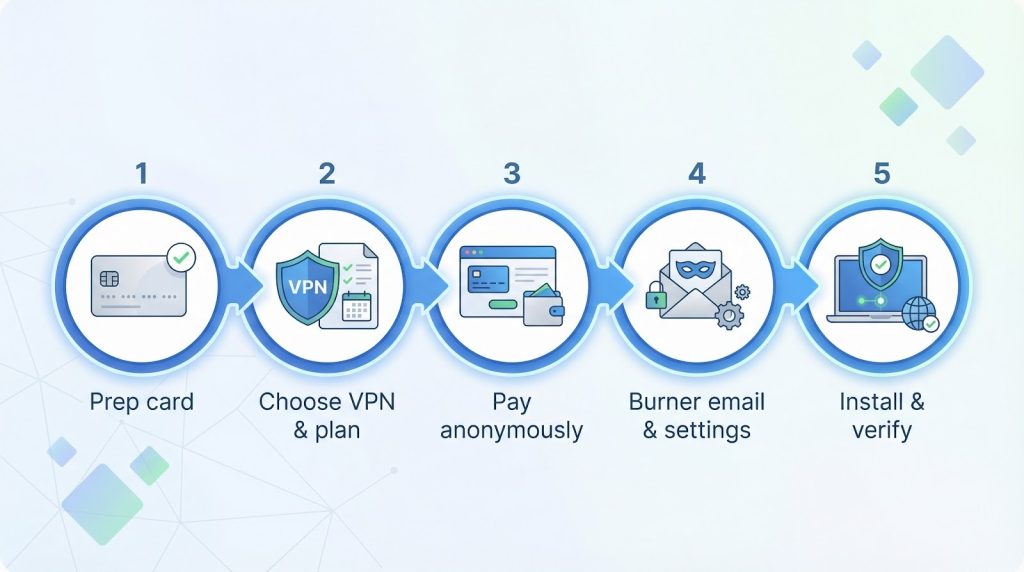
Step 1 – Prep your prepaid card
Activate your Vanilla Visa on the issuer’s site, add a ZIP code, and confirm the exact balance to the cent. This quick step stops the most common online declines. Private Internet Access notes that unregistered cards fail, while registered cards work after a short wait.
While you are logged in, check whether the card allows international purchases. Some store-branded Visas block overseas charges, and a few VPNs route payments through Europe. If the fine print says “U.S. only,” plan to funnel the card through PayPal, Apple, or Amazon instead of using it directly.
Keep the physical card or digital code until your VPN subscription is active. Refunds are rare, but if support reverses a charge the money returns to that same number. Lose the card and you lose the credit.
Step 2 – Pick your VPN and the right plan length
Start with need, not hype.
If streaming matters most, choose NordVPN or CyberGhost. For pure privacy, Mullvad or TorGuard win. Tight budget? Surfshark stretches dollars furthest.
Match the plan length to your comfort with non-refundable money. One-month codes cost a bit more per day, but you can walk away if the service disappoints. Annual or multi-year vouchers lock in lower rates but freeze more gift-card cash at once.
Note where the deal lives. The deepest discounts often sit on a VPN’s website, but anonymous shoppers may need Bitrefill, PaymentWall, or an app store instead. If the anonymous route costs a few extra dollars, remember you are buying privacy, not just bandwidth.
Step 3 – Use the correct checkout path
If the VPN offers a dedicated gift-card button—PIA, TorGuard, or PureVPN—click it and follow the swap. Paste the card number and watch the dashboard light up with paid time. No name or address required.
When a direct button is missing, choose one of two stealth routes:
- Regular credit-card form. Works on NordVPN, Surfshark, and most others once your Vanilla Visa is registered. Enter an alias for the cardholder name, add the ZIP you set earlier, and submit.
- Wallet relay. For ExpressVPN, CyberGhost, or VPN Unlimited, load the prepaid card into PayPal, Apple, Google, or Amazon first, then pay the VPN with that wallet. The final record shows only the wallet provider.
Avoid mixing paths. A prepaid Visa fails inside PaymentWall or PayGarden because those portals expect store-specific cards, a lesson TorGuard’s FAQ highlights.
After payment clears, save the invoice email or a screenshot in case support needs proof later.
Step 4 – Sign up with a burner email and lock down settings
Use an address that cannot be traced to you. Proton Mail, Tutanota, or a ten-minute alias works, because every VPN in this guide activates accounts with only an email and password.
Paste the address, choose a strong passphrase, and ignore optional name fields. If the service sends a confirmation link, open it through Tor or at least on public Wi-Fi so the signup IP cannot be linked to you later.
Inside the app, enable the kill switch and select WireGuard for the best mix of speed and privacy. A short tweak now prevents accidental leaks when your laptop wakes from sleep.
Step 5 – Install the app and verify everything works
Download the official client directly from the provider’s site or the same app store used for payment. Install, sign in, and connect to the nearest server. A green “connected” badge signals a live tunnel.
Open ipleak.net in a fresh browser tab. If the site shows a new IP in a different city and your real location stays hidden, you succeeded. Toggle the kill switch off and on once to confirm it blocks traffic when the VPN drops.
Add the app to every device you want covered—most services protect at least five gadgets under one anonymous account.
Conclusion
Private payment and a live VPN protect you only if paired with good habits.
Whenever you log in to email, social media, or shopping accounts that reveal your name, you reattach identity to that fresh IP. Separate browsing profiles help: use one browser—or even a second device—for personal log-ins and another strictly for anonymous activity.
Set a calendar reminder a week before your prepaid period ends. Letting coverage lapse even for an hour can expose your real IP to every site you visit during the gap.
Guard the paper trail. Delete confirmation emails once support no longer needs them, shred discarded cards, and wipe screenshots. Privacy rarely fails in a single breach; it leaks through small oversights. Plug those holes now, and the airtight payment you made on day one keeps protecting you for months.