Good management is not about putting in more effort. It is more about being efficient. With proper techniques, you will be able to manage numerous WordPress sites without any difficulty or security issues.
This manual features best practices that have been tested and proven, explained in simple words with actionable steps.
Table of Contents
Plan a Clear Website Structure
Organization should be the first step.
Develop a clear structure that accommodates all the websites. Decide the group of sites by their purpose, clients, or business unit. Maintain the consistency in the naming conventions.
Write down the usernames and passwords, hosting details, and site roles. This will help you avoid any mix-up later on.
Properly planning the structure will not only save the time but also the mistakes will be less frequent.
Standardize Themes and Plugins
By using different themes and plugins for every site, you are inviting trouble.
Pick a limited number of reliable themes. Install the same set of core plugins in all sites where it is possible.
Being standard makes the updating process simpler. Moreover, fewer issues of compatibility will be there.
By using fewer tools, you are also minimizing the chance of running into problems.
Schedule Regular Updates
Running a WordPress site that is out of date is one of the biggest causes of security issues. Decide on a regular update schedule. Keep WordPress cores, themes, and plugins up to date. Don’t update blindly. Always test your updates on a staging site. Regular updates make websites safe and reliable.
Automate Backups Properly
Backups are the “lifeline” for anyone managing multiple sites. Set an automated backup schedule either daily or weekly, depending on the amount of site activity. Backups should be stored off-site. Check that backups can be restored regularly. A backup that cannot be restored is of no use. Good backups are a shield for your hard work.
Focus on Strong Security Practices
The need for security becomes even more important as the number of sites goes up. Use strong passwords and make sure each site has different credentials. Two-factor authentication should be enabled wherever it is available. Restrict admin rights. Delete users who are not active. Also, install security monitoring tools to be able to detect any kind of suspicious activity at an early stage. Good security measures mean less downtime and less risk.
Use Staging Environments
Changes should never be tested on live websites. A staging environment is the place where you can do your testing in a safe way. You can test updates, new plugins, and design changes without interfering with users. After testing is finished, make the changes live by pushing them from the staging site. This habit is a “safety net” against mistakes that might “cost” you a lot.
Optimize Performance Consistently
Performance issues multiply across multiple sites. Use caching solutions. Optimize images and databases regularly. Do not use heavy plugins that slow down websites. Monitor loading speed and resource usage. Fast websites improve user experience and search rankings.
Centralized Management Tasks
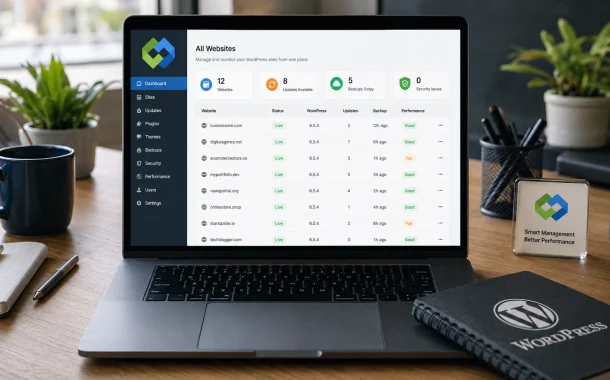
Handling each site individually is a waste of time. Centralized management tools provide an easier way to perform tasks like updates, backups, and monitoring. A good web hosting control panel lets you manage multiple WordPress installations from one dashboard, thus saving you from manual work and human error. Central control not only saves time but also ensures better quality of work.
Monitor Website Health Regularly
Do not wait for users to report issues. Keep a close watch on uptime, performance, and errors all the time. Look through logs for any strange activity. Get notified when there is a downtime or a resource usage spike. Early detection keeps you away from big troubles.
Maintain Clear User Roles
User management becomes a nightmare when there are many websites. Assign roles wisely. Provide necessary permissions only. Do not let admin accounts be shared. Each user should have his/her own access. Clear role management leads to better accountability and security.
Keep Documentation Up to Date
Documentation is a time saver. Make sure you have written down site configurations, a list of plugins, and any custom settings. Always update your documentation after significant changes.Good documentation is a great enabler for teams. It allows them to move faster and lessens the dependence on certain individuals.
Properly Train Your Team
Efficient management is not only about having the right tools. Make sure your team is familiar with WordPress workflows, knows the basics of security, and is aware of how to carry out updates. Provide them with clear instructions and training.A competent team will lead to fewer mistakes and higher productivity. Audit websites regularly
Websites, like any other thing, get messy over time. Regularly audit your websites. Get rid of what is no longer needed.Clean sites are more manageable and safer.
Prepare for Growth
The management strategies that you put in place should have the ability to scale. Select the tools and workflows that will still be effective when you expand. Avoid taking shortcuts that will end up causing you problems down the road. By anticipating expansion, it becomes easy and you remain in control of it.
Final Thoughts
Managing multiple WordPress websites should not be a source of stress. If you plan properly, automate, and standardize, your work will become much more efficient. Security, performance, and consistency should always be your main concerns.
By following these best practices, you will be able to manage WordPress websites at a high level of professionalism and with great confidence. Effective management is a big time saver, a risk reducer, and a long, term success supporter.