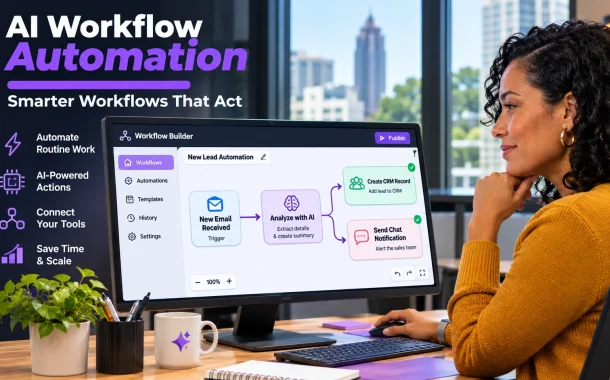
AI workflow automation changes that. Instead of only following fixed “if this, then that” rules, it uses AI models to read messy inputs, make simple decisions and take actions across your tools, with people stepping in for the cases that need judgment. Below we explain why rule-based automation falls short, how AI workflows and AI agents differ, the building blocks of an intelligent workflow, practical examples for support, sales, operations and back office work, the main tools including n8n, Zapier, Make and Power Automate, how to run a small pilot project and how to manage the risks. The guidance is written for small and mid-sized businesses in the US, UK, Canada, Australia and Europe, as well as the agencies that build automation for them.
Quick answer: AI workflow automation combines regular automation tools with AI models so workflows can understand unstructured inputs, decide what to do and act across apps. Start with one repetitive, high-volume task, build it in a tool like n8n, Zapier or Power Automate, keep a human approval step for risky actions, measure the results and expand from there.
Table of Contents
Why Traditional Automation Falls Short
Traditional automation works on fixed rules: when a trigger happens, run a set action. That’s fast and reliable for predictable tasks, but it breaks when inputs change format, arrive as free text or need judgment. Someone then has to step in, fix the rule and handle the exceptions by hand.
The Limits of Rule-Based Systems
A rule that reads invoices from one supplier fails when another supplier uses a different layout. A filter that routes support emails by keyword misses customers who describe the same problem in other words. Every exception means a new rule, and the system grows fragile.
The Human Bottleneck
Even with automation in place, people still review exceptions, approve routine decisions and correct errors. Processes slow down while they wait for someone to look at them. The goal of AI workflow automation is to shrink that queue so people only handle the cases that truly need them.
What Is AI Workflow Automation?
AI workflow automation is the use of AI models inside automated business processes so they can read documents, emails and messages, classify or summarize them, make simple decisions and trigger actions in other apps. It sits between basic rule-based automation and fully autonomous AI agents, and most practical business use falls in this middle ground.
Workflows vs AI Agents
Anthropic’s guide to building effective agents draws a useful line. Workflows connect AI models and tools through predefined steps, while agents let the AI decide its own steps and tool use. Workflows are more predictable, and agents suit open-ended problems where the steps can’t be planned in advance.
What Agentic AI Means
The industry calls the more autonomous approach agentic AI. It refers to AI that works toward a goal, plans multiple steps and uses tools to complete them with limited supervision. Instead of following a script, it figures out what needs to happen and does it, ideally within clear limits you set.
Why Simple Usually Wins
The same Anthropic guide recommends starting with the simplest solution that works and adding complexity only when needed. For most small businesses, a well-designed workflow with one or two AI steps delivers more value, with less risk and cost, than a fully autonomous agent.

Key Components of an Intelligent Workflow
An intelligent workflow has four main parts: a trigger that starts it, data inputs it can read, an AI step that understands and decides, and actions that update other systems. Good workflows add a fifth part, human review for risky or uncertain cases, plus logging so you can see what happened and improve it.
Triggers and Data Inputs
Workflows start from an event such as a new email, form submission, uploaded file, payment or scheduled time. The workflow then pulls the data it needs from documents, spreadsheets, databases or app APIs. Clean, reliable data matters, as our guide to keeping online data pipelines reliable explains.
The AI Decision Step
This is where an AI model reads the input and does something useful with it, such as extracting invoice fields, classifying a support ticket, summarizing a call or drafting a reply. Clear instructions matter here. Our article on why the problem is often bad prompts covers how to write them well.
Actions and Integrations
Once the AI has decided, the workflow acts: updating a CRM record, creating a task, sending an email, posting to a chat channel or entering data into accounting software. The more of your tools connect, the more steps you can remove.
Human Review and Logging
Add an approval step before anything risky, such as sending money, deleting data or emailing a customer something unusual. Log every run so you can check accuracy, spot errors and improve prompts over time.
AI Workflow Automation Examples
AI workflow automation examples are easiest to find in work that is repetitive, high-volume and text-heavy. Customer support triage, lead qualification, invoice processing, meeting notes, content operations and order updates are common starting points, because each one turns messy inputs into a clear next action.
Customer Service and Support
A workflow reads each incoming email or chat, identifies the topic and urgency, pulls the customer’s order history and drafts a reply for an agent to approve. Simple questions can be answered automatically, while complex ones go to a person with all the context attached. Our comparison of AI chatbots vs human support explains where each works best.
Sales and Marketing
AI can score new leads from form answers, enrich them with company details, write a personalized first email and add them to the right sequence in your CRM. Our roundup of marketing automation tools for startups lists tools that pair well with these steps.
Operations and Back Office
Invoices arriving by email can be read, checked against purchase orders and entered into accounting software, with mismatches flagged for review. Stock levels can trigger reorder suggestions, and delivery updates can be sent to customers automatically.
Internal Knowledge and Admin
Meeting recordings can be transcribed and turned into notes with action items. Common staff questions can be answered from your own policy documents. Weekly reports can be compiled from several systems and posted to a team channel.
AI Workflow Automation Tools
The main AI workflow automation tools fall into three groups: open and developer-friendly platforms such as n8n, no-code tools such as Zapier and Make, and suite tools such as Microsoft Power Automate. All of them connect apps and now include AI steps. The right one depends on your skills, budget, data rules and existing software.
n8n
n8n is a workflow automation platform popular with technical teams and agencies. It has a visual builder, AI agent features and hundreds of app integrations. According to n8n’s hosting documentation, the self-hosted Community edition is free without a license key, while paid editions and the managed n8n Cloud add team and enterprise features. Self-hosting gives you more control over data but needs someone comfortable running servers or Docker.
Zapier and Make
Zapier and Make are no-code platforms with large libraries of app connections and built-in AI steps. They’re quick to learn and good for small teams without developers. Both offer free plans with usage limits and paid tiers priced by the number of tasks or operations, so check each vendor’s pricing page for current limits.
Microsoft Power Automate
For businesses already using Microsoft 365, Power Automate is a natural fit. Microsoft’s Copilot in Power Automate overview explains that you can describe a flow in plain language and Copilot helps build it, for both cloud and desktop flows.
Choosing a Tool
| Tool | Best for | Things to check |
|---|---|---|
| n8n | Technical teams, agencies and businesses wanting self-hosting or custom logic | Hosting skills, maintenance and data storage |
| Zapier | Non-technical teams needing fast setup and many app connections | Task limits and cost as volume grows |
| Make | Visual builders who want more complex branching at lower cost | Operation limits and learning curve |
| Power Automate | Microsoft 365 businesses | Licensing and connector availability |
For more options that save time, see our list of practical tools that give busy marketers hours back.
How to Start AI Workflow Automation With a Pilot Project
The safest way to start AI workflow automation is with a small pilot project. Pick one repetitive workflow with clear inputs and outputs, map the current steps, build an automated version with human approval, run it alongside the old process for a few weeks and measure time saved, accuracy and cost before expanding.
Step 1: Pick the Right Workflow
Look for tasks that happen often, follow a pattern and eat up staff time, such as sorting support emails, entering invoices or qualifying leads. Avoid starting with anything that touches money transfers or legal decisions.
Step 2: Map the Current Process
Write down each step, who does it, which tools are involved and where delays happen. This map shows which steps AI can handle and which need a person.
Step 3: Build With a Human in the Loop
Build the workflow so the AI drafts or suggests and a person approves. This keeps quality high while you learn how accurate the AI is on your real data.
Step 4: Measure and Decide
Run the pilot for two to four weeks. Track hours saved, error rate, cost per run and staff feedback. If results are good, reduce manual checks for low-risk cases and move to the next workflow.
Step 5: Scale Gradually
Expand one workflow at a time and document each one. Many small businesses work with an automation agency or freelance developer for the first builds, then manage simpler changes in-house. If you’re hiring for this, our guide to what an AI engineer does explains the skills involved.
Managing the Risks of AI Workflow Automation
AI workflow automation brings real risks: wrong outputs, data leaks, runaway costs and actions taken without proper checks. Manage them by limiting what the AI can access and do, keeping approvals on high-impact steps, logging every run, protecting customer data and reviewing results regularly, especially in the first months.
Accuracy and Oversight
AI models can make confident mistakes. Keep a person in the loop for anything customer-facing or financial, set clear rules for when the workflow should stop and ask, and spot-check outputs every week.
Data Privacy and Security
Only send AI tools the data they need, check where vendors store and process data and follow privacy rules such as GDPR in the UK and Europe. Use separate accounts with limited permissions for automation, and protect API keys like passwords.
Governance
NIST’s AI Risk Management Framework is a free, voluntary guide built around four functions: govern, map, measure and manage. Even a short internal policy based on it helps teams decide which tasks AI may automate and who signs off.
FAQs
Here are answers to common questions about AI workflow automation.
What is AI workflow automation?
AI workflow automation uses AI models inside automated business processes so they can handle tasks that rules alone can’t. The AI reads emails, documents or messages, classifies or summarizes them, makes simple decisions and triggers actions in other apps. People stay involved for risky or unusual cases, while routine work runs automatically and much faster than manual handling by staff.
How is AI workflow automation different from regular automation?
Regular automation follows fixed rules, such as moving a form entry into a spreadsheet. It works well when inputs are predictable but breaks when they change. AI workflow automation adds a model that can understand free text, varied document layouts and context, so the workflow can handle messier real-world inputs and decide the next step without a new rule for every case.
How is an AI agent different from a chatbot?
A chatbot answers questions in a conversation and usually follows a script or knowledge base. An AI agent works toward a goal, plans several steps and uses tools to complete them, such as looking up an order, updating a record and emailing a customer. Agents can act across systems, which makes them more powerful but also means they need tighter limits.
Is AI workflow automation suitable for small businesses?
Yes. Small businesses often gain the most because a few automated workflows can save hours every week for a small team. Start with one repetitive task, use a no-code tool or a self-hosted platform such as n8n and keep a human approval step at first. Many tools offer free plans or trials, so a pilot can start with little upfront cost.
What is n8n used for?
n8n is used to connect apps and automate workflows, from simple tasks like syncing form entries to a CRM to complex AI workflows that read documents, call AI models and update several systems. It’s popular with agencies and technical teams because it supports custom code, self-hosting and AI agent features, which gives more control over data and logic than many no-code tools.
Can you use n8n for free?
Yes. n8n’s self-hosted Community edition is free to run without a license key. You install it on your own server or computer, often with Docker, and manage updates and backups yourself. n8n also offers paid cloud and business plans with hosting, support and team features. Check n8n’s official pricing page for current plan limits and costs before deciding which option suits you.
What are good examples of AI workflow automation?
Common examples include sorting and drafting replies to support emails, scoring and enriching new sales leads, reading invoices and entering them into accounting software, turning meeting recordings into notes and action items, answering staff questions from internal documents and sending order updates to customers. The best candidates are repetitive, high-volume tasks that involve reading, sorting and acting on written text.
How long does an AI workflow automation pilot take?
A focused pilot usually takes two to six weeks. The first week covers choosing the workflow and mapping the current process. Building and testing the automation takes one to three weeks depending on complexity and integrations. Running it alongside the manual process for two to four weeks then gives you enough data on accuracy and time saved to decide whether to expand.
What should I check before implementing AI workflows?
Check data privacy and where each tool stores data, how the workflow connects to your existing apps, which steps need human approval, how errors will be caught and who owns the workflow after launch. Also estimate running costs, since AI model calls and automation tasks are often billed by usage, and set budget alerts so costs don’t quietly grow unnoticed.
Conclusion
AI workflow automation moves business processes beyond rigid rules. By adding AI steps that read, classify, summarize and decide, workflows can handle messy emails, varied documents and real customer questions, then take action across your tools. People stay involved where judgment matters, while routine work runs faster and with fewer errors.
The smartest way to begin is small. Pick one repetitive, high-volume task, map how it works today and build an automated version in a tool such as n8n, Zapier, Make or Power Automate. Keep a human approval step at first, measure hours saved and accuracy over a few weeks and expand only when the results are clear. Protect data, limit what the AI can do and log every run. Most businesses don’t need fully autonomous agents to see real gains. A few well-built workflows can free up hours every week for work that actually grows the business. Which task in your business would you automate first if you could?