Most guides on this topic argue that remote work changed everything, then stop. This one does the useful part instead. You get the difference between ZTNA and a VPN in plain language, the four risks that actually cause incidents, a checklist you can hand to whoever runs your network, and a ten-week rollout plan sized for a company of about 50 people.
Secure remote access is the set of controls that lets staff reach company systems from outside the office without exposing those systems to the internet. It combines identity checks, device health checks, encryption, and per-application permissions. The three common delivery models are VPN, Zero Trust Network Access, and a gated remote desktop portal.
Table of Contents
What Is Secure Remote Access for Business?
Secure remote access for business is any system that verifies who a user is, checks the device they are using, and then grants access to specific company resources over an encrypted connection. It replaces the old assumption that anyone inside the office network is trustworthy. Access is granted per user, per device, and often per application.
The older model worked differently. Everything valuable sat in one building behind one firewall. Staff walked through the door, plugged in, and the network trusted them. That model breaks the moment your files live in Microsoft 365 and your accountant works from her kitchen. There is no longer an inside.
The Four Delivery Models You Will Actually Meet
Vendors use a lot of names for a small number of ideas. Here is what each one really does.
| Model | What it connects you to | Best fit |
|---|---|---|
| Remote access VPN | The whole network, as if you were at a desk in the office | Legacy servers, file shares, small teams with simple needs |
| Zero Trust Network Access (ZTNA) | Individual applications only, never the network itself | Cloud-first teams, regulated work, anyone with contractors |
| Remote desktop gateway | A single desktop session on a machine you control | Software that cannot leave the server, thin-client setups |
| SASE | Applications plus web traffic, filtered through a cloud edge | Multi-site companies consolidating several security tools |
Caption: The four models differ mainly in how much of your network a compromised login can reach.
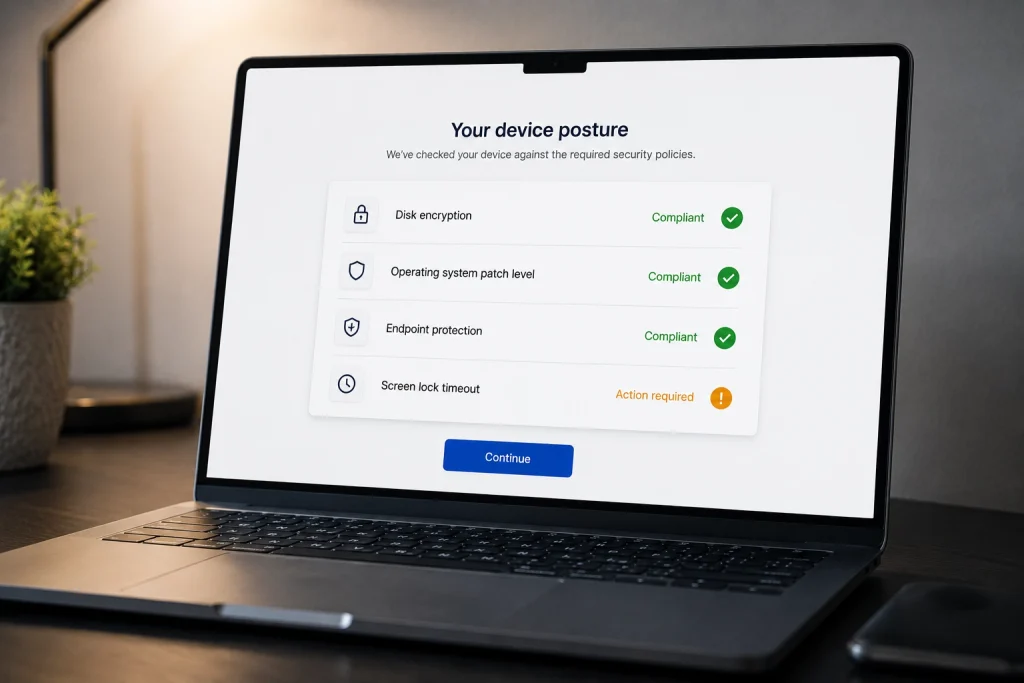
One term worth defining now, because it appears in every vendor conversation. A device posture check is an automated test run before a connection is allowed. It asks whether the laptop has disk encryption switched on, whether its operating system is patched, and whether antivirus is running. If the answer is no, the connection is refused. If your current setup does not do this, any infected home computer is one password away from your file server.
ZTNA vs VPN: Which One Does Your Business Need?
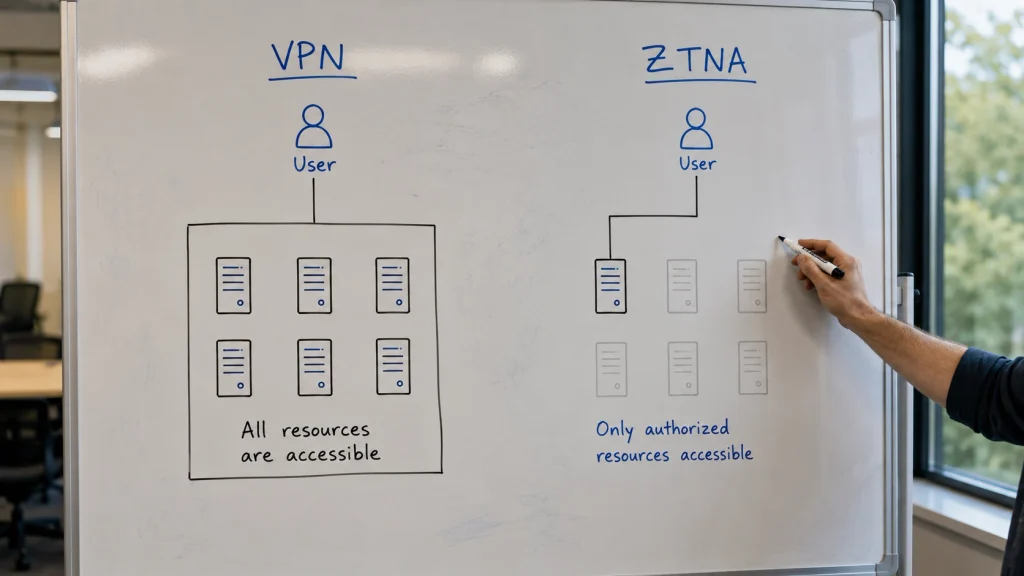
A VPN authenticates you once and then places you on the network, where you can usually reach far more than your job requires. ZTNA authenticates you per request and connects you only to named applications, so the network stays invisible. For most companies hiring remotely or handling regulated data, ZTNA is the safer default.
| Factor | Remote access VPN | ZTNA |
|---|---|---|
| Access scope | Broad network access after login | Named applications only |
| Trust model | Verified once at connection | Verified per request, continuously |
| What an attacker sees | The internal network map | Nothing beyond the one app |
| Device health checks | Rarely built in | Standard in most products |
| Contractor onboarding | Full account, then restrict | Grant one app, revoke in seconds |
| Legacy server support | Strong | Varies, sometimes needs a connector |
| Audit trail detail | Connection start and stop | Per-application access events |
Caption: The decisive column is the third one. Blast radius is what separates a bad day from a closed business.
Where a VPN Still Makes Sense
Do not rip out a working VPN for the sake of a trend. A VPN remains the right answer when you run an old line-of-business application that expects a local network, when a technician needs to reach network hardware directly, or when your team is under ten people and everyone already has full access anyway. In those cases the extra granularity buys you very little.
What matters more than the model is the configuration. A VPN with enforced multi-factor authentication, a patched gateway, and split access rules is considerably safer than a badly configured ZTNA rollout. The vendor’s logo is not the control.
Where ZTNA Wins
ZTNA earns its keep the moment people outside your payroll need access. Contractors, agencies, bookkeepers, and offshore developers all need one or two systems and nothing else. With a VPN you hand them a key to the building and hope the internal permissions hold. With ZTNA you hand them one door.
The second win is investigation. When something goes wrong, per-application logs tell you exactly which records were opened. A VPN log tells you someone connected for three hours. If you ever have to notify clients about a breach, that difference decides whether you can say what was taken. This is the same reasoning behind detecting an intrusion after access has been granted, since prevention alone never catches everything.
The zero trust model is not a vendor invention. It is documented in NIST Special Publication 800-207, Zero Trust Architecture, published in August 2020, which sets out the logical components and the principle that network location alone never grants trust.
The Four Biggest Secure Remote Access Risks
Four failure patterns cause most remote access incidents: lateral movement after a stolen password, exposed Remote Desktop ports, unmanaged personal devices, and unpatched access gateways. Each has a specific control that stops it. Fixing all four takes weeks, not years, and costs less than one incident.
1. Lateral Movement After One Stolen Password
An attacker phishes one set of credentials. On a flat network, they now move sideways at will, from the shared drive to the accounting server to the backup appliance. Backups are the real target, because a company with working backups does not pay a ransom.
The control is segmentation. Per-application access means a compromised account reaches one system and stops. Pair it with central identity management across your SaaS applications so you can revoke everything from one screen instead of nine.
2. Exposed Remote Desktop Ports
Open Remote Desktop Protocol is the most reliable entry point attackers have. Bots scan the entire internet for it continuously, then try common passwords until one works. No skill is involved.
The CISA #StopRansomware Guide is direct about the fix: audit the network for systems running RDP, close unused RDP ports, enforce account lockouts after a set number of failed attempts, apply multi-factor authentication, and log every login attempt.
If multi-factor authentication is not implemented, CISA advises requiring remote workers to use passwords of 15 or more characters. CISA #StopRansomware Guide
That 15-character figure is worth sitting with. It exists because CISA knows some organizations will not deploy MFA, and length is the only remaining defense against automated guessing. If your policy still says eight characters, it was written for a threat model that no longer exists.
3. Unmanaged Personal Devices
Personal laptops rarely carry business-grade protection. They go unpatched for months, they get shared with family, and they collect software nobody vetted. Allowing one onto your network without a health check transfers your security posture to a device you have never seen.
Device posture checks solve most of this, but the policy behind them matters as much as the technology. Our breakdown of how BYOD policies change your risk profile covers where to draw the line between staff convenience and company exposure.
4. Unpatched Access Gateways
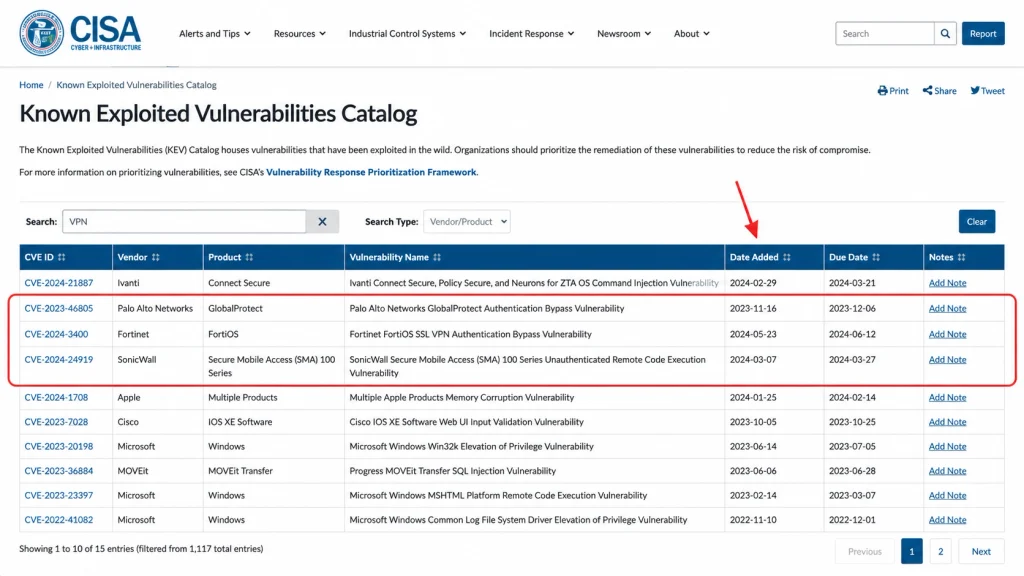
Here is the uncomfortable part. The appliance protecting your network is itself internet-facing software, and it gets vulnerabilities like anything else. Remote access gateways from major vendors appear regularly in CISA’s Known Exploited Vulnerabilities catalog, which tracks flaws confirmed to be under active attack.
So the control is unglamorous: subscribe to your vendor’s security advisories, and patch the gateway on a defined schedule rather than when someone remembers. A gateway two versions behind is not a defense. It is a target with a login page. The same discipline applies to everything you expose, which is why hardening a dedicated server starts with patch cadence rather than tooling.
Secure Remote Access Best Practices: A Seven-Step Checklist
Seven controls cover the majority of real-world risk: multi-factor authentication everywhere, device posture checks, least-privilege access, removing direct internet exposure, a patch schedule for gateways, session logging, and a documented offboarding process. Work through them in order. Each one closes a specific attack path.
- Enforce MFA on every access path. Not just the VPN. Email, the admin console, and the gateway itself all need it. One uncovered path makes the others decorative.
- Run device posture checks before connection. Require disk encryption, current patches, and active endpoint protection. Start with a warning mode so you learn what your fleet actually looks like.
- Grant least privilege by default. Give each role the smallest set of applications that lets them work. Add access on request, and record who approved it.
- Remove direct internet exposure for RDP and SSH. Put both behind a gateway. Then scan your own external IP range to confirm nothing else is listening.
- Patch access gateways on a schedule. Monthly at minimum, same week for anything in the Known Exploited Vulnerabilities catalog.
- Log sessions and review them. Logs nobody reads are storage costs. Set an alert for logins outside working hours and for impossible-travel patterns.
- Write an offboarding checklist. Departed staff and finished contractors keep access far longer than anyone assumes. Tie revocation to the identity provider so one action closes every door.
Two basics sit underneath all seven, and small businesses skip them constantly. The FTC’s small business guidance on secure remote access recommends changing every pre-set router password and default router name, keeping guest Wi-Fi separate from the business network, and writing security requirements into vendor contracts when suppliers connect to your systems.
Encryption sits underneath all of it too. A control that verifies identity but sends traffic in the clear solves half a problem, which is a distinction worth understanding before you buy anything. We covered it in detail in the difference between a secure connection and a private one.
Compliance: What HIPAA, GDPR, PCI DSS, and SOC 2 Require
Regulated industries need more than a working connection. Auditors ask for evidence: who accessed what, when, from which device, and under whose authorization. Most frameworks care less about which product you bought and more about whether you can produce that record on demand.
| Framework | What it expects from remote access | Evidence an auditor asks for |
|---|---|---|
| HIPAA | Access controls, encryption, and audit controls on systems holding health records | Access logs by user, role-based permission list, risk analysis document |
| GDPR | Appropriate technical measures, plus the ability to detect and report a breach | Records of processing, breach detection capability, access justification |
| PCI DSS | Multi-factor authentication for all remote access into the cardholder data environment | MFA configuration proof, session logs, network segmentation diagram |
| SOC 2 | Logical access controls operating consistently across the audit period | Provisioning and deprovisioning tickets, quarterly access reviews |
Caption: Compliance obligations vary by framework. Confirm current requirements with your auditor before making changes.
One pattern helps across all four. Some remote access tools stream a screen image rather than transferring files, so the data never lands on the remote device. For a clinic or a law firm, that single design choice removes an entire category of audit question.
How to Roll Out Secure Remote Access in a 50-Person Company
A realistic rollout for 50 people takes about ten weeks and moves in three stages: inventory and pilot, application-by-application migration, then decommissioning. Running the old and new systems in parallel is not a failure of planning. It is the plan. Cutting over in one weekend is how rollouts get reversed.
Weeks 1 to 2: Inventory and Pilot Group
List every system people reach from outside the office. The list is always longer than expected, because it includes the printer portal, the old invoicing server, and the marketing tool one person set up. Then pick a pilot group of five, ideally including one person who complains loudly. They find problems early, which is what you want.
Weeks 3 to 6: Migrate Application by Application
Move one application per week, starting with the least critical. Email or the CRM before the accounting system. Each migration teaches you something about your identity provider that you did not know, and you want to learn it on the low-stakes systems.
Keep the VPN running throughout. Staff who hit a wall fall back to the old path and keep working, which prevents the rollout from becoming the thing everybody blames.
Weeks 7 to 10: Tighten and Decommission
Now switch device posture checks from warning to enforcing. Expect a handful of blocked laptops in the first two days, and expect them to be genuinely out of date. Fix those, then remove VPN access for anyone whose applications have all moved.
Close the old external ports last, and verify from outside the network that they are actually shut. An open port everyone believes is closed is worse than one nobody forgot about. If your remote workforce spans countries, the connectivity and privacy trade-offs shift again, which we examined in VPNs, privacy, and productivity for a global workforce.
Where the Firewall Still Fits
Identity-based access does not retire the firewall. It changes its job from guarding a perimeter to filtering traffic and enforcing outbound rules at each site. Our guide to what a firewall does and does not protect covers where the two controls overlap and where they do not.
For a broader survey of how vendors package these controls together, this overview of secure remote access for business networks walks through the main product categories and the terminology you will meet in sales calls.
Frequently Asked Questions
What is the difference between a VPN and secure remote access?
A VPN is one method of achieving secure remote access, not a synonym for it. Secure remote access is the wider category covering identity verification, device health checks, encryption, and permissions. A VPN handles the encrypted tunnel and network placement. ZTNA, remote desktop gateways, and SASE platforms are alternative methods within the same category.
Is ZTNA better than a VPN?
For most companies, yes, though not universally. ZTNA limits a compromised account to one application instead of the whole network, and it produces far better audit trails. A VPN remains simpler for legacy systems that expect local network access, and for very small teams where everyone needs everything anyway. Many organizations run both for years.
What are the four types of remote access?
The four models you will encounter are remote access VPN, Zero Trust Network Access, remote desktop gateways, and Secure Access Service Edge. They differ mainly in scope. A VPN connects you to a network, ZTNA connects you to applications, a desktop gateway connects you to a single session, and SASE bundles application access with web filtering.
Is RDP safe for business use?
RDP is safe behind a gateway and unsafe exposed directly to the internet. CISA recommends auditing your network for systems running RDP, closing unused ports, enforcing account lockouts, applying multi-factor authentication, and logging login attempts. Exposed RDP with a weak password remains one of the most common ransomware entry points.
Do small businesses need ZTNA, or is a VPN enough?
Under ten staff with no contractors and no regulated data, a well-configured VPN with enforced MFA is usually enough. Above that, or the moment you grant access to anyone outside your payroll, ZTNA starts paying for itself. The trigger is not headcount alone. It is how many people need partial access.
What is a device posture check?
A device posture check is an automated test that runs before a device is allowed to connect. It verifies that disk encryption is on, the operating system is patched, and endpoint protection is running. Devices that fail are blocked or given limited access. It is the main control preventing an infected home laptop from reaching company systems.
How do I make remote access HIPAA compliant?
HIPAA requires access controls, encryption, and audit controls on systems holding protected health information. In practice that means role-based permissions, multi-factor authentication, encrypted sessions, and logs showing which user opened which record. Confirm the specific requirements with your compliance officer, since obligations differ by organization type and by the systems involved.
Can secure remote access stop ransomware?
It removes the most common entry point rather than guaranteeing immunity. Hiding RDP behind a gateway and requiring MFA defeats the automated scanning that finds most victims. Ransomware can still arrive through phishing or a compromised supplier, so pair access controls with tested offline backups and endpoint detection.
Is a consumer VPN safe for business use?
No. Consumer VPNs are built to mask personal browsing, not to control company access. They lack central management, per-user permissions, device posture checks, and audit logging. They also cannot produce the evidence a compliance auditor asks for. Business VPN and ZTNA products exist precisely because the consumer version solves a different problem.
How long does a secure remote access rollout take?
Around ten weeks for a company of about 50 people, assuming you migrate one application per week and keep the old system running in parallel. Larger organizations take longer, mainly because of legacy applications and identity provider cleanup. Rushing the cutover is the most common reason rollouts get reversed.
What to Fix First
The Ohio firm did not lose its client files because it lacked a security budget. It lost them because one port stayed open and one password stayed short. That is the honest shape of most incidents, and it is also the reason secure remote access for business is more achievable than it sounds. You are not buying invincibility. You are closing four specific doors.
Start by scanning your own external IP range this week and writing down what answers. Then switch on multi-factor authentication everywhere it is missing. Those two actions cost almost nothing and remove the paths attackers use most. The rollout plan can follow once you know what you are actually exposing.
The harder question comes after the technical work is done. When a contractor finishes a project on a Friday, how many hours pass before their access is actually gone?