
Stripe SEPA covers two separate payment methods. With SEPA Direct Debit, you pull euros from the customer’s account. With SEPA bank transfers, the customer pushes euros to a virtual IBAN that Stripe gives you. This guide explains which one to use and what each costs in 2026. It also covers setup, payment timing, and testing before you go live.
Stripe offers two ways to take SEPA payments. SEPA Direct Debit lets you collect euros from a customer’s bank account using a mandate, which suits subscriptions. SEPA bank transfers give each customer a virtual IBAN to send money to, which suits B2B invoices. US Stripe accounts can use both. Direct Debit settles in about six business days.
Table of Contents
What Does Stripe SEPA Mean? Two Products, Not One
“Stripe SEPA” can mean SEPA Direct Debit or SEPA bank transfers. Both move euros over the Single Euro Payments Area network, but they run in opposite directions. With Direct Debit, you start the payment after the customer signs a mandate. With a bank transfer, the customer starts the payment from their own bank to account details Stripe provides.
SEPA itself is the set of rules that makes euro payments work the same way across 41 European countries. If you’re new to it, our guide to the Single Euro Payments Area covers the countries, the payment types, and the 2025 instant payment rules. This article stays focused on what Stripe does with it.
Which One Is Your Customer Asking For?
- “Can we pay by direct debit?” They want you to collect automatically. Use SEPA Direct Debit.
- “Send us your IBAN.” They want to push the money. Use SEPA bank transfers.
- “Please enable SEPA.” Ask which one. Large companies often block outside direct debits on their accounts.
Stripe SEPA Direct Debit vs SEPA Bank Transfer
Choose SEPA Direct Debit for recurring consumer and small-business payments, because you control the timing. Choose SEPA bank transfers for large B2B invoices, because the customer controls the payment and can’t reverse an authorized transfer. Direct Debit carries an eight-week refund right for the payer. A completed EUR bank transfer can’t be disputed through Stripe.
| Feature | SEPA Direct Debit | SEPA bank transfer |
|---|---|---|
| Who starts the payment | You, using the customer’s mandate | The customer, from their bank |
| What the customer gives you | Name, IBAN, and mandate acceptance | Nothing up front. They get a virtual IBAN from you |
| Best for | Subscriptions, SaaS, memberships | B2B invoices, large one-off payments |
| Customer can reverse it | Yes. 8 weeks no questions, 13 months if unauthorized | No, for EUR transfers |
| Amount limits | €10,000 per transaction, plus a weekly limit for new accounts | No extra method-specific limit |
| Payment Links | Supported | Not supported |
| Subscriptions in Checkout | Supported | Not supported. Use invoices with send_invoice |
| Stripe API name | sepa_debit | customer_balance |
Why Not Turn On Both?
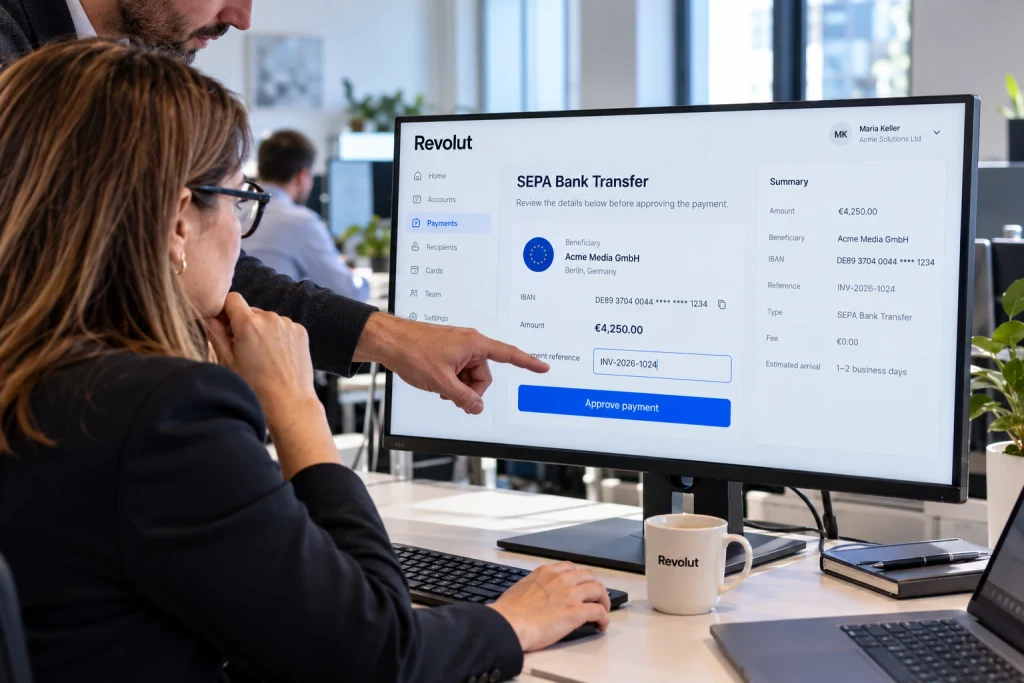
You can, and for B2B SaaS it’s usually the right call. Turn on both in the Dashboard and let the customer choose at checkout or on the invoice. Small teams tend to pick Direct Debit. Finance departments with payment approval workflows tend to pick bank transfer. Offering both removes the back-and-forth our Denver client went through.
Stripe SEPA Fees in 2026
Stripe SEPA fees depend on where your Stripe account is based. A US account pays 0.8% + 30¢ per SEPA Direct Debit, capped at $6.00, plus 1.5% for international payments. An Irish or other EEA account pays a flat €0.35. SEPA bank transfers cost 0.5% per payment on both, capped at $5.00 or €5.00.
| Fee | US Stripe account | Ireland (EEA) Stripe account |
|---|---|---|
| SEPA Direct Debit, per success | 0.8% + 30¢, capped at $6.00 | €0.35 |
| Direct Debit international add-on | +1.5% | None listed |
| Direct Debit currency conversion | +1% | +2% |
| Direct Debit failed payment | $5.00 | €3.50 |
| Direct Debit dispute | $15.00 | €15.00 |
| EUR bank transfer, per success | 0.5%, capped at $5.00 | 0.5%, capped at €5.00 |
| EUR bank transfer international add-on | +1.5% | None listed |
| Bank transfer refund | $0.50 | €0.50 |
What a €1,000 Invoice Costs a US Account
Here’s a worked example for a US account collecting a euro invoice worth about $1,000 from a German customer. By Direct Debit, the base fee hits the $6.00 cap, then the 1.5% international fee adds $15, for $21. By bank transfer, the base fee hits the $5.00 cap, and 1.5% adds $15, for $20. Add 1% more if Stripe converts the euros to dollars. Compare that with cards in our breakdown of how Stripe and PayPal fees compare.
The big hidden cost is failure. A failed Direct Debit costs a US account $5.00, and a dispute costs $15.00, on top of the lost payment. That’s why the setup steps below matter more than the headline rate.
How to Set Up Stripe SEPA Direct Debit
To set up SEPA Direct Debit in Stripe, turn it on in your Dashboard’s payment method settings, complete the extra identity checks Stripe asks for, and price your products in euros. Stripe Checkout then shows SEPA Direct Debit to eligible customers, collects their IBAN, and displays the mandate. You handle the delayed payment result with webhooks.
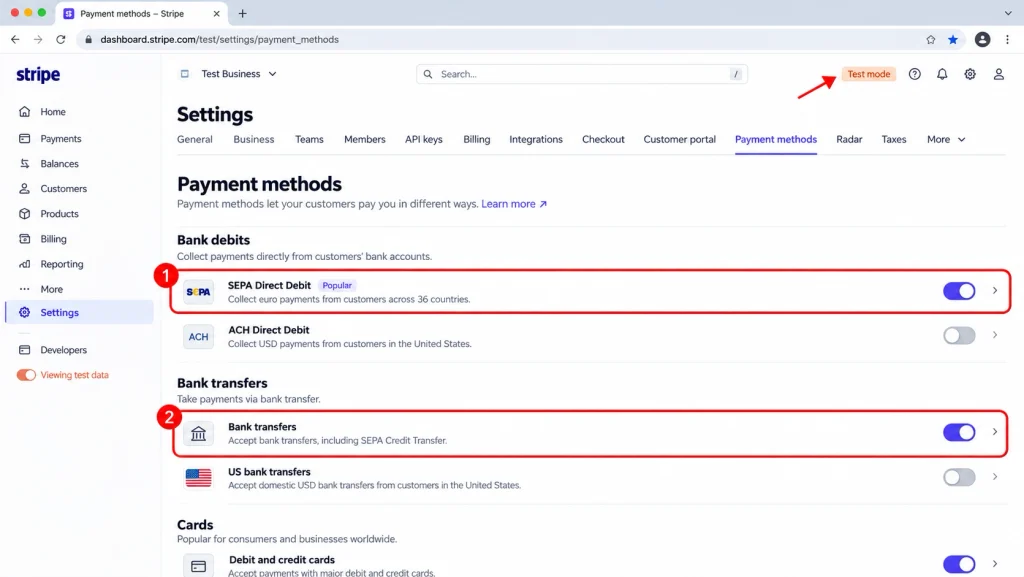
- Turn it on. In the Stripe Dashboard, open Settings, then Payment methods, and enable SEPA Direct Debit. Stripe will ask for more identity verification before it goes live.
- Price in euros. Every line item in the Checkout Session must use the eur currency, or SEPA Direct Debit won’t appear.
- Let Checkout show it. With dynamic payment methods, Stripe shows SEPA Direct Debit automatically. If your code still lists payment_method_types, move to Dashboard-managed methods or add sepa_debit to the list.
- Collect the mandate. Checkout and the Payment Element display the mandate text when the customer enters an IBAN. Don’t hide or shorten it.
- Fulfill on the right event. SEPA Direct Debit is a delayed payment. Grant access on checkout.session.async_payment_succeeded, not on checkout.session.completed, and handle async_payment_failed too.
Use Your Own Creditor ID If You’re in the EU
By default, Stripe collects under its own SEPA Creditor Identifier, and your customer’s statement may show a Stripe name if you haven’t set a clear statement descriptor. Unrecognized debits get disputed. EU-based businesses can add their own Creditor ID in payment method settings, and everyone should set a recognizable descriptor. You can’t change the Creditor ID in the Dashboard after collecting live payments.
Debit Notifications and Mandate References
The SEPA rulebook, as Stripe’s documentation explains, requires you to notify the customer before each debit. Stripe sends this email automatically, and always does when you use Stripe’s Creditor ID. You can also add a prefix of up to 12 characters to mandate references, such as your company initials, so customers spot your debits faster. For what the customer sees on their side, see how to set up and cancel a SEPA direct debit mandate.
How to Set Up Stripe SEPA Bank Transfers
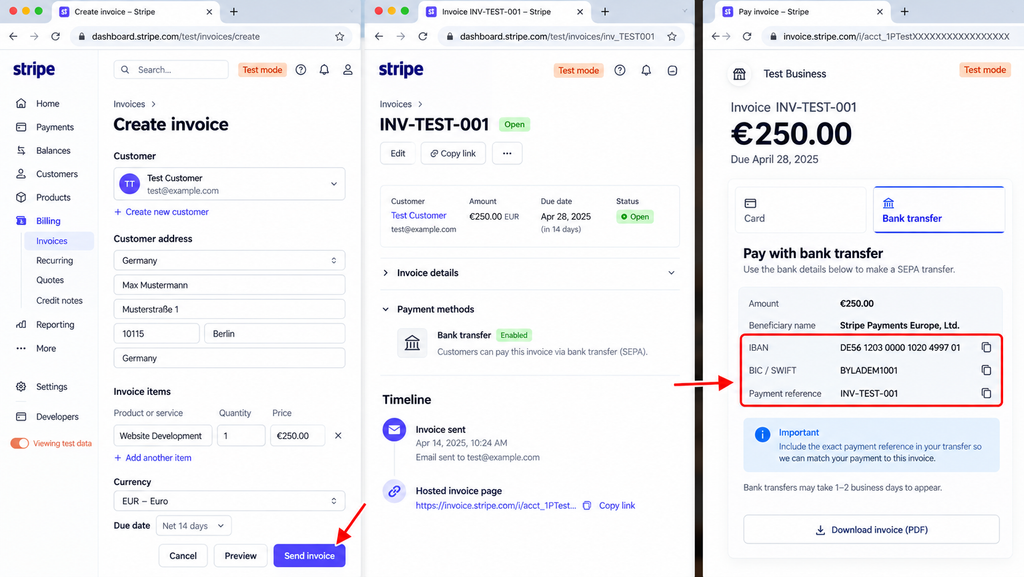
To accept SEPA bank transfers in Stripe, enable Bank transfers in your Dashboard’s payment method settings. Per Stripe’s bank transfer documentation, each customer gets a virtual IBAN and a payment reference. The customer sends euros from their own bank, and Stripe matches the money to the invoice. US accounts can accept EUR transfers from SEPA countries as cross-border bank transfers.
- In Settings, then Payment methods, turn on Bank transfers.
- For US accounts, open the customer in the Dashboard, go to Payment Methods, choose Add a bank transfer account, and pick EUR and the customer’s country.
- Send an invoice with the send_invoice method, or use Checkout with a customer attached. Checkout requires a customer for bank transfers.
- Ask the customer to use your exact registered business name as the beneficiary. A mismatch can trigger extra screening and delay the money.
The Customer Balance and the 75-Day Rule
Customers sometimes send too much or too little. Stripe holds incoming transfers in a customer balance and applies them to open invoices. If money sits unmatched for more than 75 days, Stripe tries to return it to the sender. After 90 days, unreturned funds move to your Stripe balance. Check the cash balance page monthly so overpayments don’t sit there.
Localized IBANs
Some European finance teams hesitate to pay an IBAN from a different country. Stripe supports localized virtual IBANs for Germany, France, Ireland, and the Netherlands, so a German customer can pay a German-looking IBAN. For other countries, the IBAN may start with a different country code. EU rules say a payer shouldn’t refuse an IBAN just because it comes from another EU country, but a short note on the invoice helps.
How Long Do Stripe SEPA Payments Take?
A SEPA Direct Debit through Stripe takes about six business days from submission to available funds. Stripe submits payments created before 10:30 CET on the same business day, then waits through a five-day refusal window when the customer’s bank can reject it. SEPA bank transfers arrive when the customer sends them, usually the next business day, or seconds with SEPA Instant.
| Stage | SEPA Direct Debit timing |
|---|---|
| Submission | Same business day if created before 10:30 CET, otherwise next business day |
| Refusal window | 5 business days when the customer’s bank can return the payment |
| Payment success and funds available | T+6 business days after submission |
| Payout to your bank | Your normal Stripe payout schedule after that |
| Dispute window | 8 weeks no questions, up to 13 months if unauthorized |
Plan Access Around the Six-Day Wait
This is where most SEPA integrations go wrong. If you unlock a course or ship a product on checkout completion, a customer whose payment fails on day five keeps what they got. Give provisional access, or wait for the success event, depending on your risk. Then check Stripe payout times in the EU to see when the money reaches your bank.
How to Test Stripe SEPA Before Going Live
Test SEPA Direct Debit in Stripe’s test mode with Stripe’s test IBANs. Each IBAN triggers a set outcome, such as success, failure, a revoked mandate, or a dispute. That lets you confirm your webhooks and access rules handle every case. Use the German or Austrian set below, entered in Checkout or the Payment Element.
| Test IBAN | What happens |
|---|---|
| DE89370400440532013000 | Payment moves from processing to succeeded |
| DE08370400440532013003 | Succeeds after at least three minutes |
| DE62370400440532013001 | Payment fails |
| DE84370400440000454545 | Fails with debit_not_authorized. The mandate becomes inactive |
| DE35370400440532013002 | Succeeds, then a dispute is created immediately |
| DE65370400440002222227 | Fails with insufficient_funds |
| AT611904300234573201 | Austrian IBAN that succeeds |
What to Check in Each Test
- The customer doesn’t get full access until the success event arrives.
- A failed payment removes access and sends a clear email.
- A revoked mandate stops retries and asks for a new mandate.
- A dispute flags the account for follow-up instead of retrying.
If your webhook endpoint misses events during testing, our guide to Stripe API exception handling covers retry and logging patterns.
Stripe SEPA Failures, Disputes, and Refunds
Most SEPA Direct Debit failures happen within six business days, during the bank’s refusal window. Disputes can come up to 13 months later. Unlike card chargebacks, SEPA disputes are final, with no evidence process. You can refund a SEPA debit for up to 180 days, but a refund doesn’t stop the customer’s bank from also honoring a dispute.
| Failure code | What it means | What to do |
|---|---|---|
| insufficient_funds | Not enough money in the account | Ask the customer, then retry |
| authorization_revoked | The customer cancelled the mandate | Contact them and collect a new mandate |
| debit_not_authorized | No valid mandate for this payment | Collect a new mandate |
| debit_disputed | The customer asked their bank for a refund | Resolve with the customer before retrying |
| account_closed | The bank account no longer exists | Ask for new bank details |
| incorrect_account_holder_name | Name doesn’t match the account | Collect a new mandate with the exact account name |
Automatic Retries
For insufficient funds, Stripe Billing can retry a failed SEPA Direct Debit automatically, up to two times within 30 days of the first attempt. Stripe doesn’t charge the failure fee on the retries it starts. Turn this on for subscription and one-off invoices. Our Stripe Smart Retries setup guide walks through the settings.
Avoid the Double Refund
If a customer emails you for a refund and also files a dispute with their bank, they can get paid back twice. Stripe warns about this directly. Confirm in writing that you’re processing the refund, and tell the customer it takes about 3 to 4 business days. Then refund only after the original payment has settled.
Frequently Asked Questions
Short answers to the Stripe SEPA questions that come up most often.
Can a US Stripe account accept SEPA payments?
Yes. US Stripe accounts can accept SEPA Direct Debit from customers with euro bank accounts, and EUR bank transfers from customers in SEPA countries. You charge in euros. Stripe asks for extra identity verification before turning on SEPA Direct Debit. Expect a 1.5% international fee on top of the base rate, and 1% more if Stripe converts the euros to dollars.
How much does Stripe charge for SEPA Direct Debit?
It depends on your account’s country. US accounts pay 0.8% + 30¢ per successful payment, capped at $6.00, plus 1.5% for international payments. Irish and other EEA accounts pay €0.35 per successful payment. Failed payments cost $5.00 or €3.50, and disputes cost $15.00 or €15.00. Check Stripe’s local payment methods pricing for your own country before you quote a client.
How long does Stripe SEPA Direct Debit take?
About six business days. Stripe submits the payment the same business day if it’s created before 10:30 CET. The customer’s bank then has a five-business-day window to reject it. Funds become available at T+6 business days, and then follow your normal payout schedule. Wait for the success event before treating the payment as final.
Does Stripe support SEPA B2B Direct Debit?
No. Stripe supports the SEPA Direct Debit Core scheme only, which works for both personal and business bank accounts. Under the European Payments Council’s Core rules, the payer gets an eight-week refund right, so it carries more dispute risk than B2B. If you need payments a business customer can’t reverse, offer SEPA bank transfers instead, since EUR transfers can’t be disputed through Stripe.
What is the Stripe SEPA Direct Debit limit?
Each SEPA Direct Debit is limited to €10,000. New accounts also have a weekly limit of €10,000, which rises as you process more SEPA payments. If you need higher limits, contact Stripe support. For larger B2B invoices, a SEPA bank transfer avoids the per-payment cap, though Stripe’s general maximum charge amounts still apply.
Why isn’t SEPA Direct Debit showing in my Stripe Checkout?
Usually one of three things. The price isn’t in euros, SEPA Direct Debit isn’t enabled in payment method settings, or your code passes a payment_method_types list that leaves out sepa_debit. It also won’t appear in the Express Checkout Element, which doesn’t support it. Check your Dashboard’s payment method settings and the currency on every line item first.
Can I use Stripe SEPA for subscriptions?
Yes, with SEPA Direct Debit. It works with Stripe Billing and Checkout in subscription mode, and the mandate covers future payments. SEPA bank transfers also work for subscriptions, but only with the send_invoice collection method, so the customer must pay each invoice themselves. For automatic renewals, Direct Debit is the better fit.
What happens if a customer cancels their SEPA mandate?
Future debits under that mandate fail. Stripe only learns about the cancellation when a payment attempt fails, then marks the mandate inactive and sends a mandate.updated webhook. The failure code is usually authorization_revoked. Contact the customer and collect a new mandate before you try again. Retrying the old one just adds failure fees.
Is Stripe SEPA cheaper than cards?
Usually, for larger payments. SEPA Direct Debit on a US account is capped at $6.00 plus international fees, while card fees are a percentage with no cap. On a €2,000 annual plan, that difference adds up. For small payments, the gap is narrower, and SEPA’s six-day settlement and dispute rules may matter more than the fee.
Pick the Right Stripe SEPA Method First
Our Denver client fixed her German deal in ten minutes. She turned on SEPA bank transfers, resent the invoice with a virtual IBAN, and the customer’s finance team paid it the next morning. She kept SEPA Direct Debit switched on too, and her next two European customers, both small teams, chose it at checkout for monthly billing.
That’s the whole lesson of Stripe SEPA. Direct Debit and bank transfers solve different problems, cost different amounts, and carry different risks. Turn on the one your customers actually use, wait for the success event before granting access, and test every failure path with Stripe’s test IBANs. Which of your European customers would pay faster if you gave them the option they expect?