
ACH is the network banks use to move money between accounts, and PayPal already uses it every time you add money from a bank or make a standard transfer out. A PayPal ACH transfer is cheap and safe but slow, and the fee depends on which direction the money moves and whether you have a personal or business account.
Quick answer: PayPal uses ACH bank transfers to move money between your bank and PayPal. A standard transfer to your bank is free and usually arrives in 1 business day, up to 3. Adding money from your bank can take up to 5 business days. Instant Transfer costs 1.75% on personal accounts. Businesses can let invoice clients pay by bank for 1%, capped at $10.
| Transfer | Uses ACH? | Typical time | Fee |
|---|---|---|---|
| Standard transfer, PayPal to bank | Yes | 1 business day, up to 3 | Free (no currency conversion) |
| Add money, bank to PayPal | Yes | Up to 5 business days | No fee listed |
| Instant Transfer, personal account | No, real-time | Minutes | 1.75%, $0.25 minimum, $25 maximum |
| Instant Transfer, business account | No, real-time | Minutes | 1.50%, $0.50 minimum |
| Client pays an invoice with Pay by Bank | Yes | Usually 4 to 5 business days | 1%, capped at $10 |
| Bill Pay to a supplier by ACH (US) | Yes | Bank timing | $0.49 per payment |
Table of Contents
Can You ACH Transfer From PayPal?
Yes. A standard transfer from PayPal to your linked US bank account is an ACH transfer, and it’s free when no currency conversion is involved. PayPal’s withdrawal help page says it’s “typically completed within 1 business day but could take up to 1-3 business days,” depending on your bank.
- Open PayPal on the web or in the app and go to your balance or Wallet.
- Select Transfer Money, then transfer to your bank.
- Pick your linked bank account and enter the amount.
- Choose the standard option, not Instant, to avoid the fee.
- Confirm. The transfer status shows in your Activity.
How long does an ACH transfer take with PayPal?
Out of PayPal, a standard transfer usually lands in 1 business day and can take up to 3. PayPal says transfers started after 7:00 PM ET, on a weekend or on a holiday may take an extra day. Into PayPal, adding money from your bank “usually takes up to 5 business days,” because PayPal waits for the ACH debit to clear before releasing the money.
Why a PayPal ACH transfer gets delayed
- Security review. PayPal says automated reviews usually clear within 24 hours but can take up to 72.
- Wrong bank details. An incorrect account or routing number can get the transfer rejected by your bank and returned to PayPal.
- Name mismatch. Different names on your bank and PayPal accounts can hold a transfer.
- Timing. Weekends, holidays and evening requests add a business day.
How to Make an ACH Transfer to PayPal
There are two ways to move bank money into PayPal over ACH. You can add money from a linked bank inside PayPal, which can take up to 5 business days. Or, with a PayPal Balance account, you can give your employer or another US payer your PayPal direct deposit routing and account numbers, so the money arrives by ACH like a paycheck.
PayPal’s add money help page says bank transfers are verified through the Federal Reserve’s ACH network before the money is released. If you need it faster, adding money with a linked debit card usually takes seconds.
What is PayPal’s ACH routing number?
PayPal doesn’t publish one routing number for everyone. Personal accounts get their own numbers after enrolling in Direct Deposit, which PayPal says is only available for PayPal Balance accounts and payers located in the US. Business accounts may be assigned an account and routing number issued by The Bancorp Bank, N.A., to receive funds for business purposes. Find yours inside your account, never on a third-party site.
What Is the PayPal ACH Transfer Fee?
Standard ACH transfers between your own bank and PayPal are free for both personal and business accounts. Fees start when you pay for speed or get paid by bank. Instant Transfer costs 1.75% on personal accounts and 1.50% on business accounts, and a client paying your invoice by ACH costs your business 1%, capped at $10.
| Fee | Personal account | Business account |
|---|---|---|
| Standard transfer to bank | Free | Free |
| Instant Transfer to bank or debit card | 1.75%, $0.25 minimum, $25 maximum | 1.50%, $0.50 minimum, up to $25,000 per transfer |
| Invoice paid with Pay by Bank (ACH) | Not applicable | 1%, capped at $10 |
| Online payments received by ACH | Not applicable | 0.80%, capped at $5 |
| Bill Pay disbursement by ACH (US) | Not applicable | $0.49 per payment |
The figures come from PayPal’s consumer fees page and its merchant fees page. For the full picture on sending money, see how much PayPal charges to send money, and for what a sale costs before it reaches your bank, how to avoid PayPal fees when receiving money.
Is There a PayPal Instant ACH Transfer?
Not exactly. ACH runs in batches, so PayPal’s standard transfer takes a business day or more. PayPal’s Instant Transfer is a separate, paid option that sends money to an eligible bank or debit card in minutes. If you want same-day money without the fee, there isn’t a PayPal ACH option for it. You either pay for Instant Transfer or wait.
Not every bank or card supports Instant Transfer, which is the most common reason the option is greyed out. Our guide on why PayPal Instant Transfer stops working covers the fixes.
What does PayPal Inst Xfer mean on a bank statement?
“PayPal Inst Xfer” on a bank statement usually means PayPal pulled money from your bank to cover a payment your PayPal balance couldn’t. Answers in the PayPal Community explain it as your bank acting as the backup funding source. If your bank shows it as an ACH hold, the debit is still pending. Check your PayPal Activity for a matching purchase, or follow the steps to match a PayPal Inst Xfer charge.
Is There a PayPal ACH Transfer Limit?
PayPal doesn’t publish one fixed limit for standard ACH transfers. The amount you can move depends on your account’s verification and history, and PayPal shows any limit when you start a transfer. The published caps are for Instant Transfer: business accounts can send up to $25,000 per instant transfer, and personal instant transfers are also subject to withdrawal limits.
If you hit a limit, confirming your bank account, identity and business details usually raises it. Large one-off transfers are also the ones most likely to trigger a 24 to 72 hour security review, so leave time before a deadline.
What Is PayPal Pay by Bank?
Pay by Bank is the PayPal Invoicing option that lets your US clients pay an invoice straight from their bank account over ACH. PayPal’s merchant fees list it as “Pay by Bank (ACH) 1% (capped at $10.00 per transaction).” That’s the banner Derrick saw. It’s cheapest on large invoices, because the fee stops growing at $10.
In a PayPal business account, the offer shows as a banner at the top of the Invoicing page, on the Invoices tab. Select Go to Settings on the banner to set Pay by Bank up as a payment method for your invoices.

| Invoice amount | Pay by Bank fee (1%, $10 cap) |
|---|---|
| $250 | $2.50 |
| $500 | $5.00 |
| $1,000 | $10.00 |
| $2,000 | $10.00 |
| $5,000 | $10.00 |
How clients pay an invoice by bank
Once Pay by Bank is switched on, your PayPal invoices show it as a payment choice next to cards and PayPal. The client picks it, links their US bank account and confirms. Because ACH settles over days, the invoice can show the payment as pending before the money becomes available in your PayPal balance.
Should you turn on Pay by Bank?
For invoices over a few hundred dollars, usually yes. In PayPal Invoicing, Settings, Payment methods, Pay by Bank (ACH) is listed at “1% fee, $10 maximum” with the note that it “usually takes 4 to 5 business days.” It’s available only in the US and for transactions in USD.
| Invoice payment method | PayPal Invoicing fee | Fee on a $2,400 invoice |
|---|---|---|
| Pay by Bank (ACH) | 1%, $10 maximum | $10.00 |
| Debit and credit cards | 2.99% + $0.49 | $72.25 |
| Apple Pay | 2.99% + $0.49 | $72.25 |
| PayPal | 3.49% + $0.49 | $84.25 |
| Venmo | 3.49% + $0.49 | $84.25 |
| Pay Later | 4.99% + $0.49 | $120.25 |
Two details on that settings page matter. Pay by Bank doesn’t show the Seller Protection label that every other payment method there carries. And a checkbox lets you require Pay by Bank for invoices worth $1,000 or more, which moves your largest bills onto the cheapest method.
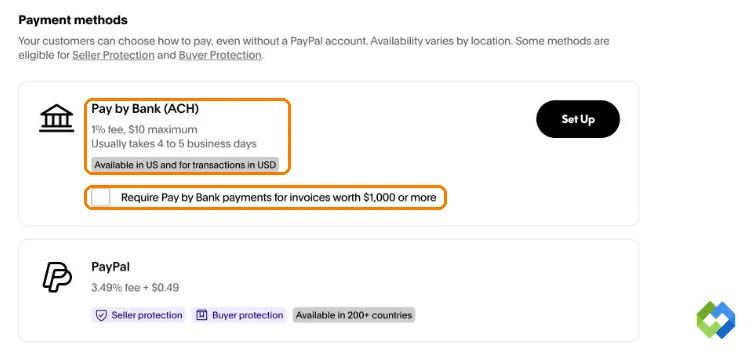
The trade-off is time, so Pay by Bank suits clients who pay on account terms rather than at a counter. Keep cards switched on too, so clients who want to pay now still can. If you’re comparing PayPal with other processors for your own website, check how Stripe and PayPal fees compare.
Using PayPal to Move Money Between Two Banks
You can move money from one bank to another through PayPal, sometimes called ACH to PayPal to ACH. Add money from the first bank, then make a standard transfer to the second. It’s free, but it takes up to 5 business days in and up to 3 out, and large amounts can trigger a review on either leg.
For most people, a transfer straight from one bank to the other, or Zelle between participating US banks, is faster and leaves fewer places for money to get stuck. Our comparison of Venmo vs Zelle explains when each one makes sense.
Is ACH Transfer Safe?
Yes. ACH moves money directly between regulated US banks under rules set by Nacha, and PayPal connects only to bank accounts in your own name. According to Nacha, about 80% of ACH volume settles in one banking day or less. The real risk is scams, not the network.
Treat your routing and account numbers like a card number. Never type your bank login into a site that promises “instant ACH transfer online with no verification.” Legitimate services confirm the account belongs to you before moving money, and a site that skips that step is after your bank login.
Frequently Asked Questions
These are the PayPal ACH questions people ask most often.
Can you ACH transfer from PayPal to a bank?
Yes. A standard transfer from your PayPal balance to a linked US bank account goes over ACH and is free when no currency conversion is involved. Open your balance or Wallet, select Transfer Money, choose your bank and pick the standard option. It usually arrives in 1 business day, up to 3. Choosing Instant Transfer instead is faster but costs a fee.
How long does an ACH transfer take with PayPal?
From PayPal to your bank, a standard transfer typically completes in 1 business day and can take up to 3, plus an extra day if you start it after 7:00 PM ET or on a weekend or holiday. From your bank to PayPal, adding money usually takes up to 5 business days. A security review can add 24 to 72 hours to either direction.
What is the PayPal ACH transfer fee?
Standard ACH transfers to your bank are free. Instant Transfer costs 1.75% for personal accounts, with a $0.25 minimum and $25 maximum, and 1.50% for business accounts, with a $0.50 minimum. Businesses pay 1%, capped at $10, when a client pays an invoice with Pay by Bank, and 0.80%, capped at $5, on other ACH payments received online.
Can I do an instant ACH transfer with PayPal?
Not as a free ACH transfer. Standard ACH transfers take at least a business day. For money in minutes, use PayPal’s Instant Transfer to an eligible bank account or debit card, which charges 1.75% on personal accounts. If Instant Transfer isn’t offered, your bank or card doesn’t support it, and the standard transfer is the only option.
What is PayPal’s ACH routing number?
There isn’t one public number. Personal PayPal Balance accounts get their own routing and account numbers after enrolling in Direct Deposit, and they work only for payers in the US. Business accounts may be assigned numbers issued by The Bancorp Bank, N.A. to receive business payments. Find your numbers inside PayPal, not on websites listing a supposed PayPal routing number.
What does ACH Hold PayPal Inst Xfer mean?
It usually means PayPal is pulling money from your bank to fund a payment, and the debit is still pending at your bank. This happens when your PayPal balance doesn’t cover a purchase and your bank is the backup funding source. Open your PayPal Activity and match the amount to a purchase. If you don’t recognize it, contact PayPal and change your password.
Can businesses pay suppliers by ACH through PayPal?
Yes. PayPal’s merchant fees list a Bill Pay ACH disbursement fee of $0.49 per domestic US payment and $0.95 for international ones. That flat fee doesn’t grow with the bill, so it’s a cheap way for a business account to pay a large supplier invoice. Check the current fee sheet before you rely on it, because PayPal updates it several times a year.
Can I use PayPal ACH transfers outside the US?
ACH is a US network, so these transfers need a US bank account. Other countries use their own systems, such as SEPA in Europe or Faster Payments in the UK, and PayPal moves money through those instead. PayPal’s direct deposit numbers also fail for payers outside the US. PayPal doesn’t operate in Pakistan, so freelancers there usually get paid through Payoneer instead.
PayPal ACH Transfer: The Short Version
Derrick switched on Pay by Bank the same afternoon and kept card payments available beside it. His next $2,400 commercial invoice was paid by bank and cost him $10 in PayPal fees. It took the 4 to 5 business days PayPal warns about, which suited a client paying on 30-day terms anyway.
A PayPal ACH transfer is the free, slow way to move money. Standard transfers to your bank cost nothing and take 1 to 3 business days, and adding money from your bank takes up to 5. Instant Transfer buys speed for 1.75%. For businesses, Pay by Bank at 1%, capped at $10, is the cheapest way to get a large invoice paid.