What made it worse was why. That site had been “upgraded to PHP 8” a couple of years before, and everyone involved treated it as done. But PHP 8 is not a destination. It is a series, and as of August 2026 there are five branches in the wild, four still receiving patches, each with a different expiry date. Pick the wrong one and you do all the testing work for a runway that ends in months.
That is the decision this guide is about. Upgrading to PHP 8.2 today buys you roughly four months of security patches. Upgrading to PHP 8.4 buys you until the end of 2028. Same testing, same risk, wildly different payoff. Below: which branch to target for WordPress PHP 8 in 2026, what actually breaks at each version step, the performance claim that does not hold up on WordPress, and a rollback-ready upgrade sequence.
WordPress recommends PHP 8.3 or higher as a minimum in 2026, and the safest production target is PHP 8.4, which carries security patches until December 2028. PHP 8.1 and below are end-of-life. PHP 8.2 stops receiving patches on December 31, 2026. Test on staging before upgrading.
Table of Contents
“Upgrade to PHP 8” Is No Longer Useful Advice
PHP 8 is not a version, it is a series. PHP 8.0 arrived in November 2020 and a new minor version has shipped every November since. Each branch gets roughly two years of active support, then two years of security-only patches, then nothing. The branch you pick determines how soon you have to do this again.
Here is where each one stands as of August 2026.
| PHP branch | Released | Support status | Security patches end | Should you run it? |
|---|---|---|---|---|
| 8.0 | Nov 2020 | End of life | Ended Nov 2023 | No. Unpatched for nearly three years |
| 8.1 | Nov 2021 | End of life | Ended Dec 31, 2025 | No. Unpatched since January |
| 8.2 | Dec 2022 | Security only | Dec 31, 2026 | Only as a stopgap. About four months left |
| 8.3 | Nov 2023 | Security only | Dec 31, 2027 | Acceptable. WordPress minimum recommendation |
| 8.4 | Nov 2024 | Active support | Dec 31, 2028 | Yes. The production default for most sites |
| 8.5 | Nov 2025 | Active support | Dec 31, 2029 | Yes, if your plugin stack is current |
Support dates from the PHP project’s published lifecycle. Verified August 2026. PHP aligned all end-of-support dates to December 31 of the relevant year and extended security support to two years, which is why older articles quoting November dates are off.
The practical read: choose by remaining runway, not by novelty. PHP 8.4 and 8.5 both require the same testing effort as 8.2 would. Landing on 8.2 means repeating the exercise before New Year. Landing on 8.4 means not thinking about it again until 2028.
If you are on PHP 8.1 or below
Treat this as urgent rather than scheduled maintenance. PHP 8.1 stopped receiving patches on December 31, 2025, and anything below that has been unpatched for longer. Vulnerability disclosures continue after end of life. The patches simply stop arriving.
WordPress 7.0 also raised the minimum supported PHP version to 7.4, dropping 7.2 and 7.3 entirely. If a site is still on those, core will not load after updating WordPress, which turns a maintenance item into an outage.
What WordPress Actually Supports in 2026
WordPress core is compatible with every current PHP 8 branch, and the “beta support” label that used to hedge this was retired in May 2026. The minimum recommended version is PHP 8.3. The minimum supported version is PHP 7.4 since WordPress 7.0. Core compatibility is no longer the limiting factor. Plugins are.
This changed recently enough that a lot of published guidance is behind. On May 22, 2026, WordPress Core published a PHP support clarification retiring the beta label and removing it retroactively from all versions:
- WordPress 6.9 and 7.0 fully support PHP 8.5
- WordPress 6.8 and later fully support PHP 8.4
- WordPress 6.4 and later fully support PHP 8.3
The reasoning matters as much as the change. The beta label existed because WordPress is rarely run without plugins and themes, and the project waited until each PHP version passed 10% usage before calling it supported. It was retired because the label itself had become the problem: hosts and plugin developers were treating “beta” as a warning and delaying their own updates.
If you read elsewhere that PHP 8.4 or 8.5 is “beta supported” in WordPress, that page has not been updated since May. The current position is documented on the PHP compatibility and WordPress versions handbook page.
Core is fine. Your plugins are the risk
WordPress core is maintained by people who track PHP releases closely. The plugin directory is tens of thousands of separate projects on their own schedules, and that is where upgrades break. A plugin last updated in 2022 has never been run against PHP 8.4 by its author.
Two signals worth checking on every active plugin before you touch anything:
- Last updated date. Anything untouched for two or more years is high risk regardless of what its compatibility field says.
- The changelog, not the “Tested up to” field. That field refers to the WordPress version, not the PHP version. Search the changelog for “PHP 8” mentions.
The JIT Claim That Does Not Survive Contact With WordPress
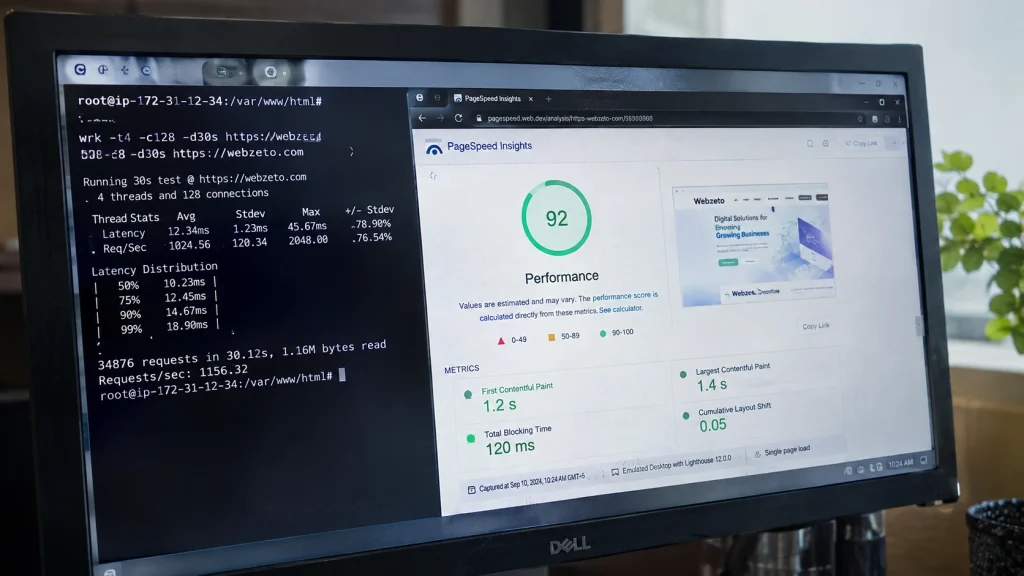
PHP 8.0 shipped a Just-In-Time compiler and it became the headline feature in nearly every upgrade article, including the earlier version of this one. For a typical WordPress site, JIT delivers close to nothing. It is off by default in most PHP builds, and turning it on is not the performance lever people think it is.
The reason is what JIT accelerates. It compiles hot code paths at runtime, which helps CPU-bound work: image processing, mathematical computation, long analytical loops. A WordPress page load is not CPU-bound. It is dominated by database queries and I/O, and measured gains from JIT on I/O-bound applications sit under 10%, often at the edge of measurement noise. Hosting engineers who benchmark it on real WordPress workloads routinely find no meaningful difference, and JIT has a history of stability issues with certain extensions.
There is a real performance story in upgrading PHP. It is just not JIT. It comes from engine-level improvements across the 8.x series, and moving from PHP 7.x to a current 8.x branch typically produces a noticeable throughput gain on WordPress workloads without touching a single configuration flag.
We tested this properly once, on a content site with heavy category archives, because a client had read that JIT would speed up their site and wanted it switched on. We benchmarked the same three URLs with JIT off and JIT on, a thousand requests each, and compared median time to first byte. The difference was small enough that it sat inside the run-to-run variance. Adding Redis object caching to the same site the following week cut median TTFB by a far larger margin than JIT had, and that result was obvious without needing a careful benchmark to see it.
What to do with this: leave JIT off unless you have benchmarked your own site with and without it against a representative URL. The levers that actually move WordPress page load times, roughly in order:
- OPcache, correctly sized. Not JIT. OPcache is the one that matters and it is usually already on.
- Object caching, Redis or Memcached, so repeat queries stop hitting the database.
- Page caching, so most visitors never execute PHP at all.
- Database query cleanup, since the slowest part of most WordPress requests is a query, not the language runtime.
Anyone selling a PHP upgrade primarily on JIT is repeating a 2020 press release. Upgrade for the security runway and the general engine improvements, and treat any speed gain as a bonus you should measure rather than assume.
What Breaks at Each Version Step
Upgrade failures are predictable because each PHP release deprecates specific things. Knowing which change belongs to which version tells you what to expect in your logs before you flip the switch, and lets you read a deprecation notice as a known issue rather than a mystery.
| PHP version | The change that bites | What it looks like |
|---|---|---|
| 8.0 | Stricter type handling on internal functions | TypeError when code passes null or a loose type where a string or int is expected |
| 8.0 | Removed long-deprecated functions and behaviors | Fatal errors in plugins that predate 2020 |
| 8.1 | Passing null to non-nullable internal function parameters deprecated | Log floods of deprecation notices, mostly from older plugins |
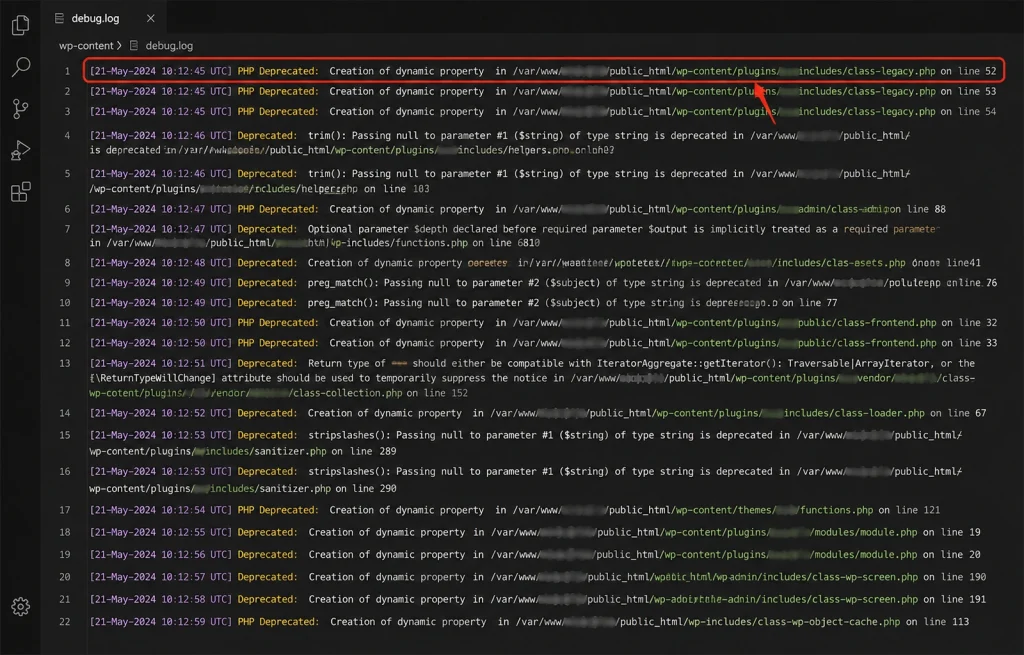
| 8.2 | Dynamic properties deprecated | Deprecation notice whenever code writes to an undeclared object property. The most common source of PHP 8.2 log noise on WordPress |
| 8.2 | utf8_encode() and utf8_decode() deprecated | Warnings in form, import, and legacy migration plugins |
| 8.3 | Tightened readonly and typed constant handling | Narrow impact, mostly custom code |
| 8.4 | Implicitly nullable parameter types deprecated | Deprecation notices in older custom code and unmaintained plugins |
Two things worth understanding about this table.
Dynamic properties are the big one. Writing to an object property that was never declared used to work silently. Since PHP 8.2 it raises a deprecation notice, and the underlying RFC schedules it to become a fatal Error in PHP 9.0. Plenty of older WordPress plugins do this constantly. It is noise today and a breakage later, which is a good reason to fix rather than suppress it.
On the client blog I mentioned at the top, the move from 8.1 to 8.4 produced a debug log that was almost entirely dynamic property notices, and nearly all of them traced back to two plugins that had not been updated since 2022. Neither plugin broke anything visible. Both were doing something that stops working in PHP 9.0. We replaced one and the other had a maintained fork, which took longer than the PHP switch itself.
Deprecation notices are a preview, not a failure. Almost everything above surfaces as a notice before it becomes fatal in a later version. That is exactly why staging with WP_DEBUG enabled is worth the setup time: the notices you see on staging today are the fatal errors you avoid in production two years from now.
One caution. Do not fix deprecation noise by turning off error display and calling it done. Suppressing the notice leaves the code broken and moves the failure to whichever version makes it fatal, at which point you will be debugging it under pressure rather than on a schedule.
The Upgrade Sequence
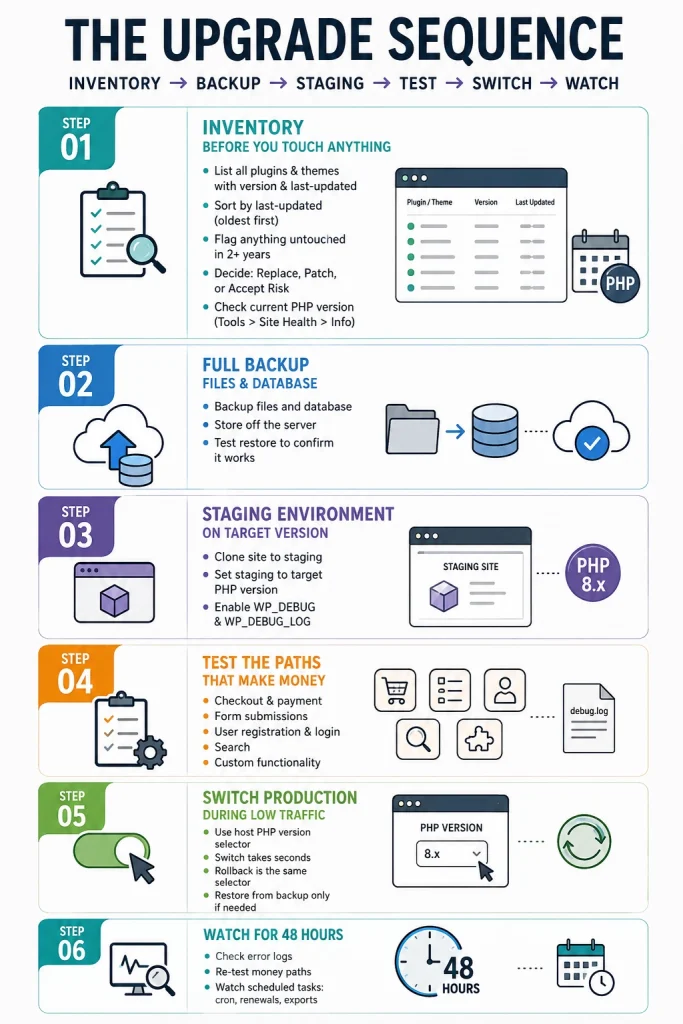
Upgrade in this order: inventory, backup, staging, test, switch, watch. The step people skip is the inventory, and it is the one that predicts whether the rest goes smoothly. Knowing which plugins are abandoned before you start turns a surprise into a decision.
Step 1: Inventory before you touch anything
List every active plugin and theme with its version and last-updated date. Sort by last-updated, oldest first. Anything untouched in two years goes on a risk list. For each one on that list, decide now whether you will replace it, patch it, or accept it might break. Doing this before the upgrade means you are choosing rather than reacting.
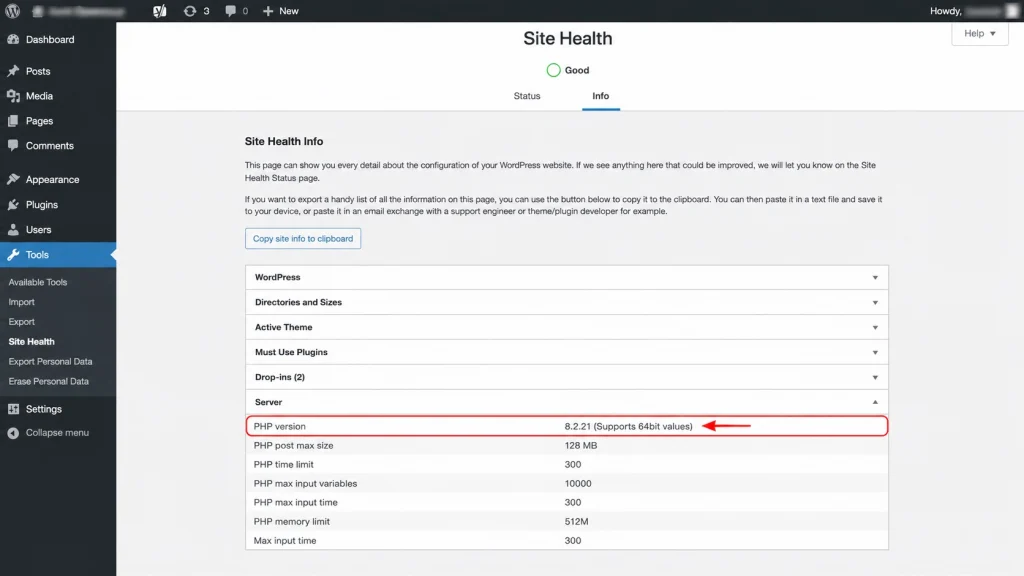
Check your current PHP version at the same time, in Tools then Site Health then Info, under the Server section.
Step 2: Full backup, files and database
Files and database both, stored somewhere that is not the server you are about to change. Confirm you can actually restore it. An untested backup is a hope, not a rollback plan.
Step 3: Staging environment on the target version
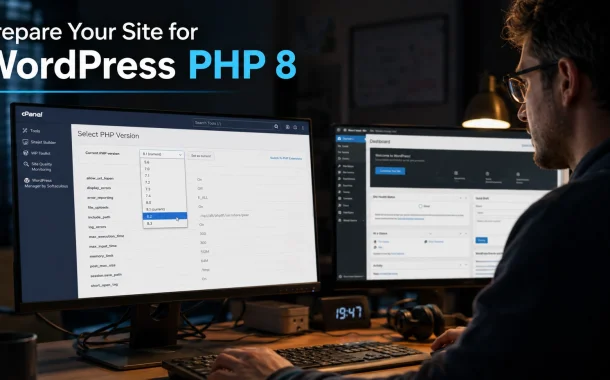
Clone the site and set staging to your target PHP branch. Most managed hosts offer a one-click staging site with a PHP version selector. Enable WP_DEBUG and WP_DEBUG_LOG so notices go to a file rather than the screen.
Step 4: Test the paths that make money
Do not click around randomly. Test the flows where a failure costs something: checkout and payment, form submissions, user registration and login, search, and any custom functionality unique to the site. Then read wp-content/debug.log even if nothing appeared broken. Silent deprecation notices are the ones that become next year’s outage.
Step 5: Switch production during low traffic
Most hosts expose a PHP version selector in the control panel, and the switch takes effect in seconds. The rollback is the same selector, which is what makes PHP version changes far less frightening than most site changes. Restore from backup only if a plugin wrote bad data during the window.
Step 6: Watch for 48 hours
Check error logs, run through the money paths once more, and watch for anything scheduled. Cron jobs, subscription renewals, and scheduled exports run on their own timetable, so a failure there can surface a day later rather than immediately.
If you run this across a portfolio rather than one site, the sequencing and record-keeping become the hard part. Our guide to WordPress management across multiple websites covers running that kind of change at fleet scale. For catching visual breakage that error logs never report, adding visual regression testing to your QA workflow is worth the setup on any site where layout matters.
Which Version Should You Actually Pick?
Pick PHP 8.4 for most WordPress sites. It has active support until the end of 2026 and security patches until December 2028, and by now it has a two-year track record across the plugin ecosystem. PHP 8.5 is the right call if your plugin stack is current and actively maintained.
The decision in four cases:
- Standard business or content site, mainstream plugins. PHP 8.4. Longest runway paired with a proven compatibility record.
- WooCommerce store or complex plugin stack. PHP 8.4, and test payment and checkout flows specifically. The extra caution is about transaction paths, not the PHP version.
- Actively maintained site, everything current. PHP 8.5. Nine more months of active support and twelve more months of security patches than 8.4.
- Legacy site with old custom code, limited testing budget. PHP 8.3 as a floor, on the understanding that it expires December 2027 and you are choosing to repeat this exercise sooner.
PHP 8.2 is not on that list deliberately. It stops receiving security patches on December 31, 2026. Upgrading to it now means doing the same work twice within a few months.
The version that is genuinely wrong for everyone is whatever you are running if it is 8.1 or below. That is not a performance conversation, it is an unpatched software conversation, and it belongs in the same bucket as the business cost of a website left on autopilot.
Plugin choices feed directly into how painful this gets. Every abandoned plugin on a site is a future upgrade blocker, which is a reasonable lens for evaluations like our breakdown of Google Reviews WordPress plugins: maintenance cadence is a compatibility feature. The same goes for custom template code, where sticking to documented patterns rather than clever shortcuts pays off at upgrade time. Our guide to building a WordPress post template covers the conventional approach.
Frequently Asked Questions
What PHP version does WordPress recommend in 2026?
WordPress recommends PHP 8.3 or higher as a minimum. The minimum supported version is PHP 7.4 since WordPress 7.0. For production, PHP 8.4 is the better target, since it receives security patches until December 2028 while PHP 8.3 expires at the end of 2027.
Is PHP 8 still safe to use?
It depends entirely on which PHP 8 branch. PHP 8.0 and 8.1 are end-of-life and receive no security patches. PHP 8.2 is patched only until December 31, 2026. PHP 8.3, 8.4, and 8.5 are still supported. “PHP 8” has not been a single answer since 2021.
Does WordPress support PHP 8.4 and 8.5?
Yes, fully. WordPress retired the “beta support” label in May 2026 and removed it retroactively. WordPress 6.8 and later fully support PHP 8.4, and WordPress 6.9 and 7.0 fully support PHP 8.5. Guides still describing these as beta have not been updated since then.
Will upgrading to PHP 8 make my WordPress site faster?
Moving from PHP 7.x to a current 8.x branch usually produces a measurable throughput improvement. Moving between 8.x versions produces very little. The JIT compiler, often credited for speed gains, does close to nothing for typical WordPress workloads because page loads are database-bound rather than CPU-bound.
Should I enable JIT for WordPress?
Generally no. JIT accelerates CPU-bound code, and WordPress page loads are dominated by database queries and I/O. Measured gains on I/O-bound applications sit under 10% and often within noise. OPcache, object caching, and page caching deliver far more.
What breaks when upgrading to PHP 8.2?
The most common issue is deprecated dynamic properties. Any code writing to an undeclared object property now raises a deprecation notice, and older plugins do this frequently. The utf8_encode() and utf8_decode() functions were also deprecated, which affects some form and import plugins.
How do I check my current PHP version in WordPress?
Go to Tools, then Site Health, then the Info tab, and open the Server section. Your PHP version is listed there along with server details. Your hosting control panel shows the same information and is usually where you change it.
Can I roll back if the PHP upgrade breaks my site?
Yes, and this is why PHP upgrades are lower risk than most site changes. Switch the version back in your hosting control panel and the change takes effect in seconds. Restore from backup only if a plugin wrote corrupted data during the window it was live.
Do I need new hosting to run PHP 8.4?
Almost certainly not. Most hosts support current PHP branches and provide a version selector in the control panel. If your host does not offer PHP 8.3 or higher in 2026, that is a signal about the host rather than a reason to stay on an unpatched version.
How long does a PHP upgrade take?
The switch itself takes seconds. The work is testing. A simple site with mainstream plugins needs one to two hours on staging. A WooCommerce store or a site with heavy custom code needs a day, most of it spent testing checkout and custom functionality rather than fixing PHP.
Getting WordPress PHP 8 Right the First Time
That client blog is on PHP 8.4 now. The switch itself took about ten seconds. The work was the two abandoned plugins the debug log surfaced, and honestly, finding those was worth more than the version bump was.
What I got wrong the first time was treating “upgrade to PHP 8” as a finished task. It was never a task. It is a recurring decision about which of five branches deserves the testing work, and the work is roughly identical whichever you pick. Inventory the plugins, back up, stage, test the paths that make money, switch, watch. What differs is when you have to do it again. Landing on PHP 8.2 in August 2026 means repeating everything by New Year. Landing on 8.4 means not thinking about it until 2028, and 8.5 buys another year past that.
So the question is not whether to move to PHP 8. You are almost certainly already on some part of it, the same way that blog was. The question worth asking is when your current branch stops getting security patches, and whether that date is close enough that you would rather find out now than from a vulnerability report. When did you last check?