
Choose comparable sites, collect their terms with sources, remove mismatches, group by intent, then rank possible pages. The gardening store is an illustrative example.
Table of Contents
Choose Two or Three Sites for Your Keyword Gap Analysis
The largest gardening retailer is often a poor comparison for a shop selling seeds and beginner kits. Its pages may rank for equipment your shop never carries. Choose two or three sites whose readers, products, and target country overlap with yours. A smaller seed seller may reveal more useful topics than a national chain.
Record each candidate’s domain, relevant pages, country, language, and reason for inclusion. Check whether a core product search brings up its relevant page. If the overlap exists only at the brand level, leave it out. A good comparison site does not need to be bigger or smaller than yours. Keep the scope small enough to inspect the pages behind the terms.
Collect Competitor Keywords and Keep the Source
Obtain ranking terms from a source that provides competitor keyword data. Keep the country, language, date, domain or page URL, and definition of “ranking.” Third-party positions are estimates, not measurements from the competitor’s account. Without that data source, compare published pages topic by topic and call it a content coverage review.
You can organize terms in a spreadsheet, or use SEO automation tools for your AI agent as a reference for a source-backed shortlist with intent, proposed pages, and missing metrics. That sample workflow requires an available keyword data source; the page does not supply live competitor rankings. A manual export and spreadsheet also work. If you are starting from scratch, this walkthrough on how to build a keyword list for SEO using free tools covers the basics.
Compare those terms with your own pages and authorized Google Search Console queries. Search Console tells you which searches showed your site, alongside its own clicks and impressions. It cannot show a competitor’s private performance. Keep the two data sources in separate columns so a third-party ranking estimate never gets presented as your own observed search data.
Use one row per candidate query. Include the source URL, export date, market, competitor page, your closest page, and a notes column. Leave unavailable fields blank and label them “not checked.” This makes the later decisions traceable: you can see whether a suggested gap came from a ranking estimate, a competitor page, or your own query data.
Remove Terms Your Site Would Never Serve
First, drop terms about products you do not offer, places you do not serve, and competitor brands. A seed seller should exclude riding mowers even if a tool reports high volume. Inspect terms already covered by your pages. A thin or outdated page might need improvement rather than a new article.
“Best soil for raised beds” stays if the shop sells soil or supports its growing kits. “Lawn tractor repair” goes. “When to start tomato seeds indoors” stays for review if the shop serves the region implied by the results. Record why you remove a term: product mismatch, geography, brand query, or existing coverage. That judgment concerns this site, not overall search demand.
Group the Remaining Terms by Search Intent
Now read the search results and the pages that satisfy each surviving query. A beginner asking “how to start tomato seeds indoors” likely needs instructions. Someone comparing seed-starting trays may need a side-by-side guide. A query for a particular kit may point to a product page. These are working interpretations, not automatic labels. If the results show a different kind of page than you expected, revise the group before you assign a topic.
An AI agent can help sort terms and collect URLs for review. SpringBrand describes a general way to connect an existing agent with APIs and plugins, which may help organize a workflow. The editor still has to inspect the result pages, decide whether two phrases express the same question, and check if the suggested page matches the shop’s products. A single word such as “best” does not settle intent.
For each group, keep the representative query, reader question, observed page type, and proposed page. If results mix guides and product pages, mark intent as mixed and inspect more examples. A short, defensible list beats hundreds of loosely tagged terms.
Turn Groups Into a Topic Priority Table
This illustrative example contains no live rankings, search volumes, or measured outcomes. Priority reflects reader fit, existing coverage, evidence, and production effort.
| Topic cluster (illustrative example) | Intent | Current coverage | Proposed page | Priority and reason |
|---|---|---|---|---|
| Starting tomato seeds indoors | How-to | No clear guide | Beginner growing guide | High: strong reader fit; instructions can support relevant kits |
| Choosing a seed-starting tray | Comparison | Short product description | Tray comparison guide | Medium: useful, but products and differences need checking |
| Lawn tractor maintenance | Service information | No page | None | Exclude: outside the shop’s products |
For real candidates, add source URL and date, country, and available metrics. Mark missing volume or difficulty “not checked.” Ask whether each row serves your reader, exposes a real page gap, matches the observed intent, and is feasible to cover well.
The tomato guide moves up because it fits the assumed shop and offers a concrete reader task. The tray comparison waits until someone verifies which trays the shop actually sells and what distinguishes them. The tractor topic stays out even if a third-party tool estimates high demand. If an existing page already answers the tomato question well, improve that page instead of adding a near duplicate. A keyword export can inform the priority, but an editor makes the call and can point to the evidence.
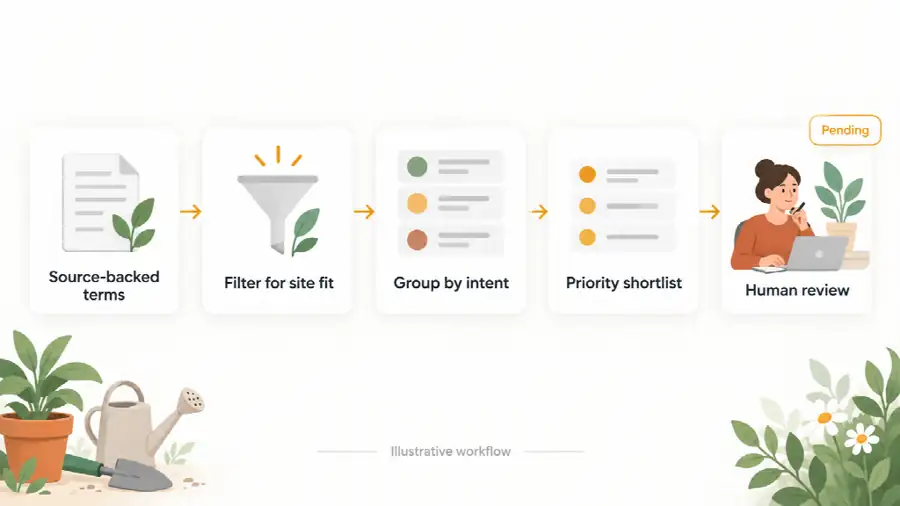
Give every proposed page an owner and a reason it outranks the next candidate. A topic with weaker data may still deserve attention when customer questions are clear and the shop can answer them well. Conversely, a large estimated volume cannot rescue a page that serves the wrong audience.
Check the Shortlist Before Publishing
Before approving a topic, open current search results for the leading rows and compare the page types with your proposed page. Revisit your page inventory. A colleague may know which questions customers actually ask. Check the export date too; old rankings and estimated metrics need a fresh look.
Google’s SEO Starter Guide stresses useful content for readers and notes that people may search for the same topic in different words. That is a useful final test for a gap: a new page should answer a real question your audience has, using language they recognize. Pick the highest-fit, well-supported topic and write a one-page brief with its reader question, evidence URLs, and proposed page type. After publication, use your own Search Console data to observe what happens; the priority table is a plan and guarantees no rankings. For the bigger picture, see how to create a long-term SEO strategy that delivers results.