The good news is that you don’t need an expensive subscription to do it well. Google gives you most of the data for free through Keyword Planner, Search Console, autocomplete and the People Also Ask box, and several paid tools offer free versions that fill the gaps. Below we walk through what a keyword list is, a seven-step process to build one, the best free keyword research tools, how to use Google Keyword Planner, how to prioritize terms, a worked SEO keyword list example and how to keep the list up to date. The steps work for small business sites, blogs and online stores targeting the US, UK, Canada, Australia or Europe.
Quick answer: To build a keyword list, start with three to five core topics, expand each one into seed keywords with Google autocomplete, People Also Ask and Keyword Planner, then add real queries from Search Console. Group related terms into clusters, check volume, difficulty and intent, assign one main keyword to each page and review the list every few months.
Table of Contents
What Is a Keyword List in SEO?
A keyword list in SEO is an organized set of search terms your site wants to rank for, grouped by topic and mapped to specific pages. It shows each keyword’s intent, rough search volume and difficulty, so you know what content to create, which page targets which term and what to update first.
What a Good Keyword List Includes
A useful list goes beyond a column of phrases. Each row should record:
- The keyword and its close variations
- Search intent (informational, commercial, transactional or navigational)
- Estimated monthly searches and difficulty
- The topic cluster it belongs to
- The page that targets it, or “new page needed”
- Current ranking position, if you already rank
How Many Keywords Should Your List Have?
There’s no magic number. A small local business might start with 30 to 50 keywords across a handful of service pages, while a content-heavy blog can track several hundred. What matters is that every keyword has a clear page and a reason to be on the list. A short, well-mapped list beats a huge spreadsheet nobody uses.
How to Build a Keyword List Step by Step
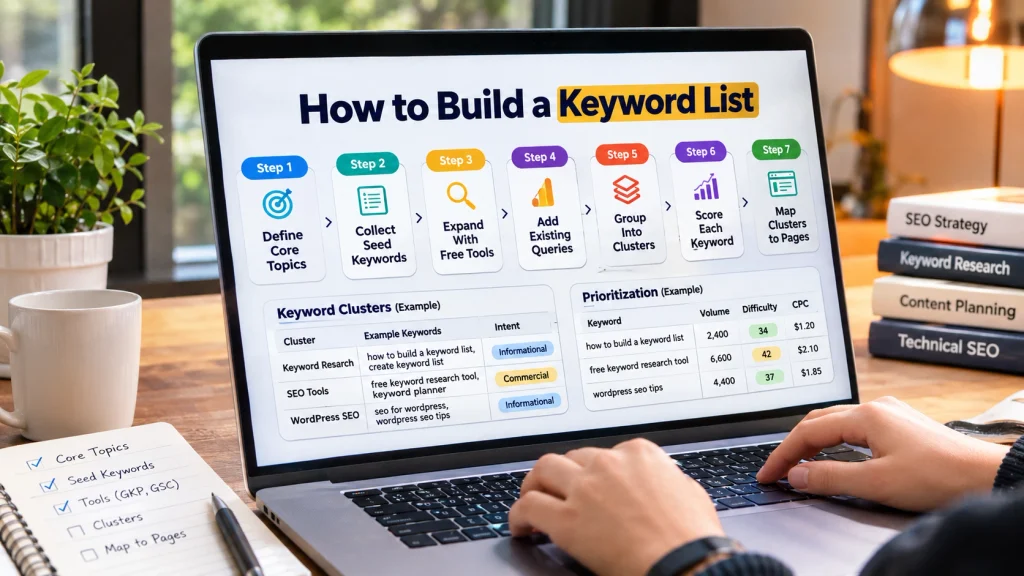
Learning how to build a keyword list comes down to seven repeatable steps. You define topics, collect seed terms, expand them with free tools, add queries you already get, group them into clusters, score them with a few metrics and map each cluster to a page. The process takes a few hours for a small site.
Step 1: Define Your Core Topics
Write down the three to five main things your business offers or your site covers. A web design studio might list “website design,” “WordPress development,” “SEO” and “ecommerce.” An online pet store might list “dog food,” “cat toys” and “pet grooming.” These core topics become the folders your keywords live in.
Step 2: Collect Seed Keywords
For each topic, list the plain words a customer would type into Google. Think about how people describe the problem, not how your industry describes the product. Ask customers, check support emails and read the questions people ask on forums. Five to ten seeds per topic is plenty to start.
Step 3: Expand Seeds With Free Tools
Type each seed into Google and note the autocomplete suggestions, the People Also Ask questions and the related searches at the bottom of the page. Then run the seeds through a free SEO keyword research tool or Google Keyword Planner to pull long-tail variations, questions and rough volumes.
Step 4: Add Queries You Already Get
If your site is live, open Google Search Console and look at the queries that already bring impressions. These are real searches where Google sees you as relevant, and they’re often the quickest wins. Add any with high impressions but few clicks to your list.
Step 5: Group Keywords Into Clusters
Put keywords with the same intent together, because one good page can rank for many close variations. For example, “how to build a keyword list,” “how to create a keyword list” and “how to make a keyword list” all want the same answer and belong on one page.
Step 6: Score Each Keyword
Add volume, difficulty, cost per click and trend data for every cluster. These numbers help you decide what to write first, which we cover in the prioritization section below.
Step 7: Map Clusters to Pages
Give each cluster one main page. Service and product terms go on service or category pages, question-style terms go on blog posts and FAQs, and brand terms go on the homepage. Mapping this way prevents two pages from competing for the same search.
Best Free Keyword Research Tools
The best free keyword research tools come straight from Google: Keyword Planner, Search Console, Google Trends and the search results page itself. Free versions of Semrush, Ahrefs and similar tools add difficulty scores and extra ideas. Using two or three together gives a more complete picture than relying on any single tool.
Google’s Own Free Tools
- Google Keyword Planner: Keyword ideas, estimated monthly searches and competition data. It needs a Google Ads account, but you don’t have to run ads to use it.
- Google Search Console: The queries your site already appears for, with clicks, impressions, click-through rate and average position.
- Google Trends: Shows whether interest in a term is rising, falling or seasonal, and lets you compare terms side by side.
- Autocomplete, People Also Ask and related searches: Free, real phrasing straight from the search results page.
Free Versions of Paid SEO Tools
Semrush, Ahrefs and Moz each offer limited free keyword tools or free accounts with a small number of daily searches. Ahrefs has a free keyword generator, and Semrush’s free account allows a limited number of keyword lookups per day. These tools are useful for difficulty scores, which Google’s tools don’t show. Check each vendor’s site for current limits, as they change often.
Question and Idea Tools
AnswerThePublic groups autocomplete data into questions, comparisons and prepositions, which is handy for FAQ ideas. RankWatch’s tool also breaks results into questions and long-tail variations. For a wider look at options, our roundup of SEO tools without the boring stuff covers more choices.
How to Build a Keyword List With Google Keyword Planner
Google Keyword Planner is the most reliable free source of search volume because the data comes from Google itself. Knowing how to build a keyword list with it means using two features: one that discovers new keyword ideas from words or a website, and one that checks volume and forecasts for keywords you already have.
Set Up Access
Google’s Keyword Planner help page explains that you need to finish Google Ads account setup and add billing details to access keyword ideas. You can pause or skip campaigns, so the research itself costs nothing. Accounts with little or no ad spend may see volume shown as ranges rather than exact numbers.
Use “Discover New Keywords”
Enter a few seed words or your website address. Keyword Planner returns related ideas with average monthly searches, competition and estimated bid ranges. Filter by location to focus on the US, UK, Canada or Australia, and remove brand names you don’t want.
Use “Get Search Volume and Forecasts”
Paste or upload the keywords you collected from other tools. Keyword Planner shows their volume and forecasts, which helps you confirm whether ideas from autocomplete or a third-party tool have real demand. Google notes that keywords with very low volume may not appear at all.
How to Prioritize Your Keyword List
Prioritizing your keyword list means balancing demand, difficulty and value so you target terms you can realistically rank for. Look at search volume, keyword difficulty, cost per click, Keyword Golden Ratio and trend data together, then start with relevant terms that have steady demand and weaker competition.
Search Volume
Search volume shows how many people search for a term each month. Higher volume means more potential traffic, but very broad terms often bring visitors who aren’t ready to act. A keyword with 200 monthly searches and clear buying intent can be worth more than one with 20,000 vague searches.
Keyword Difficulty
Difficulty scores estimate how hard it will be to reach page one, usually based on the strength of pages already ranking. Newer sites should lean toward low and medium difficulty terms to build momentum before chasing the most competitive phrases.
Cost per Click
Even for organic search, CPC is a useful signal. Advertisers pay more for keywords that lead to sales, so a high CPC often points to strong commercial intent. Those terms may bring fewer visits but more leads.
Keyword Golden Ratio
The Keyword Golden Ratio (KGR) divides the number of Google results with the keyword in the title by its monthly search volume. A ratio below 0.25 usually signals an easier term to rank for. A free KGR calculator tool speeds this up when you’re checking many long-tail phrases.
Trend Data
Use Google Trends to check whether interest is growing, shrinking or seasonal. A rising term is worth getting into early, while a seasonal one needs content published a few weeks before its peak.
How to Build a Keyword List: A Worked Example
The easiest way to see how to build a keyword list is through an example. Below is a small SEO keyword list for a web design agency’s “WordPress development” topic, showing how keywords are grouped by intent and mapped to a page, with notes on priority.
Example SEO Keyword List
| Keyword | Intent | Cluster | Target page | Priority |
|---|---|---|---|---|
| wordpress development services | Commercial | Services | WordPress development service page | High |
| hire wordpress developer | Transactional | Services | WordPress development service page | High |
| custom wordpress theme development | Commercial | Custom builds | Custom theme service page | Medium |
| do i need coding for wordpress | Informational | Learning | Blog post | Medium |
| wordpress vs html website | Informational | Comparisons | Blog post | Medium |
| how much does a wordpress site cost | Commercial | Pricing | Pricing guide post | High |
Turning the Example Into Pages
Notice that two keywords share one service page because they want the same thing. Each informational question gets its own post, which then links back to the service page. If you’re a local business, add location terms such as “WordPress developer in Toronto” to your service clusters, as our guide to local keyword targeting explains.
Keeping Your Keyword List Clean and Useful
A keyword list only helps if it stays organized and matches real search behavior. Remove duplicates and irrelevant terms, tag each keyword by intent, avoid giving two pages the same main keyword and never repeat keywords unnaturally on the page. Clean lists make content planning faster and rankings more stable.
Clean and Label the List
After collecting ideas from several tools, delete duplicates, brand terms you can’t serve and anything outside your business. Mark primary and secondary keywords, and add an intent label to every row. A simple spreadsheet works fine for most sites.
Avoid Cannibalization and Keyword Stuffing
When two pages target the same main keyword, they compete and often both rank lower. Merge or re-map them. Also write naturally: Google’s spam policies describe keyword stuffing as repeating words so often that it sounds unnatural, which can hurt rankings rather than help.
Check the Technical Side
If well-mapped pages still don’t rank, the problem may be crawling, indexing or site structure rather than keywords. Working with a provider offering technical SEO services can help find crawl blocks and indexing issues. Our guide on why your website is not getting traffic covers other common causes.
Track and Update Your Keyword List
Keyword research isn’t a one-time task. Search behavior shifts, competitors publish new content and your own pages start ranking for terms you never targeted. Review your keyword list every three to six months using Search Console data, and add new queries, retire dead ones and refresh pages that are slipping.
Use Search Console as Your Feedback Loop
Google’s Performance report shows clicks, impressions, click-through rate and average position for every query. Regularly tracking keyword performance here shows which pages are gaining, which are stuck on page two and which new queries deserve their own section or post.
Find Gaps Against Competitors
Compare the keywords competitors rank for with your own list to find topics you’ve missed. Our simple workflow for keyword gap analysis for small sites shows how to do this with free data, and our guide to a long-term SEO strategy explains how keyword lists fit into a bigger plan.
FAQs
Here are answers to common questions about building a keyword list for SEO.
How do you build a keyword list for SEO?
Start by listing your core topics, then collect seed keywords for each one. Expand them with Google autocomplete, People Also Ask, related searches and Google Keyword Planner. Add queries you already appear for in Search Console. Group similar terms into clusters, score them on volume, difficulty and intent, and assign one main keyword cluster to each page on your site.
What is the best free keyword research tool?
Google Keyword Planner is the best free source of search volume because the data comes directly from Google. Google Search Console is the best free tool for finding keywords you already rank for. For difficulty scores and extra ideas, the free versions of Ahrefs, Semrush and Moz are helpful. Most people get the best results by combining two or three of these tools.
Is Google Keyword Planner free?
Yes, Keyword Planner is free to use, but it sits inside Google Ads. You need to finish account setup and add billing details to see keyword ideas, though you don’t have to run or pay for ads. Accounts with little or no ad spend may see search volume shown as broad ranges instead of exact monthly numbers, which is still useful for comparing keywords.
What does a good SEO keyword list look like?
A good SEO keyword list groups keywords by topic and intent and maps each group to one page. Each row records the keyword, its intent, search volume, difficulty, the target page and current position. It mixes broad head terms with specific long-tail phrases and questions, and every keyword on it has a clear reason to be there and a page that answers it well.
How many keywords should I target per page?
Target one main keyword per page, plus a handful of close variations and related questions that share the same intent. A single strong page often ranks for dozens of related searches without trying. If two keywords need different answers or different types of page, they should go on separate pages rather than being forced together into one long article that serves neither search well.
What is the difference between short-tail and long-tail keywords?
Short-tail keywords are broad phrases of one or two words, such as “keyword research.” They have high volume but strong competition and mixed intent. Long-tail keywords are longer and more specific, such as “how to build a keyword list with free tools.” They have lower volume but are easier to rank for and usually bring visitors with a clearer goal.
How do I find keywords my competitors rank for?
Free versions of tools like Ahrefs and Semrush let you enter a competitor’s domain and see some of the keywords it ranks for. You can also search your main topics in Google and note which competitor pages appear and what they cover. Compare those topics with your own list, and add any relevant gaps as new pages or new sections on existing pages.
Can I build a keyword list without paid tools?
Yes. Google Keyword Planner, Search Console, Google Trends, autocomplete, People Also Ask and related searches together cover volume, real queries, trends and phrasing. Free versions of paid tools add difficulty scores. Paid tools save time on large sites, but a small business can build a solid, accurate keyword list entirely with free tools and a simple spreadsheet to keep everything organized.
How often should I update my keyword list?
Review your keyword list every three to six months, or sooner after a big site change or a Google core update. Use Search Console to find new queries with impressions, check which target pages are slipping and remove keywords that no longer matter. Seasonal businesses should also check their list a few weeks before each busy period, so new content has time to rank.
Conclusion
Learning how to build a keyword list is one of the most useful SEO skills you can have, because it shapes every page you write and every update you make. The process is simple: define your core topics, collect seed keywords, expand them with Google autocomplete, People Also Ask and Keyword Planner, add the queries Search Console already shows, then group, score and map them to pages.
Free tools cover almost everything a small business needs. Google provides volume, real queries and trends, while free versions of paid tools add difficulty scores. Keep the list clean, give each page one main keyword cluster and write for people rather than for repeated phrases. Most importantly, treat the list as a living document. Review it every few months, add new opportunities and refresh pages that start to slip. A well-maintained list turns scattered blog ideas into a clear content plan that grows traffic steadily over time. Which core topic will you start building your keyword list around this week?