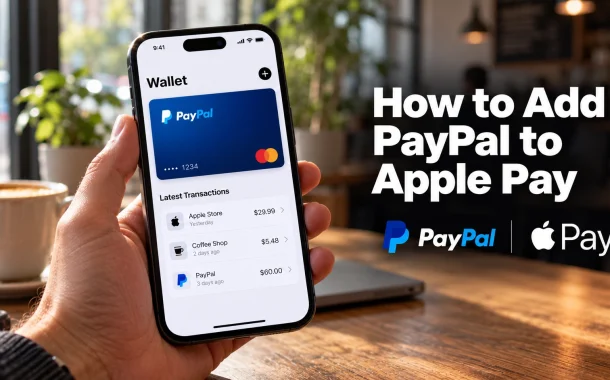
He had not. PayPal cannot be added to Apple Pay as an account, in any country, and no setting will change that. What goes into Wallet is a PayPal card, and PayPal issues five of them. That card then spends your PayPal balance through Apple Pay at the till, which is as close to the thing he wanted as the two companies allow. Two other routes exist and neither needs a card in Wallet: PayPal can sit on your Apple Account for App Store and iCloud charges, and in Germany the PayPal app now taps to pay by itself, with Apple Pay out of the picture entirely.
Quick answer: PayPal cannot be added to Apple Pay directly. Add a PayPal card instead, most commonly the PayPal Debit Mastercard, which puts your PayPal balance into Wallet. For App Store and iCloud charges, add PayPal to your Apple Account, which needs no card. In Germany, the PayPal app taps to pay without Apple Pay.
Table of Contents
Can You Integrate PayPal With Apple Pay
No, not as an account. Apple Pay holds cards issued by participating banks and card issuers, and a PayPal account is not a card. What you can do is add a PayPal-branded card to Wallet, which routes the payment through your PayPal balance or credit line while Apple Pay handles the tap.
The three routes, and which problem each one solves
| What you want to do | Route | Needs a card? |
|---|---|---|
| Tap to pay in a shop using PayPal money | Add a PayPal card to Wallet | Yes |
| Pay for App Store, iCloud or Apple Music with PayPal | Add PayPal to your Apple Account | No |
| Tap to pay in a shop without Apple Pay, in Germany | Use the PayPal app’s own contactless | No |
Most people arriving at this question want the first row and assume it requires the second. They are separate systems that happen to share a name on the screen.
Why Apple Pay cannot hold a PayPal account
Apple Pay tokenises a card number. It needs an issuer on the other end to authorise each transaction against that token. A PayPal account balance has no card number to tokenise, which is why PayPal issues cards for exactly this purpose rather than trying to put the account itself into Wallet.
How to Integrate Apple Pay With PayPal Using a Card
Five PayPal cards are eligible for Apple Pay, Google Pay and Samsung Pay. PayPal names them as the PayPal Debit Mastercard, the PayPal Business Debit Mastercard, the PayPal Cashback Mastercard, the PayPal Extras Mastercard and the PayPal Credit Card. The three credit products are issued by Synchrony Bank.
| Card | What it draws on | Typical user |
|---|---|---|
| PayPal Debit Mastercard | Your PayPal balance | Most people asking this question |
| PayPal Business Debit Mastercard | A PayPal business balance | Business accounts |
| PayPal Cashback Mastercard | A credit line | Rewards-focused spending |
| PayPal Extras Mastercard | A credit line | Legacy cardholders |
| PayPal Credit Card | A credit line | PayPal Credit users |
Card list as published in PayPal’s help documentation.
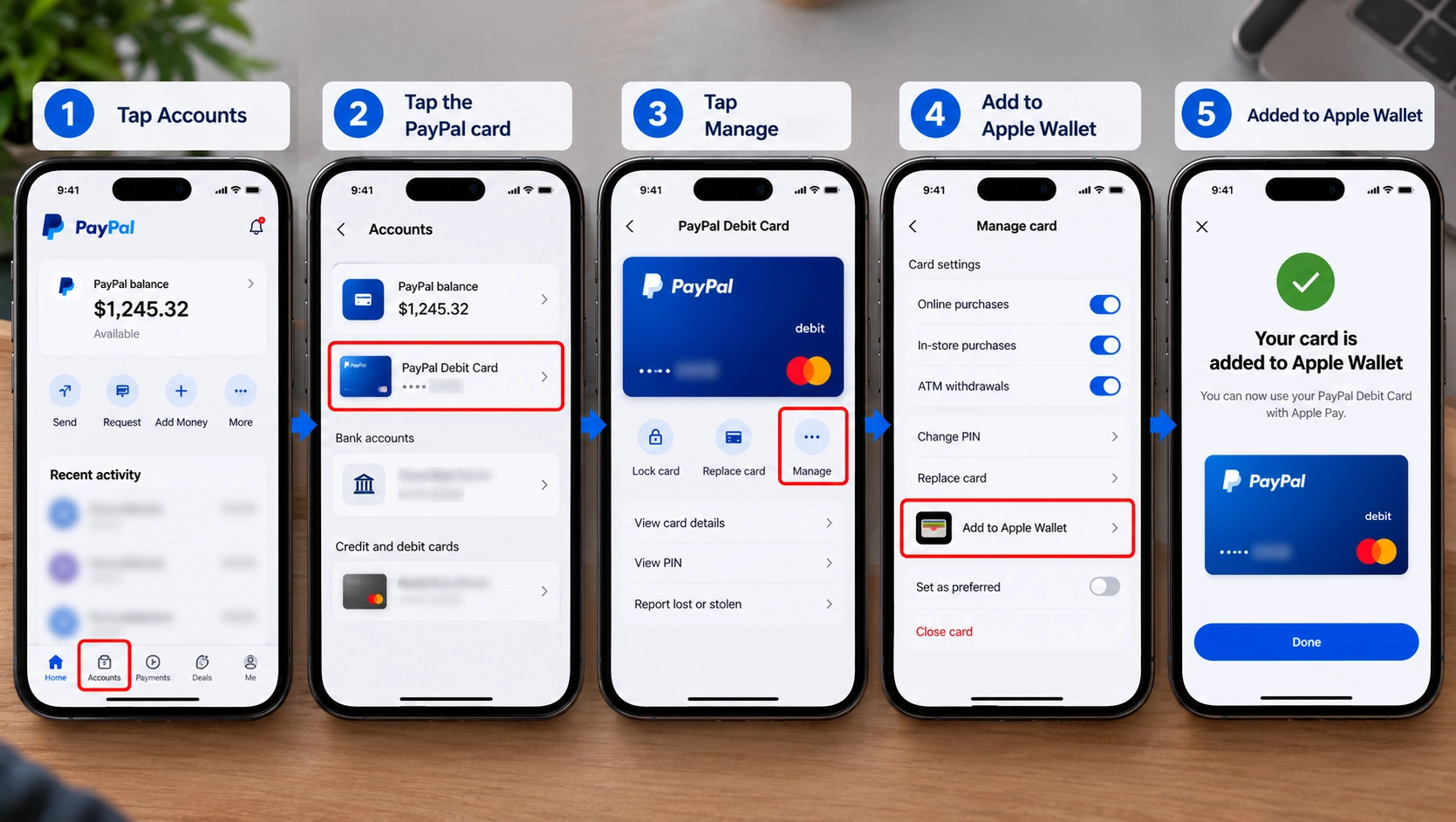
Adding the card from the PayPal app
PayPal documents two app layouts, so follow whichever matches yours. On one, tap Accounts, tap the PayPal card, tap Manage, then tap Add to Apple Wallet. On the other, tap Me, then Accounts, then the balance tile showing the debit card art, then your card, then Add to Apple Wallet. Follow the prompts from there.
Adding the card from Wallet instead
Open Wallet, tap the button to add a payment method, and follow the prompts to enter the card. Either direction produces the same result, and PayPal notes the feature is “Not available on all devices”, with compatible hardware listed on Apple’s own site.
How to integrate Apple Pay with PayPal credit card
The three credit products work the same way as the debit card in Wallet. Add the PayPal Credit Card, Cashback Mastercard or Extras Mastercard and the payment draws on the Synchrony credit line rather than your balance. Everything about the tap is identical, so the choice is about which money you want to spend.
If you do not have a PayPal card yet
The debit card is the one I point clients at, since it spends the balance rather than opening a credit line. My print-shop client did not want a credit application for what was really a convenience problem. It arrives by post before it can be added to Wallet in most cases, and our walkthrough of getting a PayPal card in the mail covers the wait and what to do if it does not turn up.
What Wallet shows once the card is in
PayPal states that in Wallet “you can easily view your PayPal balance, recent transactions, and customer service info”. That makes the card more useful inside Wallet than a plain bank card, because the balance it spends is visible at the point of paying.
How to Add PayPal to Apple Wallet Without a Card
You cannot put PayPal into Apple Wallet without a card. Wallet needs a card to tokenise, so there is no card-free version of that specific thing. Two other things are achievable without a card, and one of them is what most people asking actually need.
Add PayPal to your Apple Account instead
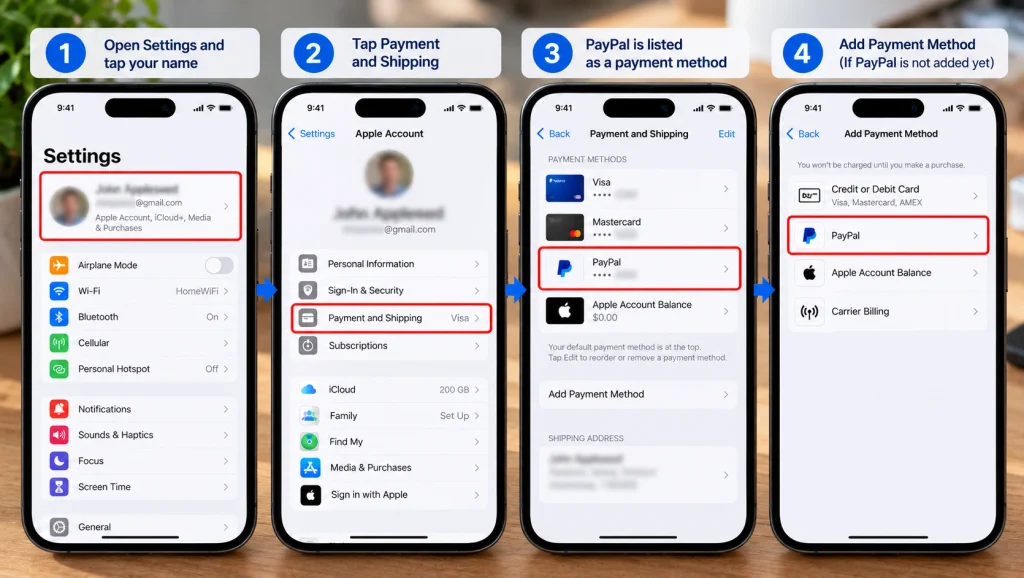
This needs no card at all. PayPal becomes the payment method for App Store purchases, iCloud storage, Apple Music, Apple TV+ and other Apple subscriptions. Apple lists PayPal as an Apple Account payment method, so the charge runs against your PayPal balance or its linked funding source rather than a card in Wallet.
To set it up, open Settings, tap your name, then Payment and Shipping, then Add Payment Method, and choose PayPal. You sign in to PayPal to confirm. Apple notes you “might be asked to verify your account with the payment method provider”.
Tap to pay without a card in Wallet
In Germany the PayPal app handles contactless payment itself, with no card in Wallet and no Apple Pay. That section is below. Outside Germany this is not yet an option.
How to integrate Apple Pay with PayPal without credit card
If the objection is specifically to a credit card, the PayPal Debit Mastercard solves it. It draws on your PayPal balance rather than a credit line, so no credit application and no interest. It still counts as a card in Wallet, which is unavoidable, but it is not a credit card.
What will not work
Linking a PayPal account directly to Wallet. Adding PayPal as a “pass” rather than a card. Using a PayPal account number in the add-card flow. None of these exist. There is no PayPal entry in the Wallet add-card list to find, in any region.
How to Pay With PayPal via Apple Pay
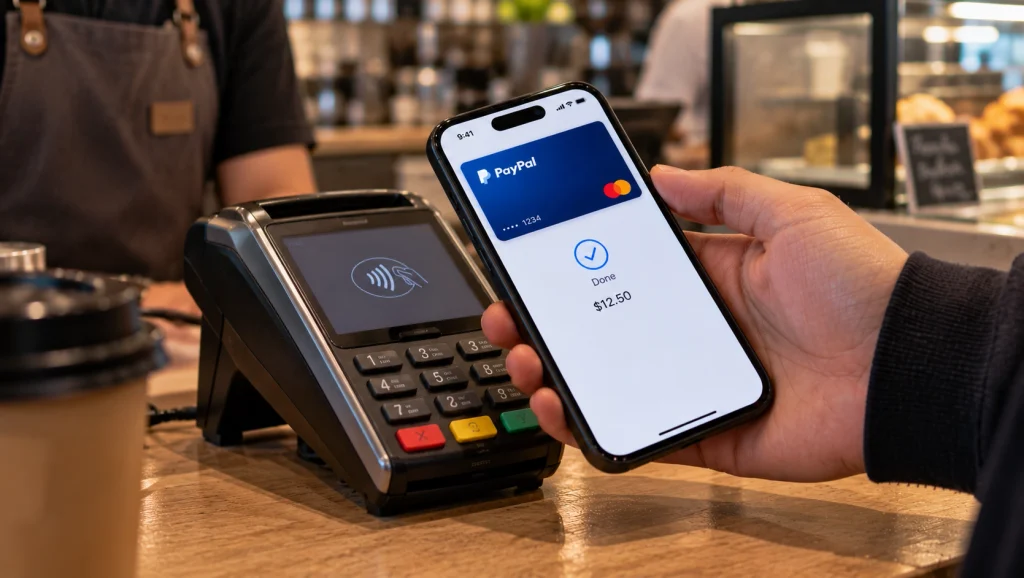
Once a PayPal card sits in Wallet, paying works exactly like any other Apple Pay transaction. Double-click the side button, authenticate with Face ID or Touch ID, and hold the phone to the terminal. The money leaves your PayPal balance if you used the debit card, or your credit line if you used one of the Mastercards.
Choosing the PayPal card at the till
This is where I get the most follow-up messages. If you hold several cards in Wallet, the default is whichever you set as default, not whichever you used last. Change it in Settings under Wallet and Apple Pay, or swipe to the PayPal card before tapping. Paying with the wrong card is the most common complaint after setup and it is a default-card problem rather than a PayPal one.
What you earn paying this way
PayPal states that the PayPal Debit Card offers “5% back on up to $1,000 of selected category spend per month earned as points redeemable for multiple options”, with terms applying. That is a concrete reason to route spending through the card rather than a plain bank card, and it survives being spent through Apple Pay.
Online and in-app payments
The card works wherever Apple Pay is accepted online and in apps, not only at physical terminals. For merchants that accept PayPal checkout directly, paying with PayPal rather than through Apple Pay usually keeps buyer protection simpler, so the card is for places that take Apple Pay but not PayPal.
Why PayPal Isn’t Working With Apple Pay
Four documented causes, in the order I check them. In my own experience the first two account for almost every case, and the fourth only comes up with clients who have been reading about the European app route.
Why can’t I add PayPal to Apple Wallet
Because Wallet has no PayPal option to find. It accepts cards, so the thing to add is a PayPal card rather than the account. If you are holding an eligible card and it still refuses, work through the four causes below in order.
The card is not one of the five eligible ones
Only the cards PayPal names are addable. A PayPal account, a virtual card number generated for a single purchase, or a card that has been replaced after loss will not add. Confirm which card you are holding before troubleshooting anything else.
The device is not supported
PayPal states the feature is “Not available on all devices”. Older hardware, or a region where the card product is not offered, will refuse the add. Apple’s own compatibility list is the reference here rather than the PayPal app.
The card is not activated or the balance is empty
This one has caught me out personally. A debit card that has arrived but not been activated will not authorise. Neither will a card drawing on an empty PayPal balance, which produces a decline at the terminal rather than an error when adding. Check the balance before assuming the Wallet integration broke.
Apple Watch is a known gap for the European app route
The PayPal app’s contactless feature does not work on Apple Watch, because Apple has not been required to open NFC access there. A PayPal card in Wallet does work on Watch, so the limitation applies to the app route rather than the card route. Decline patterns that look specific to the card itself are often the same underlying issues our guide to why PayPal instant transfer stops working covers for transfers.
How to Transfer Money From Apple Pay to PayPal
This is the reverse of the question and it has a stricter answer. Apple Cash, the balance behind person-to-person Apple Pay payments, can be moved to exactly two destinations. Apple names a bank account and an eligible debit card. PayPal is not a destination.
| Route | Fee | Timing |
|---|---|---|
| Apple Cash to a US bank account | No fee | Most complete within 1 to 3 business days |
| Apple Cash to an eligible debit card | 1.7%, minimum $0.25, maximum $25 | Immediate, up to 30 minutes |
Apple Cash transfer options as published by Apple, which lists limits of up to $10,000 per transfer and $20,000 in a seven-day period.
Why there is no card-free route
Both destinations are a card or a bank account, so “transfer from Apple Pay to PayPal without a card” has no path that avoids both. With a debit card you can run Apple Cash onto the card and then add money to PayPal from it, since PayPal accepts a linked Visa or Mastercard debit card as a funding source. That is two steps and a 1.7% fee if you use Instant Transfer.
The cheaper version of the same thing
Use the free standard transfer to a bank account and wait the 1 to 3 business days, then move the money into PayPal from there. The 1.7% only buys speed, which is the same trade Venmo and PayPal apply to their own instant transfers (our Venmo vs PayPal comparison lists both). The fee logic across all of these is covered in our guide to avoiding PayPal fees.
If you have no bank account at all
The constraint is real and the workarounds are limited. Our guide to verifying PayPal without a bank account covers what PayPal will accept in place of one, and which stores handle PayPal cash covers the retail route for getting money in and out.
PayPal Tap to Pay on iPhone Without Apple Pay
Germany got something no other market has. PayPal’s own app pays contactless at the terminal, with no card in Wallet and no Apple Pay in the transaction. PayPal announced it as being “available to PayPal consumers in Germany before anywhere else in the world”.
How it works
You tap your phone at any terminal accepting Mastercard contactless and choose PayPal to pay, from within the PayPal app on iOS or Android. The capability exists on iPhone because the EU Digital Markets Act required Apple to open NFC access to third-party wallet apps across the European Economic Area.
What it adds that Apple Pay does not
PayPal says that once offers are activated in the app, “users will earn cashback when they pay contactless with the PayPal App” at participating stores. It also brings instalments in store through PayPal Ratenzahlung To Go, letting a purchase be spread over 3, 6, 12 or 24 months.
Why it is not in the US
The NFC opening came from European regulation rather than a commercial decision, so it applies in the European Economic Area and not in the United States. Unless comparable rules arrive, US users stay on the card-in-Wallet route.
Where PayPal Works With Your Apple Account
The card route depends on holding a PayPal card in your country. The Apple Account route depends on Apple supporting PayPal in your region, and Apple publishes that list.
Apple lists PayPal as an Apple Account payment method in Australia, Austria, Belgium, Canada, Finland, France, Germany, Greece, Ireland, Israel, Italy, Luxembourg, Mexico, the Netherlands, Portugal, Spain, the United Kingdom and the United States.
What this list does and does not tell you
It covers paying Apple for Apple things. It says nothing about Apple Pay at a shop till, which depends on the card rather than the account. A country can appear on this list and still have no PayPal card available, in which case App Store purchases work through PayPal and in-store Apple Pay does not.
Checking before you plan around it
Open Settings, tap your name, then Payment and Shipping, then Add Payment Method. If PayPal appears as an option, your region supports it. That check takes ten seconds and beats reading a list.
Frequently Asked Questions
Can I integrate PayPal with Apple Pay?
Not as an account. Apple Pay holds cards, and a PayPal account is not a card. You can add one of five PayPal cards to Wallet, most commonly the PayPal Debit Mastercard, which spends your PayPal balance through Apple Pay. For Apple’s own charges such as iCloud and the App Store, you can add PayPal to your Apple Account with no card involved.
Can I connect my Apple Pay to my PayPal account?
Not in that direction. There is no setting in either app that links an Apple Pay wallet to a PayPal account. The connection happens through a card: a PayPal card sits in Wallet and draws on your PayPal balance or credit line. Apple Cash, separately, cannot be sent to PayPal at all.
Why isn’t PayPal working with Apple Pay?
Usually the card is not one of the five eligible PayPal cards, or the device is not supported, since PayPal states the feature is not available on all devices. An unactivated card or an empty PayPal balance produces a decline rather than an add error. The PayPal app’s contactless feature also does not work on Apple Watch.
How do I pay with PayPal via Apple Pay?
Add a PayPal card to Wallet, then pay as you would with any Apple Pay card: double-click the side button, authenticate with Face ID or Touch ID, and hold the phone to the terminal. If you hold several cards, set the PayPal card as default in Settings under Wallet and Apple Pay, or swipe to it before tapping.
How do I integrate Apple Pay with PayPal without a card?
For Apple’s own charges, add PayPal to your Apple Account under Settings, your name, Payment and Shipping. No card is needed and it covers the App Store, iCloud, Apple Music and other subscriptions. For tapping at a shop till, a card in Wallet is required everywhere except Germany, where the PayPal app pays contactless by itself.
How do I add PayPal to Apple Wallet without a card?
You cannot. Wallet needs a card number to tokenise, so there is no card-free way to put PayPal into Wallet specifically. The card-free alternatives are the Apple Account payment method for Apple charges, and the PayPal app’s own contactless payment if you are in Germany.
Which PayPal cards can I add to Apple Pay?
PayPal names five: the PayPal Debit Mastercard, the PayPal Business Debit Mastercard, the PayPal Cashback Mastercard, the PayPal Extras Mastercard and the PayPal Credit Card. The three credit products are issued by Synchrony Bank. The debit cards spend your PayPal balance, the others draw on a credit line.
Can I add PayPal Credit to Apple Pay?
Yes. The PayPal Credit Card is one of the five cards PayPal lists as eligible for Apple Pay, Google Pay and Samsung Pay. It is issued by Synchrony Bank, so adding it behaves like adding any other Synchrony card rather than linking a PayPal account.
How do I transfer money from Apple Pay to PayPal without a card?
There is no route that avoids both a card and a bank account. Apple Cash transfers only to a US bank account, free within 1 to 3 business days, or to an eligible debit card for 1.7% with a $0.25 minimum and $25 maximum. From either destination you can then move the money into PayPal.
Is the PayPal Cash Card the same as the PayPal Debit Card?
They refer to the same kind of product, but PayPal’s current documentation uses PayPal Debit Mastercard rather than PayPal Cash Card. Guides still naming the Cash Card are using a retired name. Search for the debit card in the PayPal app rather than the older term.
Can you tap to pay with PayPal on iPhone?
In Germany, yes, through the PayPal app at any terminal accepting Mastercard contactless, with no Apple Pay involved. PayPal launched it there before anywhere else in the world, enabled by the EU Digital Markets Act opening iPhone NFC access. Elsewhere, tapping with PayPal money means a PayPal card in Wallet.
Does adding PayPal to Apple Pay cost anything?
PayPal’s page for adding its debit card to Wallet lists no fee for doing so, and Apple Pay itself adds no fee to a transaction. Costs appear elsewhere: Apple Cash Instant Transfer charges 1.7%, and the credit-based PayPal cards carry their own issuer terms from Synchrony Bank.
Conclusion
Adding PayPal to Apple Pay comes down to accepting that Apple Pay wants a card and PayPal is an account. Put a PayPal card in Wallet, most usefully the PayPal Debit Mastercard, and your PayPal balance becomes spendable at any Apple Pay terminal, with 5% back on up to $1,000 of selected category spend each month going some way to justifying the extra setup.
My client was not missing a step. He was looking for an option that has never existed in any country, and twenty minutes of searching was never going to produce it. If the goal is paying Apple rather than a shop, the Apple Account route handles it with no card at all, in eighteen countries. If you are in Germany, the PayPal app now taps to pay without Apple Pay, with cashback and in-store instalments attached. Going the other way, from Apple Cash into PayPal, needs a bank account or a debit card, and there is no way around that pair.
Which of the three are you actually trying to do, pay a shop, pay Apple, or get Apple Cash into PayPal?