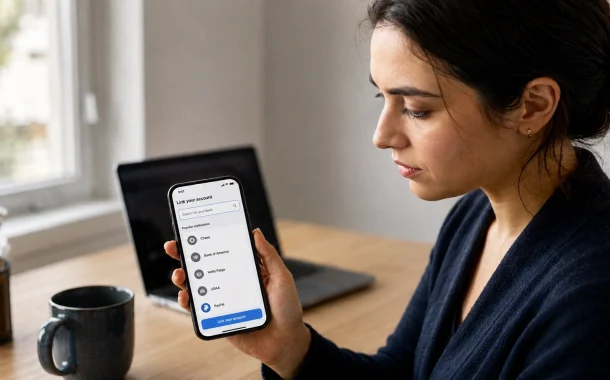
This guide answers the question the way a person actually hits it. It starts with whether PayPal is on Plaid at all, then shows what a legitimate connection screen looks like, which apps put PayPal in the picker, what Plaid can read once you approve access, and what to do when the link fails. You will also see how to cut the connection off later, which is the part nobody writes about and the part you are most likely to need six months from now.
To connect PayPal to Plaid, open the app you want to link, choose Add account, and search for PayPal in Plaid’s institution list. Plaid sends you to a PayPal-owned login page to approve access. Confirm the address bar shows paypal.com before entering anything. After you approve, transactions sync back into the app within minutes.
Table of Contents
Is PayPal on Plaid?
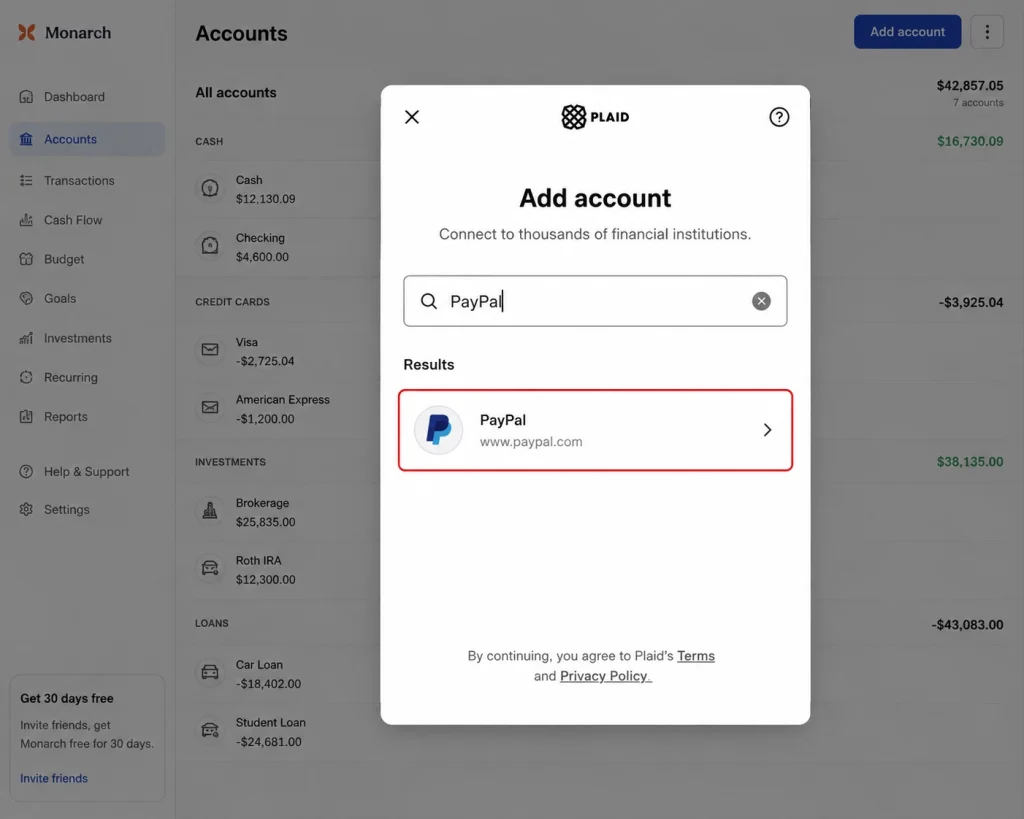
Yes, PayPal is on Plaid. PayPal sits in Plaid’s institution list, so any app built on Plaid can read your PayPal balance and transaction history once you approve access. Plaid connects to more than 12,000 institutions and PayPal is one of them. Whether you see it depends on your app, because each app picks which institutions to show.
That last point causes most of the confusion. Plaid supporting PayPal and your specific app supporting PayPal are two different things. A budgeting app can run on Plaid and still leave PayPal out of its picker, usually because the app only requests checking, savings, and card data.
What bank is PayPal on Plaid?
You do not pick a bank. In the Plaid picker you search PayPal itself, not the bank holding PayPal’s deposits. PayPal is not a chartered bank, so its balances sit with partner banks, and that is why the picker often files PayPal under payment services rather than banks.
The bank name only matters in a different situation. If a direct deposit or ACH form is asking for a routing number instead of a login, Plaid is not the tool you need. Read which bank PayPal actually uses for the name and numbers that form is asking for.
Personal and business accounts behave differently
Personal PayPal accounts connect more predictably. Business accounts sometimes hit extra verification, and some apps decline them outright because the data model is different. Multi-user business accounts add another wrinkle, since the person approving the Plaid connection needs full account permissions, not a limited role.
How to Connect PayPal to Plaid, Step by Step
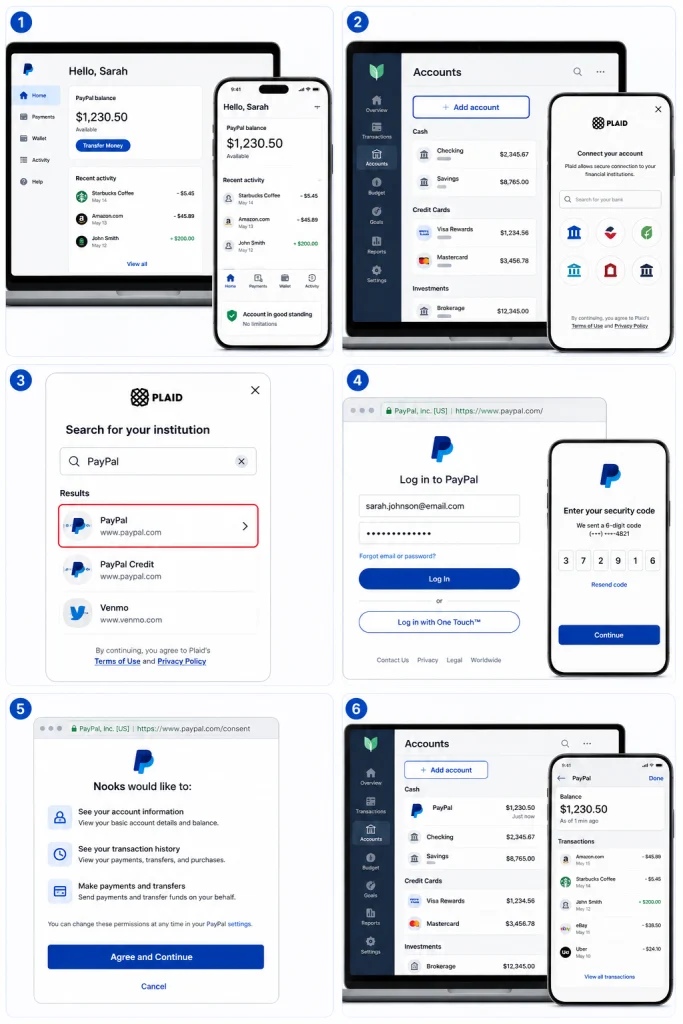
Start inside the app you want to feed data into, never inside Plaid. Plaid has no consumer signup and no dashboard where you add accounts. You open your budgeting or accounting app, choose to add an account, search PayPal, and approve access on a PayPal-owned page. The whole flow takes about two minutes when nothing goes wrong.
Step 1: Confirm your PayPal account is in good standing
Log into PayPal first and check for notices. A limitation, an unverified email, or a pending identity review will stop the link cold. If PayPal is asking you to prove who you are, clear that first. Our walkthrough on how to confirm your identity on PayPal covers the documents PayPal accepts and how long review takes.
Step 2: Open the linking screen in your app
Look for Add account, Link account, or Connect a bank. The wording changes by app. When the Plaid interface loads, you will see Plaid’s name and a search field. This is the institution picker.
Step 3: Search for PayPal in the picker
Type PayPal. If it does not appear, stop here. Do not pick a similarly named result. A missing PayPal entry means your app has not enabled it, and no amount of retrying will change that. Skip to the app table below.
Step 4: Approve access on PayPal’s page, not Plaid’s
This is the step that matters most for your security. Plaid should hand you off to a PayPal-controlled login screen. Before you type anything, read the address bar. It should show paypal.com. If a screen asks for your PayPal email and password while the address bar shows any other domain, close it.
You will then complete PayPal’s own two-factor prompt. If you have not switched that on, do it before you connect anything. Our guide to turning on PayPal two-factor authentication walks through the setup in the current PayPal interface.
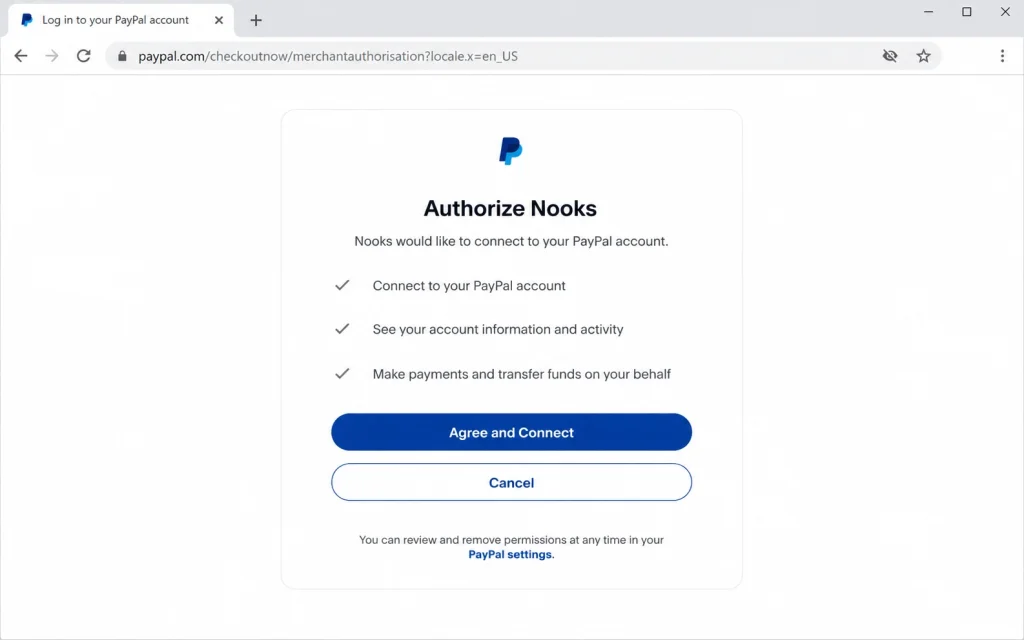
Step 5: Approve the permission scope
PayPal shows you what the app is asking for. Read it. Most requests cover account details, balance, and transaction history. Approve, and Plaid passes a token back to your app. You never hand your password to the app itself.
Step 6: Check the data landed
Go back to your app and open the accounts list. PayPal should show a balance and a first batch of transactions. Most apps backfill somewhere between 30 days and 24 months of history depending on what they requested. If the balance shows but transactions do not, give it an hour before you assume something broke.
Which Apps Let You Link PayPal Through Plaid
App support drives whether this works at all, so check your app before you troubleshoot anything else. The apps below all use Plaid for account linking. PayPal availability inside each picker varies by app and by account type, and apps change what they expose without announcing it.
| App | What it is for | Where to check for PayPal |
|---|---|---|
| Monarch Money | Full budgeting and net worth tracking | Accounts, then Add account, search PayPal |
| Rocket Money | Subscription tracking and bill negotiation | Accounts tab, Link account |
| Copilot Money | iOS budgeting with detailed categorization | Settings, Accounts, Add |
| YNAB | Zero-based budgeting | Add Account, then Linked |
| QuickBooks Online | Small business bookkeeping | Banking, then Link account |
| Empower | Net worth and investment tracking | Link account, search PayPal |
The fastest test takes fifteen seconds. Open the picker, type PayPal, and see what comes back. If nothing does, your app has not enabled it and support tickets will not change that today.
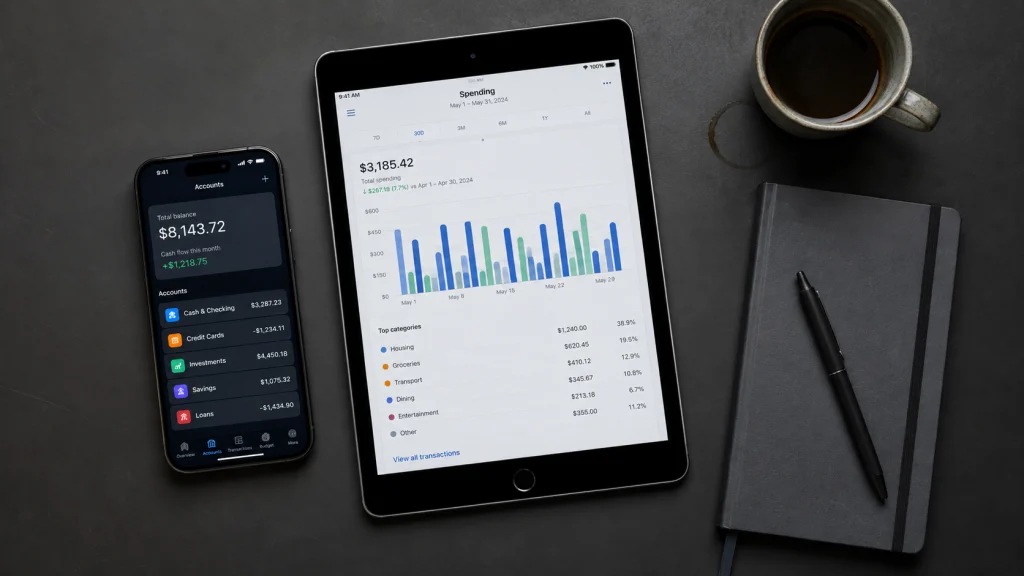
What to do when your app does not list PayPal
You have three workable options. Pick a different app that does list it. Export your data manually, which is straightforward once you know how to download your PayPal transaction history as a CSV. Or connect the bank account behind PayPal instead, which captures your transfers in and out but not individual PayPal transactions.
What Plaid Can and Cannot See in Your PayPal Account
Plaid reads. It does not move money on its own. When you approve a PayPal connection, you grant read access to balance and transaction data, scoped to what the app requested. Plaid cannot send a payment from your PayPal balance, change your settings, or add a funding source. Payment initiation is a separate product with a separate consent screen.
Here is the practical split.
| Plaid can access | Plaid cannot do |
|---|---|
| Current PayPal balance | Send or withdraw your money |
| Transaction history within the approved window | Change your PayPal password or settings |
| Account name and type | Add or remove funding sources |
| PayPal Credit balances, when the app requests liabilities data | Approve transactions on your behalf |
PayPal Credit is worth calling out separately. Plaid treats it as a credit account with a PayPal subtype, so a connection built for checking data will not return it. If your card balance matters to your budget, check whether your app requests liabilities at all, and read how PayPal Credit works before you rely on those numbers for a payoff plan.
Your data rights are less settled than they look
Most guides tell you open banking gives you a legal right to share your financial data. In 2026, that is only half true in the United States. The CFPB finalized its Section 1033 rule in October 2024 with compliance starting April 2026, but as the Congressional Research Service records, the rule is now the subject of litigation and reconsideration by new CFPB leadership (Congressional Research Service, IF13117, 2026). A federal court enjoined enforcement.
What that means for you is simple. Your PayPal connection works because PayPal chooses to support it, not because a rule currently forces it to. Treat access as a feature that could change, and keep your own exports.
Why Your PayPal to Plaid Connection Failed
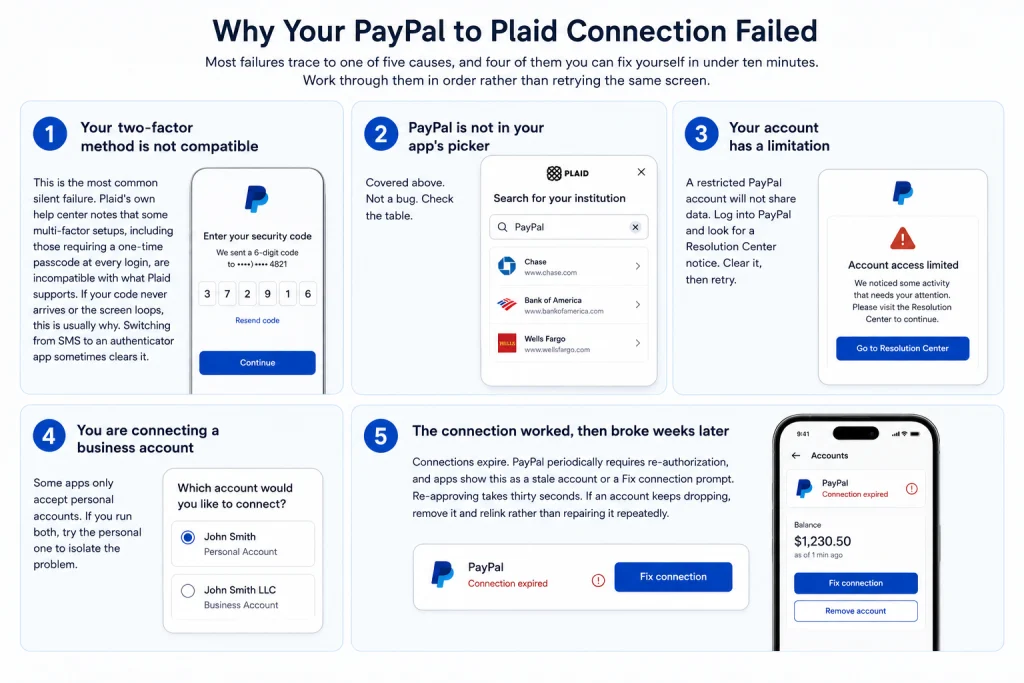
Most failures trace to one of five causes, and four of them you can fix yourself in under ten minutes. Work through them in order rather than retrying the same screen. Repeated failed attempts can trigger a temporary PayPal security hold, which turns a five-minute problem into a two-day one.
Your two-factor method is not compatible
This is the most common silent failure. Plaid’s own consumer help center notes that some multi-factor setups, including those requiring a one-time passcode at every login, are incompatible with what Plaid supports (Plaid Consumer Help Center). If your code never arrives or the screen loops, this is usually why. Switching from SMS to an authenticator app sometimes clears it.
PayPal is not in your app’s picker
Covered above. Not a bug. Check the table.
Your account has a limitation
A restricted PayPal account will not share data. Log into PayPal and look for a Resolution Center notice. Clear it, then retry.
You are connecting a business account
Some apps only accept personal accounts. If you run both, try the personal one to isolate the problem.
The connection worked, then broke weeks later
Connections expire. PayPal periodically requires re-authorization, and apps show this as a stale account or a Fix connection prompt. Re-approving takes thirty seconds. If an account keeps dropping, remove it and relink rather than repairing it repeatedly.
How to Disconnect PayPal From Plaid
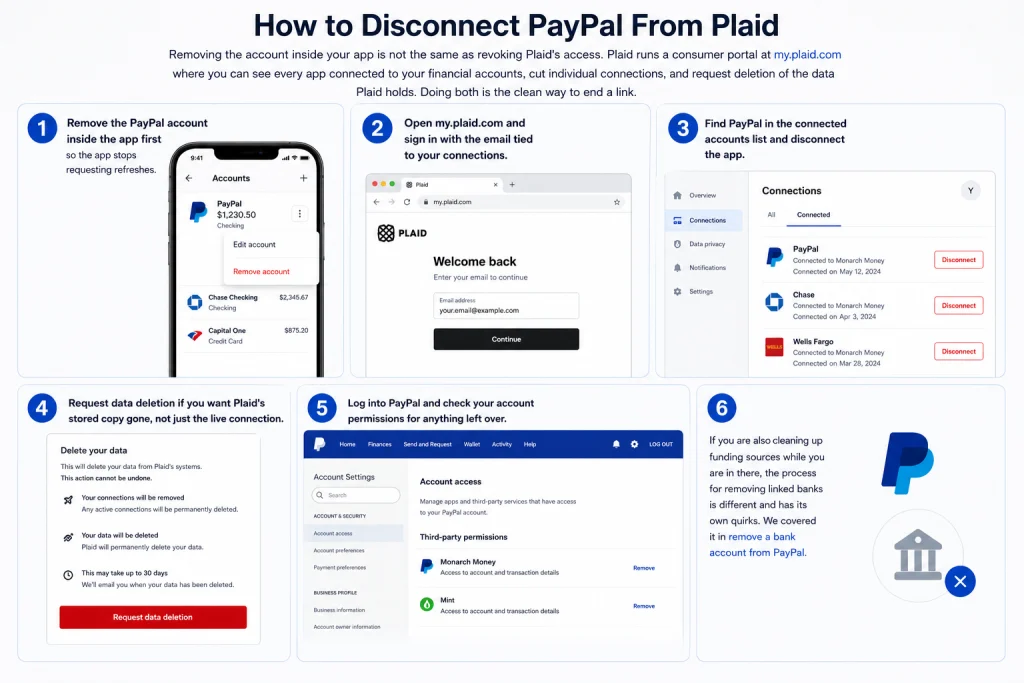
Removing the account inside your app is not the same as revoking Plaid’s access. Plaid runs a consumer portal at my.plaid.com where you can see every app connected to your financial accounts, cut individual connections, and request deletion of the data Plaid holds. Doing both is the clean way to end a link.
Do it in this order.
- Remove the PayPal account inside the app first, so the app stops requesting refreshes.
- Open my.plaid.com and sign in with the email tied to your connections.
- Find PayPal in the connected accounts list and disconnect the app.
- Request data deletion if you want Plaid’s stored copy gone, not just the live connection.
- Log into PayPal and check your account permissions for anything left over.
If you are also cleaning up funding sources while you are in there, the process for removing linked banks is different and has its own quirks. We covered it in remove a bank account from PayPal.
Connecting PayPal to Plaid as a Developer
If you are building the integration rather than using one, PayPal behaves like any other OAuth institution in Plaid Link, with one detail that catches teams out. PayPal Credit is returned as a credit account with the subtype paypal, so a Link token requesting only transactions will not surface it.
Plaid’s error documentation is explicit that the account types supported for the Liabilities product include credit accounts with the credit card or paypal subtype, and that users connecting through OAuth institutions must consent to sharing those specific account details (Plaid Docs, Item errors). If your users report missing PayPal Credit balances, check your products array before you file a support ticket.
On PayPal’s side, third-party account access runs through its REST stack rather than a separate open banking gateway. PayPal documents this under its PSD2 guidance, where it describes enabling access-to-account use cases for third-party providers through the same APIs that power its own consumer and merchant experiences (PayPal Developer, PSD2 compliance).
# Request liabilities so PayPal Credit accounts are returned
products = ["transactions", "liabilities"]
When Plaid Is the Wrong Tool for PayPal Data
Plaid is the right answer for a consumer who wants PayPal inside a budgeting app. It is often the wrong answer for a business reconciling PayPal revenue, and that distinction saves real money.
A client of ours ran a Shopify store with PayPal as a secondary checkout option. They connected PayPal to their accounting app through a Plaid-style aggregation and spent months reconciling by hand, because the feed showed net deposits rather than gross sale minus fee. Their bookkeeper was manually splitting every line. Switching to the native PayPal connector inside the accounting platform returned fee data as its own line item, and the monthly close dropped from most of a day to about an hour.
The rule of thumb is short. Aggregation feeds tell you what landed. Native connectors tell you what happened. If fees matter to your books, you want the second one. If you are still choosing a processor and fees are the deciding factor, see how Stripe and PayPal fees compare before you build any reporting around it.
Frequently Asked Questions
Is it safe to connect PayPal to Plaid?
It is reasonably safe when the flow is correct. Plaid receives a token, not your password, and the app you are linking never sees your credentials. The risk sits in the handoff. If any screen asks for your PayPal password on a domain that is not paypal.com, close it. Turn on two-factor authentication before you connect anything, and review your connections at my.plaid.com every few months.
Is PayPal on Plaid for business accounts too?
PayPal is on Plaid for both account types, but business accounts are less reliable in practice. Some consumer budgeting apps accept personal accounts only, and business connections can trigger extra verification. On multi-user business accounts, the person approving needs full permissions rather than a limited role. If a business account fails, test with a personal one to find out whether the block is the app or the account.
Why is PayPal not showing up in Plaid?
Almost always because your app has not enabled PayPal in its institution picker, not because Plaid dropped support. Each app chooses which institutions to expose based on the data it requests. Search PayPal in the picker once. If nothing returns, that app will not link it today, and retrying will not help. Use a different app or export your transactions manually instead.
Can Plaid take money from my PayPal account?
No. A standard Plaid connection grants read access to balance and transaction data. Moving money requires payment initiation, which is a separate Plaid product with its own consent screen that clearly states a payment is being authorized. If a screen mentions initiating transfers and you only wanted to see your transactions, do not approve it.
Do I need a PayPal Business account?
Usually not. Personal accounts connect more reliably than business ones in most consumer budgeting apps. Some apps restrict linking to personal accounts entirely. Business accounts can hit extra verification, and on multi-user accounts the person approving needs full permissions rather than a limited role. If both fail, try the personal account first to narrow down where the problem sits.
How long does PayPal transaction history take to sync?
Balance usually appears within a minute. Transactions often take longer, sometimes an hour, and the backfill window depends on what your app requested. Some pull 30 days, some pull up to 24 months. If the balance shows but transactions are empty after a few hours, disconnect and relink rather than waiting longer.
Does connecting PayPal to Plaid cost anything?
Not for you. Plaid charges the apps that use it, not consumers. If an app charges for account linking, that is the app’s pricing decision. Both my.plaid.com and the disconnection process are free. Be cautious about any site charging a fee to connect PayPal to Plaid, because no such fee exists on the consumer side.
Can I connect PayPal to Plaid outside the United States?
Coverage varies by country and by app. Plaid’s institution coverage is deepest in the US, Canada, and parts of Europe, and PayPal availability inside the picker is not uniform across those markets. If you are outside the US and PayPal does not appear, that is likely a coverage limitation rather than an account problem, and there is no setting that fixes it.
Why did my PayPal connection stop working?
Connections expire by design. PayPal periodically requires re-authorization, and apps surface this as a stale balance or a Fix connection prompt. Re-approving takes under a minute. If the same account keeps dropping every few weeks, remove it entirely and relink from scratch, which usually clears a broken token more reliably than repairing it.
Does Plaid work with PayPal Credit?
Sometimes. Plaid classifies PayPal Credit as a credit account with a PayPal subtype, which means it is only returned when the app requests liabilities data. Most budgeting apps request transactions and balances only, so your PayPal Credit balance will not appear. That is an app configuration limit, not something you can change from your side.
Wrapping Up
Back to that pause on the login screen. It was the right one. The single most useful thing you can take from this guide is that a legitimate PayPal to Plaid connection always sends you to paypal.com to approve access, and anything else deserves a closed tab.
Everything after that is mechanical. Check that PayPal is in your app’s picker before you troubleshoot anything else, since a missing entry is an app decision you cannot override. Turn on two-factor authentication first. Read the permission scope instead of tapping through it. And bookmark my.plaid.com, because the connection you set up today is one you will eventually want to end, and most people never find out where that switch lives.
The wider question is worth sitting with. Your PayPal data flows to these apps because PayPal currently chooses to allow it, not because anything guarantees it. If that access narrowed tomorrow, how much of your financial picture would you lose?