What makes this hard to diagnose is that PayPal rarely tells you which one applies. The option vanishes with no message, or the transfer fails with wording vague enough to fit three causes at once. Worse, most guides on this topic still say instant transfer only works to a debit card. That stopped being true in 2019. This guide covers what PayPal actually charges in 2026, the exact error messages and what each one means, the six real causes in the order worth checking, and when the problem is on PayPal’s side so you know to wait rather than keep retrying.
PayPal instant transfer fails most often because the chosen bank account or debit card cannot receive instant payments. Switch to an eligible Visa, Mastercard or Discover debit card, or an eligible bank account. Other causes are account limitations, exceeding your weekly limit, and PayPal’s real-time risk checks. The fee is 1.75%, minimum $0.25, maximum $25.00.
Table of Contents
What PayPal Instant Transfer Costs in 2026
Instant Transfer costs 1.75% of the amount you move, with a minimum fee of $0.25 and a maximum of $25.00, to either a bank account or a debit card (PayPal fees, checked October 2026). Standard transfers remain free. If you have read elsewhere that the fee is 1% capped at $10, that figure is out of date.
Where the cap actually bites
The $25 ceiling is reached at $1,428.57. Below that you pay the percentage; above it the fee stops growing, which makes instant transfer proportionally cheaper on large amounts and expensive on medium ones.
| Amount transferred | Instant Transfer fee | Effective rate |
|---|---|---|
| $50 | $0.88 | 1.75% |
| $100 | $1.75 | 1.75% |
| $500 | $8.75 | 1.75% |
| $1,000 | $17.50 | 1.75% |
| $1,428.57 | $25.00 | 1.75%, cap reached |
| $5,000 | $25.00 | 0.50% |
| $10,000 | $25.00 | 0.25% |
Fee verified against PayPal’s published US fee page, October 2026.
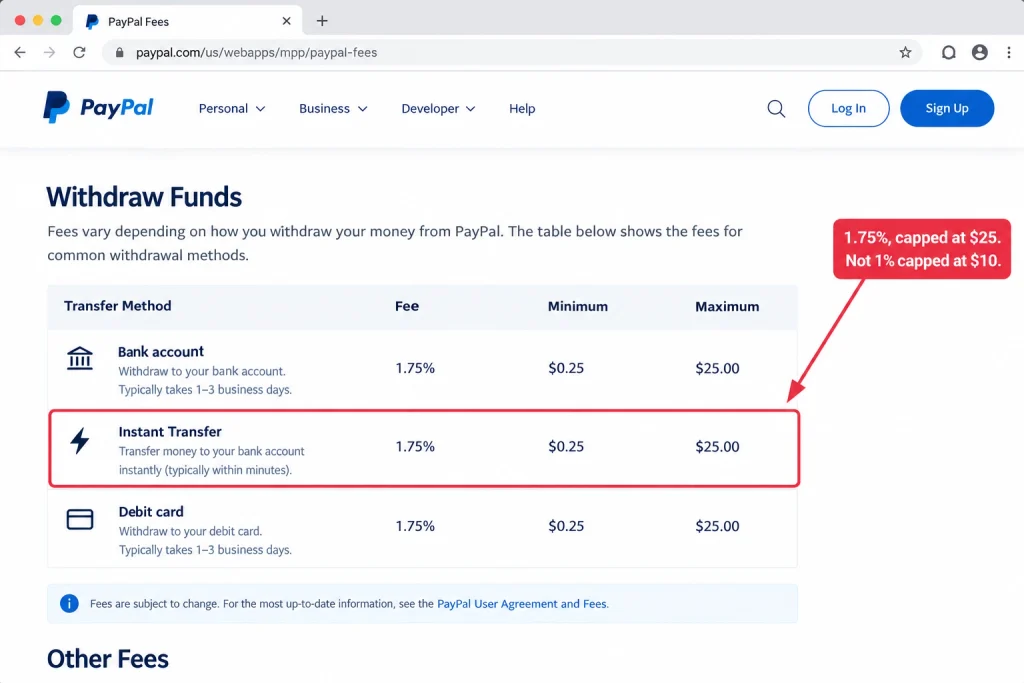
The practical read: on anything under about $1,400 you are paying a real percentage for speed. On $200, waiting one to three business days saves you $3.50. Whether that is worth it is your call, but it is worth making deliberately rather than clicking the top option. If fees across your whole PayPal account are the concern rather than this one transfer, we cover the full picture in how to avoid PayPal fees when receiving money.
How PayPal Instant Transfer Works and Why It Fails
Instant Transfer sends money over real-time payment rails rather than the ACH network that standard transfers use. Two different rails exist: bank transfers run on The Clearing House’s Real Time Payments network, and debit card transfers run on Visa and Mastercard push-to-card networks. Both settle in minutes. Both depend on your receiving institution participating.
The misconception that sends people down the wrong path
A lot of advice insists instant transfer only works to a debit card and that the first fix is always to link one. That has been wrong since March 2019, when PayPal added Instant Transfer to bank through an expanded partnership with JPMorgan Chase that gave it access to the RTP network.
Today PayPal’s own help pages list Instant Transfer for both destinations. Its fee schedule prices Instant Transfer to bank account and Instant Transfer to debit card identically at 1.75%. So if instant transfer is missing on your account, adding a debit card is one possible fix rather than the fix.
What must be true for the option to appear
Three things have to line up at once, which is why failures feel inconsistent.
- Your PayPal account is in good standing, with no active limitation.
- The specific destination you selected can receive instant payments.
- PayPal’s real-time risk check clears this particular transfer.
Any one of these can block the instant option while the other two are fine. The same account can transfer instantly on Monday and not on Tuesday without anything changing on your side.
The Error Messages and What Each One Means
PayPal publishes the exact wording of its transfer errors, and each phrase points at a different cause. Matching the message you see to this list is faster than working through every possible fix. If you see no message at all and the option is simply absent, that points to the destination rather than the account.
Match your message
| What you see | What it means | Where to go |
|---|---|---|
| “You’re transferring more than your weekly limit allows. Try a smaller amount.” | The amount exceeds your weekly transfer limit | Reason 4 |
| “We’re not able to complete this transaction at the moment.” | An account limitation is blocking the transfer | Reason 3 |
| “We can’t complete this transaction right now.” | Same cause as above, different wording | Reason 3 |
| Instant transfer option is missing entirely, no error | Your card or bank cannot process instant transfers | Reason 1 |
| Bank details do not match our records | The details you entered do not match the bank’s | Reason 2 |
| Transfer shows as “Pending” | Not an error. PayPal is reviewing it | Wait, see below |
Error wording from PayPal’s help article on transfer error messages, checked October 2026.
Pending is not failure. PayPal states plainly that a pending transfer usually just needs more time for internal review. Cancelling and retrying a pending transfer is the most common way people turn a slow transfer into a genuinely stuck one.
1. Your Destination Cannot Receive Instant Transfers
If the instant option is missing with no error message at all, the destination you chose almost certainly cannot receive a real-time payment. This is the single most common cause and the fastest to test, because switching destination takes under a minute.
Eligible debit cards
PayPal supports instant transfers to an eligible Visa, Mastercard or Discover debit card. Discover is frequently left off lists like this one, so check it before assuming your card is ineligible. American Express debit cards and most prepaid cards are not supported.
Standard transfers to a debit card are Visa only and take roughly 48 hours, which catches people out: the card works for one transfer type and not the other.
Eligible bank accounts
Not every US bank participates in the RTP network. Larger banks generally do. Smaller banks, some credit unions, and certain online-only accounts may not, and PayPal gives no warning before you try.
The test is quick. If instant is missing on your bank account, try a debit card. If it is missing on your card, try a bank account. One of the two usually works, and that tells you where the restriction sits without calling anyone. If you have neither linked yet, verifying PayPal without a bank account covers the alternatives.
2. Your Card Is Expired, Unverified, or Mismatched
A card that appears in your wallet is not necessarily usable. Expired cards often stay listed without a prominent warning, and a card that failed verification will block instant transfer while still showing in your linked methods. Mismatched bank details produce the same result on the bank side.
What to check
Open Money, Banks and Cards on desktop, or Wallet in the app. Look for a Verify prompt or a flag next to each method. Remove anything expired and add the current card with its new expiry date, rather than editing the old entry.
For a verification error, PayPal may have placed a small temporary authorisation on the card that needs confirming, or your issuer may have declined that authorisation outright. For a bank account showing a details mismatch, PayPal’s guidance is to remove the account and link it again rather than editing it in place.
Card issues are also worth ruling out before you assume the problem is your account, because a single expired card produces symptoms that look exactly like a limitation. If you are waiting on a replacement card, getting a PayPal card in the mail covers the delivery timeline.
3. An Account Limitation Is Blocking the Transfer
If you see “We’re not able to complete this transaction at the moment” or “We can’t complete this transaction right now”, PayPal has placed a limitation on your account. Limitations restrict transfers as part of a broader restriction, and no amount of retrying will clear one.
Finding and clearing it
Log in and look for a notification banner on the account summary, or go to Account Settings, then Account Limitations. PayPal lists the specific steps to lift it, which usually means submitting identity documents, confirming a bank account, or resolving a disputed transaction.
Limitations are triggered by unusual activity, incomplete identity verification, a returned bank payment, or a transaction under review. Complete the steps PayPal names, and instant transfer typically returns within one to two business days of the limitation clearing.
A limitation that escalates to a permanent one is a different and harder situation, covered in how to reopen a closed PayPal account.
4. The Amount Exceeds a Transfer Limit
The message “You’re transferring more than your weekly limit allows. Try a smaller amount.” means exactly what it says, and PayPal’s own fix is to send less. Limits differ by destination, and the card limits are much lower than the bank limits, which surprises people moving larger sums.
Approximate limits by destination
| Destination | Per transaction | Per day | Per week | Per month |
|---|---|---|---|---|
| Debit card | $5,000 | $5,000 | $5,000 | $15,000 |
| Bank account | $25,000 | Not published | Not published | Not published |
Figures as commonly reported for US accounts. PayPal does not publish a single limits table, and your account’s limits depend on verification status and history, so treat these as indicative and check your own transfer screen.
Two practical moves. Split a large transfer into smaller ones across the week, or switch from a card to a bank account, where the per-transaction ceiling is five times higher. Completing PayPal’s identity verification raises limits on unverified accounts, and that is worth doing once rather than working around repeatedly. For the sending side of this question, see how much you can send on PayPal.
5. PayPal’s Risk Check Declined This Specific Transfer
Instant transfer availability is decided per transaction, not once per account. PayPal runs a real-time risk assessment on each attempt, and it can decline the instant option on a transfer while approving the same amount an hour later. This is why the feature seems to come and go for no reason.
What influences it
The amount relative to your usual pattern, recent account activity, a newly added payment method, a recent password or email change, and the current sensitivity of PayPal’s fraud systems all feed in. A card or bank account added in the last few days is a common trigger, because new destinations attract more scrutiny.
There is no setting to change here. If everything else checks out, wait a few hours and retry, or use a destination you have transferred to before. A standard transfer will usually go through when an instant one will not, because it carries less risk for PayPal.
6. Instant Transfer Is Temporarily Unavailable
PayPal’s instant transfer network has outages and maintenance windows. During one, the option may disappear, appear greyed out, or initiate and then fail with a generic message. These usually last minutes to a few hours.
Confirming it is not just you
PayPal does not proactively notify users of instant transfer disruptions. Check its status page or an outage tracker such as Downdetector before troubleshooting your own account, because an hour spent re-linking cards during a platform outage is an hour wasted.
If a broad disruption is confirmed, waiting is the only fix. If you need the money out during an outage, a standard transfer often still works, and so do the in-store cash options covered in what stores let you withdraw money from PayPal.
Instant Transfer vs Standard Transfer
| Feature | Instant Transfer | Standard Transfer |
|---|---|---|
| Delivery, bank account | Minutes, up to 30 for clearing | 1 to 3 business days |
| Delivery, debit card | About 30 minutes | About 48 hours |
| Fee | 1.75%, min $0.25, max $25.00 | Free |
| Destinations | Eligible bank account, or Visa, Mastercard or Discover debit card | Bank account, or Visa debit card |
| Weekends and holidays | Available | Delayed by banking days |
| Per transaction limit | Lower, especially on cards | Higher |
Timings and destinations from PayPal’s help article on transferring to a debit card and its withdrawal options page, checked October 2026.
Troubleshooting Checklist
Work through these in order. Most problems resolve by step four, and the order is deliberate: the cheapest checks come first.
- Read the error message and match it to the table above. The wording tells you which cause applies.
- Try the other destination type. If instant is missing on your bank, try a card, and the reverse. This one test separates a destination problem from an account problem.
- Check for expired or unverified methods in Money, Banks and Cards. Remove and re-add rather than edit.
- Check Account Limitations and complete any steps listed there.
- Try a smaller amount if you hit a limit error, or switch from card to bank where the ceiling is higher.
- Check PayPal’s status page or Downdetector before assuming the fault is yours.
- Wait a few hours and retry if everything checks out, since risk checks are per transaction.
- Call your card issuer or bank and ask whether the account receives real-time payments, via Visa Direct, Mastercard Send, or the RTP network.
When to contact PayPal support
Contact support when your account shows no limitation but instant transfer has been unavailable for more than 48 hours, when you get an error code none of the above explains, or when a transfer completed and charged the fee but the money has not arrived within two hours.
Have the transaction ID ready from your activity feed. PayPal support can see the internal decline reason that is never surfaced in the app, which turns a guessing game into a two-minute answer.
Frequently Asked Questions
How much does PayPal charge for an instant transfer?
It is 1.75% of the amount transferred, with a minimum of $0.25 and a maximum of $25.00, the same for bank accounts and debit cards. The cap is reached at $1,428.57, so larger transfers get proportionally cheaper. Older guides quoting 1% capped at $10 are out of date and understate the cost of a $1,000 transfer by $7.50.
Why is PayPal instant transfer not showing up?
Most often the destination you selected cannot receive instant payments. Not every bank participates in real-time payment networks, and only Visa, Mastercard and Discover debit cards are eligible. Try the other destination type. If instant is missing on your bank account, try a debit card, and the reverse. An account limitation can also remove the option entirely.
Can I instant transfer to a bank account or only a debit card?
Both. PayPal added Instant Transfer to bank in March 2019 using The Clearing House’s Real Time Payments network, and its current fee schedule prices bank and debit card instant transfers identically. Guides saying you must link a debit card are repeating advice that stopped being accurate years ago.
Why did PayPal charge the fee but the money has not arrived?
The fee is charged when you initiate. If the transfer then fails, PayPal returns both the amount and the fee to your balance, which shows as a reversal in your activity feed. If no reversal appears after two hours, contact support with the transaction ID. A transfer showing as pending is still in progress rather than failed.
What does “We can’t complete this transaction right now” mean?
PayPal states this wording indicates a limitation on your account preventing the transfer. Go to Account Settings, then Account Limitations, and complete the steps listed. Retrying without clearing the limitation will not work. The similar message “We’re not able to complete this transaction at the moment” has the same cause.
How long should an instant transfer take?
To a bank account, typically minutes, though the bank’s own clearing can add up to 30 minutes. To a debit card, roughly 30 minutes, and some issuing banks take one to three business days to post it even though PayPal has sent it. Past that, check whether the transfer is pending rather than failed before contacting support.
Why does instant transfer work sometimes and not others?
Availability is assessed per transaction. PayPal runs a real-time risk check on every attempt, influenced by the amount, recent activity, and how new the payment method is. A destination added in the last few days attracts more scrutiny. Nothing on your side has to change for the option to appear one day and not the next.
What are the instant transfer limits?
Debit card transfers are commonly capped around $5,000 per transaction, per day and per week, with roughly $15,000 a month. Bank transfers allow substantially more, often up to $25,000 per transaction. Your own limits depend on verification status and account history, so check your transfer screen rather than relying on general figures.
Can I use instant transfer internationally?
No. Instant Transfer applies to US bank accounts and US-issued debit cards. International movement between PayPal accounts uses a different mechanism and is not eligible for instant delivery. Cross-border withdrawals also carry currency conversion costs on top of any transfer fee.
Is instant transfer worth the fee?
On small amounts, rarely. Moving $200 instantly costs $3.50, and a standard transfer is free within one to three business days. Above roughly $1,429 the $25 cap makes it proportionally cheap, so a $5,000 transfer costs 0.5%. The honest test is whether you need the money today or simply want it today.
The Bottom Line
When PayPal instant transfer is not working, start with the destination rather than your account. Switching between a bank account and a debit card is a thirty-second test that separates a destination problem from an account problem, and it resolves more cases than any other single step. If the option is missing with no error at all, that is almost always what you are looking at.
After that, let the error message do the work. PayPal’s wording maps cleanly onto causes: limit messages mean send less or switch destination, “can’t complete this transaction” means a limitation to clear, and a pending status means wait rather than retry. Only when all of that checks out is it worth calling support, and then only with a transaction ID in hand.
The one thing worth fixing permanently is the fee assumption. At 1.75% capped at $25, instant transfer costs real money on mid-sized amounts and very little on large ones. So before you reach for it next time, is this transfer actually urgent, or is three days genuinely fine?