Here’s the honest version. PayPal won’t show your account balance to anyone who hasn’t proved they own the account. But “logging in” no longer has to mean typing an email and password, and PayPal-branded cards have their own balance lines. This guide covers every method that still works in 2026, the ones that quietly stopped working, and the scams built around this exact search.
You can’t view a PayPal account balance without verifying your identity. The closest options are logging in with Face ID, a fingerprint, or a passkey, which takes about two seconds with no password. PayPal-branded cards have separate balance lines, and the PayPal Prepaid Mastercard was discontinued on April 30, 2026.
Table of Contents
Can You Check Your PayPal Balance Without Logging In?
No, not for a PayPal account. Your balance is financial data, and PayPal only shows it after confirming you own the account. What you can do is skip the password. Biometric login, passkeys, and app approval prompts all count as logging in, but they take seconds and need nothing typed.
That distinction covers most of what people mean by this search. Very few people genuinely want to see their balance with no verification at all. They want to avoid remembering a password, typing on a small screen in public, or waiting through a code. Those are all solvable.
Why PayPal Requires a Login
A balance tells a fraudster exactly how much there is to steal and whether an account is worth targeting. If PayPal answered balance requests from an email address or phone number alone, anyone who knew yours could check it. So PayPal ties every balance view to something only you have: a password, your face, your fingerprint, or your unlocked phone.
That’s also why any website offering to check your PayPal balance by entering your email is a scam. More on that below.
What “Without Logging In” Usually Means
The searches behind this question split into four real needs, and each has a different answer:
| What you actually want | Best method |
|---|---|
| See your balance without typing a password | Face ID, fingerprint, or passkey login |
| Know your PayPal card balance before paying | The card’s own balance line or the app |
| Get told when money arrives, without checking | Push notifications and email alerts |
| Check by phone because you have no internet | Card phone lines, or PayPal support after verification |
The Fastest Way: Log In Without Typing Anything
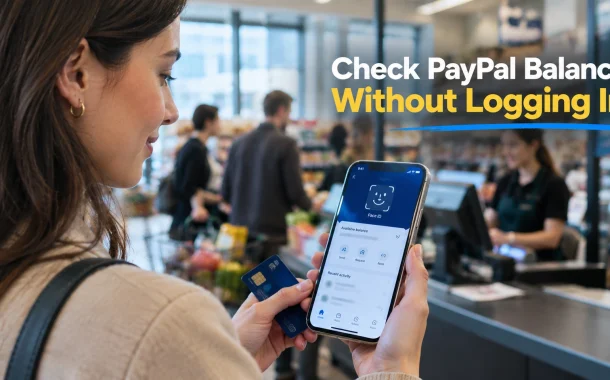
Turn on biometric login in the PayPal app and your balance appears in about two seconds after you open it. You look at your phone or touch the sensor, and you’re in. It’s still a login, but it removes everything that makes logging in annoying.
Set Up Face ID or Fingerprint Login in the App
- Open the PayPal app and log in once with your password.
- Tap your profile icon, then Login and security.
- Turn on Face ID, Touch ID, or fingerprint login, depending on your phone.
- Confirm with your password one last time.
From then on, opening the app shows your balance on the home screen after a glance or a touch. Menu labels move occasionally between app updates, so if the wording differs slightly, look under your profile’s security settings.
Use a Passkey or App Approval on a Computer
On a desktop browser, PayPal’s login page offers two password-free options. If you’ve set up a passkey, your computer or phone verifies you with your face, fingerprint, or device PIN. If you have the app installed, PayPal can send an approval prompt: you tap Yes on your phone, match the number shown, and the browser logs in.
Either way, you check your balance on a laptop without typing a password. That matters on shared or work computers, where a typed password is the thing you least want to leave behind.
What PayPal One Touch Does Not Do
People often expect One Touch to keep them “logged in” everywhere. It doesn’t. PayPal’s own login page states that One Touch only works for checkout. It speeds up paying at stores that accept PayPal, but it won’t show you your balance. For that, you still need the app or the website.
Can You Check Your PayPal Balance by Text?
Historically, yes. PayPal once ran a text service where you sent the word BAL to 729725, which spells PAYPAL on a phone keypad, and received your balance by reply. It required linking your phone number in advance. Whether it still answers in 2026 is inconsistent, so treat it as something to try once rather than rely on.
Most guides still present this as a working feature. The evidence is thin. Reports of it working come mostly from 2011 to 2017, including community threads where users said it stopped responding and later started again. PayPal no longer promotes it, and the shortcode is now used mainly to send security codes and account alerts.
If you want to test it, make sure your phone number is confirmed in your PayPal settings, then text BAL to 729725 with any automatic text signature turned off. A signature added to the message can stop the system from recognizing the command. If nothing useful comes back, the feature isn’t available on your account.
One useful fact survives either way. PayPal’s own community team has confirmed that 729725 and 72975 are both numbers PayPal legitimately uses for texts. A message claiming to be PayPal from any other number deserves suspicion.
How to Check Your PayPal Card Balance
Your PayPal card balance depends on which card you have, and in 2026 that question matters more than usual because one popular card no longer exists. The debit card simply shows your PayPal balance. The prepaid card was discontinued in April 2026. Credit cards and gift cards each work differently.
| Card | Where the balance lives | How to check it without the PayPal website |
|---|---|---|
| PayPal Debit Mastercard | Your PayPal account balance | App with biometric login |
| PayPal Prepaid Mastercard | Discontinued April 30, 2026 | Former users now check through Netspend |
| PayPal-branded credit cards | A separate credit account | The phone number on the back of the card |
| PayPal digital gift cards | Added to your PayPal balance once redeemed | App with biometric login |
PayPal Debit Mastercard
The PayPal Debit Mastercard, previously sold as the PayPal Cash Card, doesn’t hold its own money. It spends directly from your PayPal balance. So your card balance and your PayPal balance are the same number, and checking one checks the other.
The fastest way to see it is the app with biometric login, as above. If you’re still waiting for a physical card to arrive, our guide on how to get a PayPal card in the mail covers ordering and activation.
PayPal Prepaid Mastercard: Discontinued
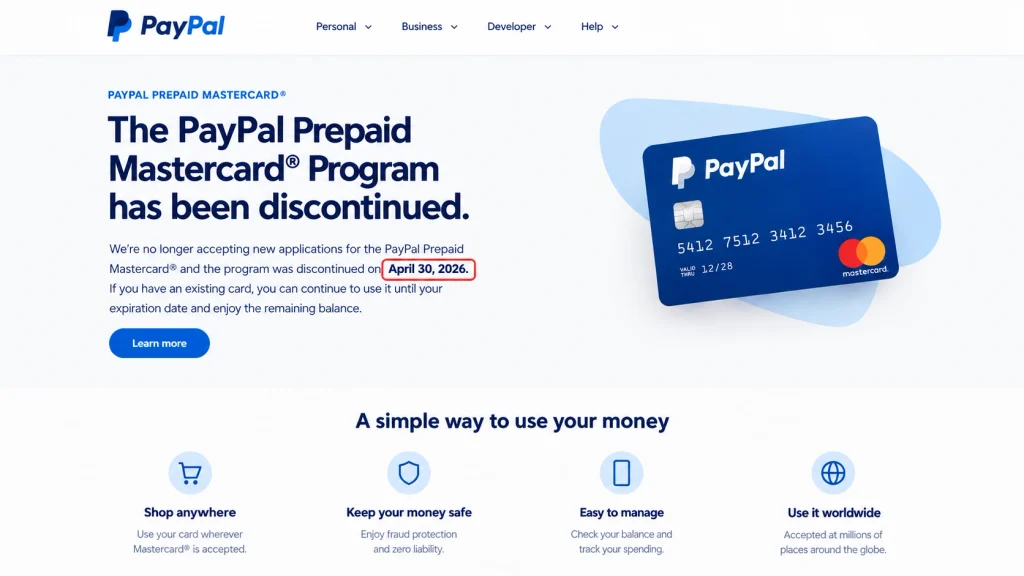
This is the card behind many “check PayPal card balance” searches, and most guides haven’t caught up. PayPal’s own page confirms the PayPal Prepaid Mastercard program was officially discontinued on April 30, 2026. All accounts in the program closed that day, and any loads, direct deposits, or purchases after it are rejected.
Cardholders had two options. They could move to a Netspend Prepaid Mastercard, or spend the balance down and receive a refund check for whatever remained. Balances of $1.00 or more were mailed as a check automatically. Balances under $1.00 require a call to request one.
If you moved to Netspend, you can check your balance by text without logging in. Netspend says that once you’ve signed up for its Anytime Alerts, you can text BAL to 22622 and your card balance comes back by reply. If you’re still waiting on a refund check or have questions about a closed account, Netspend customer service is at 866-387-7363.
PayPal-Branded Credit Cards
PayPal’s credit cards are issued by a partner bank, not by PayPal itself, so their balances sit in a separate credit account. Like most credit cards, they have an automated phone line. Call the customer service number printed on the back of your card and follow the prompts for your balance, payment due date, and available credit.
This is the one PayPal-related balance you can genuinely check by phone without going online. Keep the card nearby, since the automated system usually asks for the card number and some identifying details.
PayPal Gift Cards
PayPal digital gift cards don’t have a separate balance to look up. Once redeemed, the value lands in your PayPal balance and shows there. If you’re thinking of buying one for someone, our guide on where to buy PayPal gift cards explains which cards actually add to a PayPal balance and which don’t.
Can You Check Your PayPal Balance by Phone?
Not as a quick automated check for a regular PayPal account. PayPal doesn’t advertise a phone line that reads out your account balance. The phone lines that do give automated balances belong to PayPal-branded credit cards and the former prepaid card program, both run by partner banks.
You can call PayPal customer support, but the agent has to verify your identity before discussing your account, and that process takes longer than opening the app. For a balance check, the phone is almost always the slowest option. For a problem with your account, it’s the right one.
If the real issue is that you’ve lost access to your phone number or email, that’s an account recovery situation rather than a balance question. Our guide on how to confirm your identity on PayPal walks through what PayPal asks for.
Alerts That Tell You Without Checking
Notifications don’t show your balance on demand, but they tell you when it changes, which covers most of the reason people check. Turn on push notifications in the PayPal app and you’ll get an alert when a payment arrives, money leaves, or something needs attention.
To manage them, open the app, tap your profile, then Notification preferences, and choose which events you want. Email notifications run alongside, and PayPal sends a receipt for most transactions by default.
What About Budgeting Apps?
Budgeting apps can show your PayPal balance next to your bank accounts, but they don’t remove the login. You connect PayPal once, usually through Plaid, and that connection itself requires your PayPal credentials. After that, the app refreshes your balance in the background.
One warning: older guides, including an earlier version of this one, recommended Mint for this. Intuit shut Mint down in 2024. If you’re comparing current options, our guide on how to connect PayPal to Plaid covers which apps support PayPal and what they can actually see.
How to Check Your PayPal Balance the Normal Way
If you’re fine logging in and just want the steps, here they are. Your balance shows on the first screen after login, on both the app and the website.
In the app:
- Open the PayPal app.
- Log in with Face ID, fingerprint, or your password.
- Your balance appears on the home screen under PayPal balance.
- Tap it to see available funds and any other currencies you hold.
On a computer:
- Go to paypal.com by typing it into the address bar, never through a link.
- Log in with a passkey, app approval, or your password.
- Your balance appears on the dashboard.
- Select it to view each currency separately if you hold more than one.
If you need a record rather than a glance, for taxes or accounting, our guide on how to download PayPal transaction history covers exporting statements.
PayPal Balance Checker Scams
Any website, app, or message offering to check your PayPal balance without logging in is a scam. No legitimate tool can do it, because PayPal doesn’t release balance information to third parties without your authorization. These pages exist to collect your PayPal email and password.
They follow a pattern. A search ad or social post promises a free PayPal balance checker. The page asks for your email, then your password, sometimes a security code. That code is the giveaway, because it’s the one thing a thief needs to get past two-step verification.
A few rules cover nearly every version:
- Only enter your PayPal password on paypal.com or inside the official app.
- PayPal texts come from 729725 or 72975. Treat any other sender with suspicion.
- Never share a security code with anyone, including someone claiming to be PayPal support.
- If a message says there’s a problem with your account, don’t click its link. Open the app or type paypal.com yourself.
If your account has already been exposed, turning on two-step verification is the single most effective fix. Our PayPal two-factor authentication setup guide walks through it.
Why Your PayPal Balance Looks Wrong
When the number on screen doesn’t match what you expected, one of five things is usually happening. Most aren’t errors, just the difference between money you’ve received and money you can spend.
| What you see | What’s happening | What to do |
|---|---|---|
| Payment shows as pending | The sender’s funds haven’t cleared yet | Wait for it to complete, often a few days |
| Money received but not in available balance | PayPal has placed a temporary hold | Check the payment details for the release date |
| Balance lower than expected | A pending purchase or subscription has reserved funds | Review your activity for pending items |
| Card declined despite a balance | The purchase went over a limit, or a hold applies | Check account limits and holds in the app |
| Balance missing entirely | Money is held in another currency | Tap your balance to view each currency |
Holds are the most common source of confusion, especially for new sellers. PayPal can hold received funds for a period on some accounts, and those funds show in your total without being spendable. The payment detail screen usually states when they’ll be released.
Frequently Asked Questions
Can I check my PayPal balance without logging in?
Not for a PayPal account. PayPal shows your balance only after verifying you own the account. You can skip typing a password by using Face ID, a fingerprint, a passkey, or an app approval prompt, all of which take a couple of seconds. Anything claiming to show your balance with no verification at all is a scam.
How do I check my PayPal card balance without logging in?
It depends on the card. The PayPal Debit Mastercard uses your PayPal balance, so check it in the app. PayPal-branded credit cards have an automated line on the back of the card. The PayPal Prepaid Mastercard was discontinued on April 30, 2026, and users who moved to Netspend can text BAL to 22622 after enabling alerts.
Can I check my PayPal balance by text message?
PayPal once offered this by texting BAL to 729725. Reports of it working are mostly from before 2018, and PayPal no longer promotes it. You can try it with your phone number confirmed in PayPal and your text signature turned off, but don’t rely on it.
Can I check my PayPal balance by phone?
There’s no advertised automated balance line for regular PayPal accounts. You can call PayPal support, but an agent will verify your identity first, which is slower than the app. PayPal-branded credit cards do have automated balance lines, printed on the back of the card.
What happened to the PayPal Prepaid Mastercard?
PayPal discontinued it on April 30, 2026, and all accounts in the program closed that day. Cardholders could move to a Netspend Prepaid Mastercard or receive a refund check. Balances of $1.00 or more were mailed automatically. Netspend handles questions at 866-387-7363.
Is the PayPal Debit Card balance the same as my PayPal balance?
Yes. The PayPal Debit Mastercard, formerly called the PayPal Cash Card, spends directly from your PayPal balance and holds no separate funds. Checking your PayPal balance in the app tells you exactly what the card can spend, apart from any holds or limits.
Can I check someone else’s PayPal balance?
No. PayPal only shows a balance to the account owner. Tools or services claiming to check another person’s PayPal balance are scams, usually designed to collect login details. Screenshots showing large PayPal balances on social media are also easy to fake and shouldn’t be trusted.
Does PayPal One Touch show my balance?
No. PayPal’s login page states that One Touch only works for checkout. It speeds up paying at participating stores but doesn’t keep you logged in to view your balance. Use biometric login in the app for fast balance checks instead.
Why is my PayPal balance showing but I can’t use it?
Usually a hold or a pending status. Received payments can sit on hold before becoming available, and pending payments haven’t cleared from the sender yet. The payment details screen in your activity shows the status and, for holds, when the money will be released.
How do I see my PayPal balance in other currencies?
Tap or select your PayPal balance in the app or on the dashboard. If you hold more than one currency, each appears separately with its own amount. You can convert between them from the same screen, though conversion carries a fee.
Is it safe to check PayPal balance on a public computer?
Avoid it where possible. If you must, use a passkey or an app approval prompt so no password is typed, log out fully afterward, and never save your details in the browser. Checking in the app on your own phone is always safer.
Why can’t I log in to check my PayPal balance?
The common causes are a forgotten password, a phone number you no longer have access to, or a limitation on the account. Use the forgot password link on paypal.com, and if the account is limited, the app or website will explain what PayPal needs from you to restore access.
The Quickest Way to Know Before You Pay
Back to the store line. The fix isn’t a secret way around PayPal’s security. It’s a two-minute setup you do once: turn on Face ID or fingerprint login in the app, and the next time you need your balance, it’s on screen before you reach the register.
If you carried the old PayPal Prepaid card, check that you either moved to Netspend or received your refund, because that card stopped working on April 30. And if any site promises to check your PayPal balance without logging in, close the tab, because that promise is the scam.
So what’s the real reason you wanted to skip the login: the password, the speed, or the public screen?