Luckily, there is already a workable approach for cases like this. It is both cost-effective and convenient: a headless CMS! But how do you choose one CMS for different brands? They may share guidelines and materials but still have their own local workflows. In this article, we’ll help you find the right system for your business!
Table of Contents
What Are Isolated Content Spaces?
Here, we’re talking about a separate area where a brand manages its own content. Sure, the head office can still give all its brands access to shared info like brand books and general guidelines. But each brand or market also has its own brand-specific data. This may include materials for local promotions, content in different languages, legal details. Plus, each location also has its own local team responsible for corresponding tasks.
A content manager in Austrian office doesn’t need access to materials for the French one. That’s why each brand should have its own separate content repository. Here, editors work only with their brand’s pages and media and have their own publishing workflows. There, they can have separate content models, assets, credentials and even administration rules.
Why Multi-Brand Organizations Need Content Separation
Brand autonomy is one reason. A premium brand and a budget one could belong to the same corporation. But, their messaging, campaigns and approval rules can be very different. A team responsible for one brand should not have to sort through another brand’s drafts. They do not have to worry about changing its materials by mistake.
There may also be legal, contractual or organizational reasons for separation. An external agency could manage one brand, but have no reason to see another office’s campaigns. A clear structure makes these boundaries easier to manage. Especially it helps when more new brands join the corporation.
Key Benefits of Isolated Content Environments
Clearer responsibility. Each team sees which content it owns and editors spend less time finding the right materials.
Fewer accidental changes. With separate access, editors will not publish the wrong campaign or edit another brand’s materials.
Independent workflows. Brands can use different approval stages and publishing schedules.
Different content models. One brand could need detailed technical specifications, while another needs editorial articles.
More control as the portfolio expands. New brands can receive their own spaces, teams and permissions. Central administrators still oversee how the wider portfolio is organized.
What to Look for in a Headless CMS
Content isolation. The difference matters when you need to isolate not just pages, but also assets, content models and publishing settings.
Permissions. So, the chosen CMS should let you separate the rights to view, edit, approve and publish materials. A clear content governance strategy helps multi-brand organizations establish consistent rules, define ownership, and maintain control over content access and publishing across teams.
Content reuse. Some materials belong to the whole company. You shouldn’t have to create and update a separate copy for every local brand.
Localization. Local editors should manage their own promotions, translations and campaigns, and publish it on their own schedule.
Scalability. You need a practical way to create new content spaces, assign new teams and quickly apply the right permissions.
Clear API access rules and separate credentials. There should be a reliable way to retrieve content from the relevant space. This matters because often different applications serve different brands.
Headless CMS Platforms Compared
Hygraph
Hygraph combines structured content models with detailed access permissions. Teams can control access by content model, locale, stage and environment. Separate projects provide another level of separation. Businesses keep brand content separate, while still working with data from other systems: Content Federation feature allows external data to be queried alongside Hygraph content through one GraphQL API.
Storyblok
Storyblok gives each Space its own components, assets, datasources, users and access tokens. This creates a clear boundary for brands that need separate editing environments. Direct content linking between separate spaces is not supported in the same way as references within a space, so shared content needs planning.
Contentstack
Contentstack organizes content into Stacks. Each stack has its own content types, assets and configuration. Roles can also limit access to entries, fields, assets and specific environments.
Sanity
Sanity organizes content within Projects and Datasets. Datasets hold separate groups of documents, while roles control access to content and project settings. You can use different datasets for separate brands or purposes, but queries normally run within a dataset.
How Hygraph Supports Multi-Brand Content Management
With Hygraph, you can define models for the information each brand manages and configure permissions. Custom conditions can further restrict access to selected entries. Administrators can define more precise boundaries than a single shared role for everyone. Content Federation adds a separate capability. When approved data lives in an external service, Hygraph can connect to REST or GraphQL APIs and expose selected data through its GraphQL schema. Companies can make shared info available without copying all of it into every brand’s content repository.
Content Isolation vs. Content Reuse
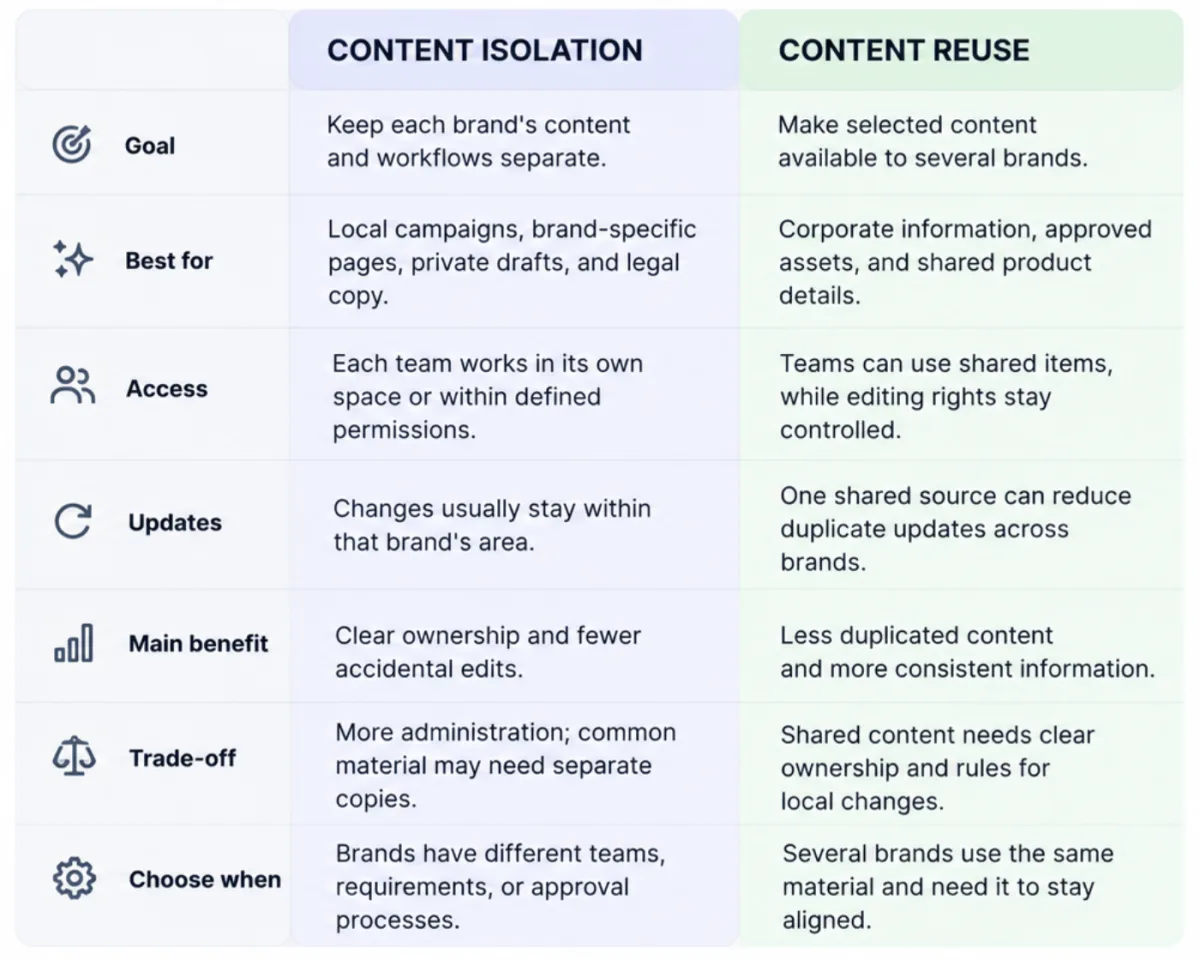
Keeping every asset and content entry separate may sound safer. But for some types of data, it just makes little sense. Let’s see which content truly belongs to one brand and which should be shared:
How to Choose the Right CMS
List your existing systems. Write down every brand, website, CMS and connected platform you have. For example, your German store uses one CMS and a PIM. Your French brand has a separate CMS, its own commerce platform and cooperates with a local marketing agency. Record who manages each system and what it stores.
Sort your content into three groups. Corporate contact details can be shared across the company. Product photos and campaign pages belong to a specific brand. Note that return policies, promotions, product availability also often differ by market.
Decide which brands need separate spaces. Compare their content models, teams, publishing rules. If one brand has its own editors, product catalog, approval process, give it a separate space. If brands use the same models and publishing process, just separate access permissions.
Create an access matrix. List your teams and specify what each can do. For example, central marketing can edit brand guidelines. The German team can publish German campaign pages. An external agency can edit drafts but cannot publish them.
Identify shared content and its owner. This could be a corporate presentation, approved logo, general product specifications. Record where the original lives and who can change it. Also list the teams that need access to all this data.
Map API access for each website. Websites most likely get product descriptions from their CMS. Prices come from commerce platforms, while images come from DAMs. Record the APIs involved!
Calculate the migration workload. Count pages, assets, content entries, language versions. Record what to move, update or remove at all. Outdated campaign pages, duplicate product entries, dead URLs may still receive search traffic. So, delete or consolidate old content, set up correct redirects for URLs.
Test the setup with one brand. Choose a brand with real content. Migrate a few pages and assign editor permissions. Connect the required integrations and publish a test update.
Estimate the work required to add another brand. After the pilot, record how long it took to configure content models, set permissions, connect the website. Note which steps you can reuse and which require custom work.
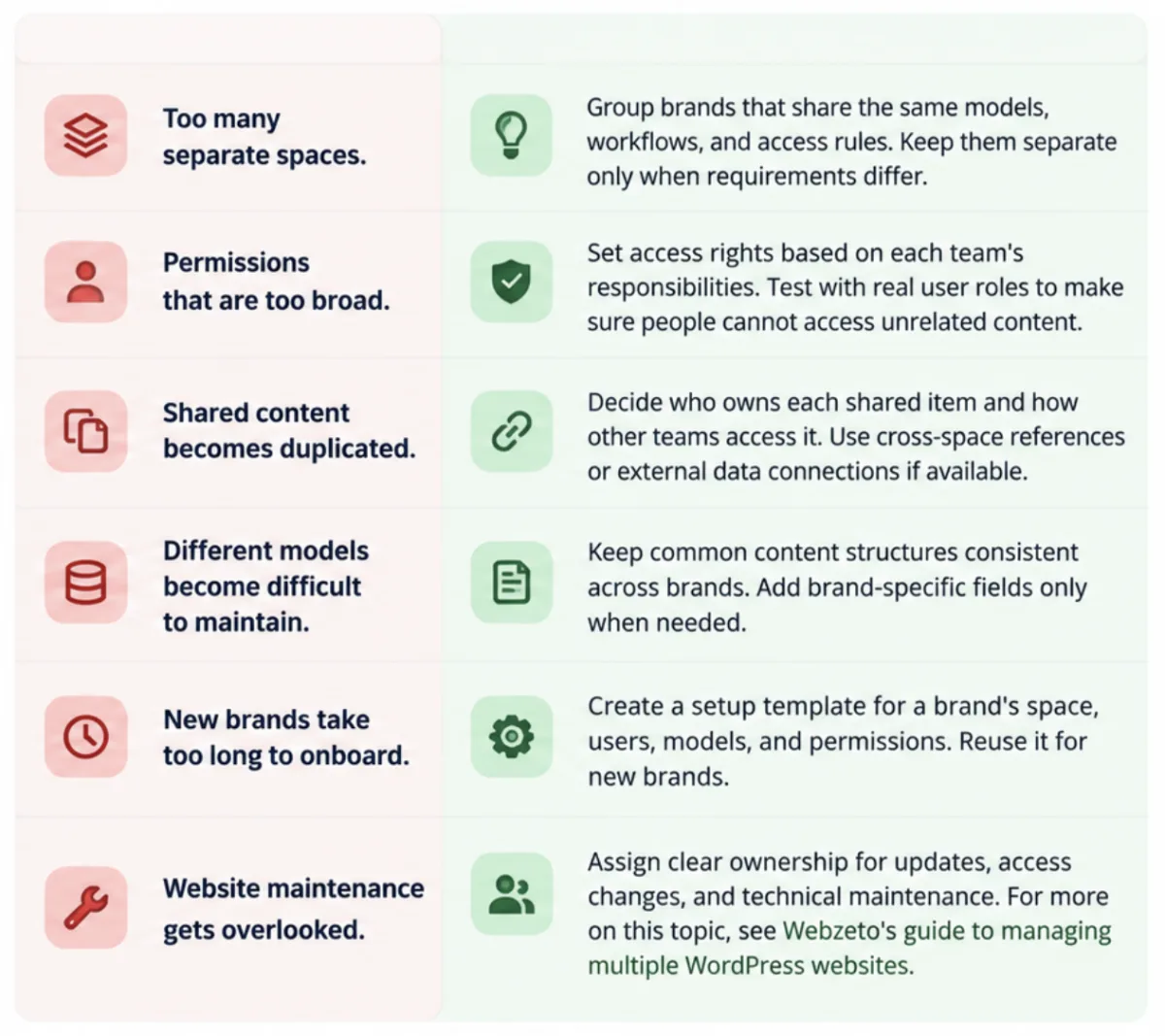
Common Challenges and Best Practices
Conclusion
Separate content spaces are more than a way to organize pages. When your company adds more brands, clear boundaries make it easier to bring new people into the process and build the system that supports itself. Before choosing a CMS, look at how your brands operate on a daily basis. It will help you to focus more on the features your teams may require the most.
Already planning to move to a headless CMS? Great decision! And it’s not as complicated as it may seem. You only need a few steps here. Define what each of your brands needs, choose a platform that supports these exact requirements, not just offers a bunch of just-in-case features. Start with one brand to improve the settings and then move on to the rest. With a little preparation, you can get your new setup running without turning the transition into a huge project!